# ion-multi-picker
**Repository Path**: MBPSCD/ion-multi-picker
## Basic Information
- **Project Name**: ion-multi-picker
- **Description**: No description available
- **Primary Language**: Unknown
- **License**: MIT
- **Default Branch**: master
- **Homepage**: None
- **GVP Project**: No
## Statistics
- **Stars**: 0
- **Forks**: 0
- **Created**: 2018-07-25
- **Last Updated**: 2024-06-06
## Categories & Tags
**Categories**: Uncategorized
**Tags**: None
## README
# Ion-Multi-Picker
[](https://travis-ci.org/raychenfj/ion-multi-picker) [](https://david-dm.org/raychenfj/ion-multi-picker) [](https://david-dm.org/raychenfj/ion-multi-picker?type=dev) [](https://badge.fury.io/js/ion-multi-picker) [](https://www.npmjs.com/package/ion-multi-picker)
Ion Multi Item Picker--An Ionic2 Custom Picker Component
Simulate IOS multi column picker by ionic2 picker.
**For ionic 2.x, please use ion-multi-picker 1.x**
Github: [https://github.com/raychenfj/ion-multi-picker](https://github.com/raychenfj/ion-multi-picker)
NPM: [https://www.npmjs.com/package/ion-multi-picker](https://www.npmjs.com/package/ion-multi-picker)
## Preview
### Picker with Independent/ Dependent Columns
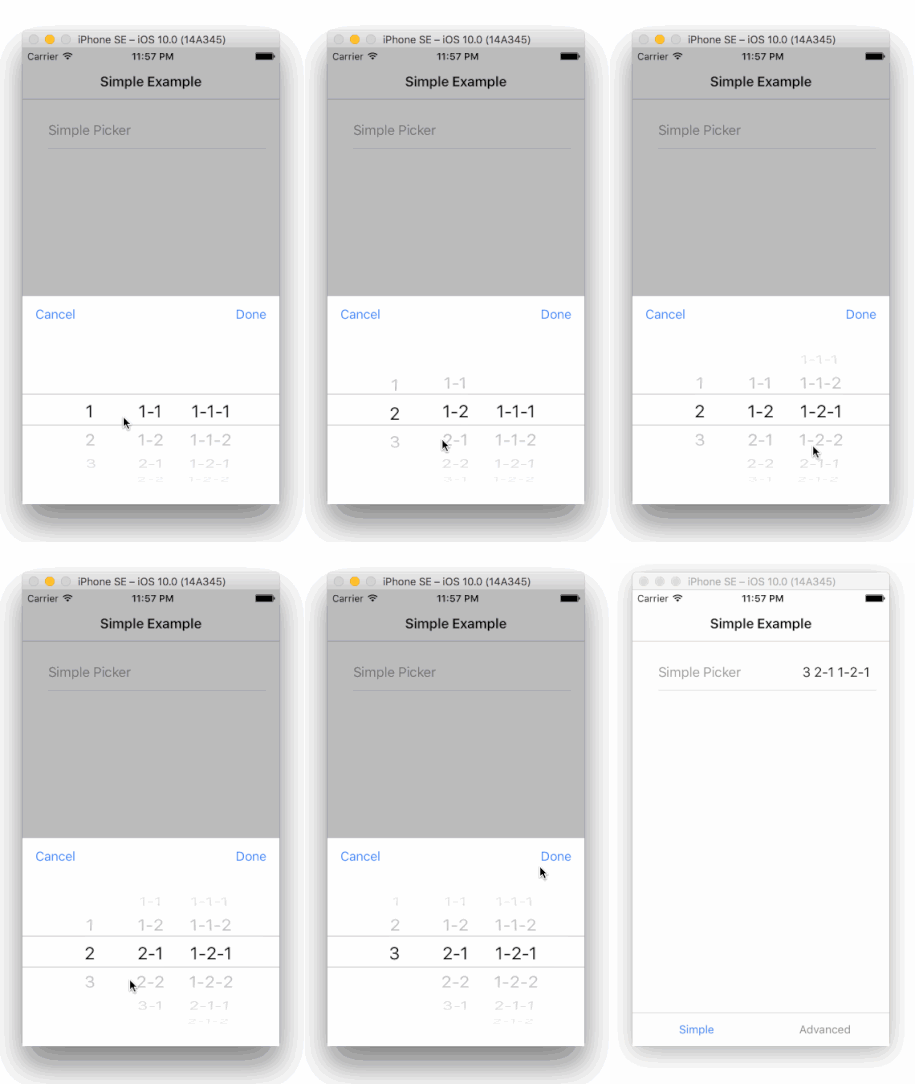
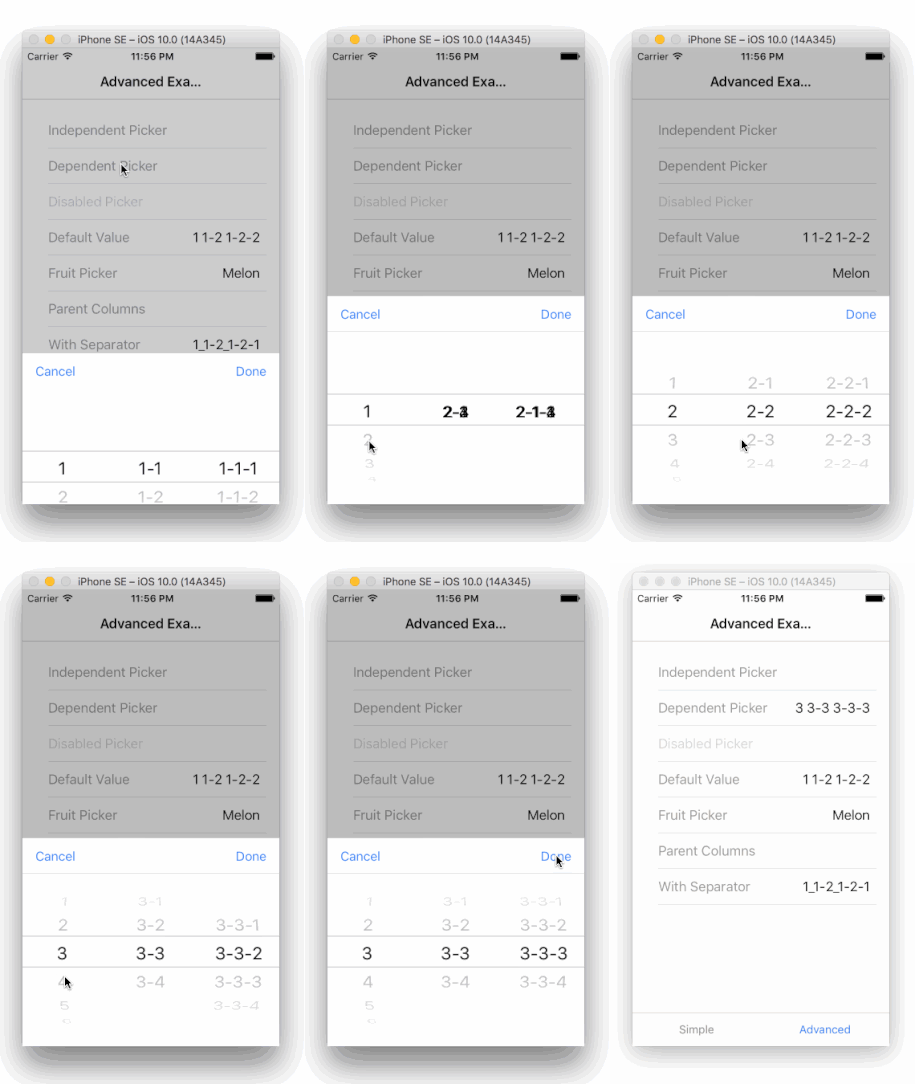
## Demo
Check out the live demo here: [https://raychenfj.github.io/ion-multi-picker/](https://raychenfj.github.io/ion-multi-picker/)
## Installation
```
npm install ion-multi-picker --save
```
## Usage
### Basic
1.Import MultiPickerModule to your app/module.
```Typescript
import { MultiPickerModule } from 'ion-multi-picker';
@NgModule({
declarations: [
MyApp,
AboutPage,
ContactPage,
HomePage,
TabsPage,
],
imports: [
IonicModule.forRoot(MyApp),
MultiPickerModule //Import MultiPickerModule
],
bootstrap: [IonicApp],
entryComponents: [
MyApp,
AboutPage,
ContactPage,
HomePage,
TabsPage,
],
providers: []
})
export class AppModule {}
```
2.Initialize picker columns in your controller.
```typescript
constructor(private navCtrl: NavController) {
this.simpleColumns = [
{
name: 'col1',
options: [
{ text: '1', value: '1' },
{ text: '2', value: '2' },
{ text: '3', value: '3' }
]
},{
name: 'col2',
options: [
{ text: '1-1', value: '1-1' },
{ text: '1-2', value: '1-2' },
{ text: '2-1', value: '2-1' },
{ text: '2-2', value: '2-2' },
{ text: '3-1', value: '3-1' }
]
},{
name: 'col3',
options: [
{ text: '1-1-1', value: '1-1-1' },
{ text: '1-1-2', value: '1-1-2' },
{ text: '1-2-1', value: '1-2-1' },
{ text: '1-2-2', value: '1-2-2' },
{ text: '2-1-1', value: '2-1-1' },
{ text: '2-1-2', value: '2-1-2' },
{ text: '2-2-1', value: '2-2-1' },
{ text: '2-2-2', value: '2-2-2' },
{ text: '3-1-1', value: '3-1-1' },
{ text: '3-1-2', value: '3-1-2' }
]
}
];
}
```
You can use `parentVal` property to create dependency between each column.
```typescript
this.dependentColumns = [
{
options: [
{ text: '1', value: '1' },
{ text: '2', value: '2' },
{ text: '3', value: '3' }
]
},{
options: [
{ text: '1-1', value: '1-1', parentVal: '1' },
{ text: '1-2', value: '1-2', parentVal: '1' },
{ text: '2-1', value: '2-1', parentVal: '2' },
{ text: '2-2', value: '2-2', parentVal: '2' },
{ text: '3-1', value: '3-1', parentVal: '3' }
]
}];
```
3.Add ion-multi-picker to your html template.
```html
Simple Picker
```
**Note: Don't miss the `item-content` attribute**
Like other ionic components, you can use `[(ngModel)]` to bind your data.
```html
Default Value
```
Set `disabled` to `true` to prevent interaction.
```html
Disabled Picker
```
### Using Enum
It's a good case to use picker to choose value for an enum variable.
This componennt now provide a shorthand util function `convertEnumToColumns` to generate column from enum type,
and also you can bind a enum variable to `ngModel`.
Check the example fruit picker in the demo.
1. Use `convertEnumToColumns` to generate columns;
```typescript
import { convertEnumToColumn } from 'ion-multi-picker';
enum Fruit {
Apple, Orange, Melon, Banana, Pear,
}
export class YourPage {
fruits: any[];
fruit: Fruit;
Fruit;
constructor(public navCtrl: NavController) {
// Using enum
this.fruit = Fruit.Melon;
this.Fruit = Fruit;
this.fruits = convertEnumToColumn(this.Fruit);
}
}
```
2. Binding enum variable to `ngModel`;
```html
Fruit Picker
```
### Value Separator
When there are multiple columns, it need a separator to separate values from different columns.
The separator is space `' '` by default. Now you can customize the separator by using input property `[separator]`.
Instead of define a property in your controller, you can directly pass a string or a char like below:
```
```
And the multi picker's return value should format like `val1_val2_val3`.
### Parent Column
When use as a dependent picker, by default the dependency sequence is from left to right.
Now with `parentCol`, you can configure your own dependency sequence when needed, like from right to left.
The picker columns should be configured as below. The `parentCol` should be another column's `name` or `alias`.
```
// Using parentCol
this.parentColumns = [
{
name: 'child',
parentCol: 'parent',
options: [
{ text: '1-1-1', value: '1-1-1', parentVal: '1-1' },
{ text: '1-1-2', value: '1-1-2', parentVal: '1-1' },
{ text: '1-2-1', value: '1-2-1', parentVal: '1-2' },
{ text: '1-2-2', value: '1-2-2', parentVal: '1-2' },
{ text: '2-1-1', value: '2-1-1', parentVal: '2-1' },
{ text: '2-1-2', value: '2-1-2', parentVal: '2-1' },
{ text: '2-2-1', value: '2-2-1', parentVal: '2-2' },
{ text: '2-2-2', value: '2-2-2', parentVal: '2-2' }
]
},{
name: 'parent',
parentCol: 'ancestor',
options: [
{ text: '1-1', value: '1-1', parentVal: '1' },
{ text: '1-2', value: '1-2', parentVal: '1' },
{ text: '2-1', value: '2-1', parentVal: '2' },
{ text: '2-2', value: '2-2', parentVal: '2' },
]
},{
name: 'ancestor',
options: [
{ text: '1', value: '1' },
{ text: '2', value: '2' }
]
}
];
```
## Attributes
| Attribute | Description | Type | Options | Default|
|-----------|-------------|------|---------|--------|
|multiPickerColumns| **Required**, configure multi picker columns | Array of MultiPickerColumn| - | - |
|item-content|**Required**, add this attribute so that this custom component can be display correctly under `ion-item` tag| - | - | - |
|separator|Optional, charactor to separate value from each column| String | - | space |
|cancelText|Optional, customize the cancel button text | String | - | Cancel
|doneText|Optional, customize the done button text | String | - | Done
|placeholder (since 2.0.2)|Optional, set up a placeholder text when there is no option selected| String | - | - |
|showReset (since 2.1.1)|Optional, add an additional reset button next to the cancel button| Bool | - | false
|resetText (since 2.1.1)|Optional, customize the reset button text| String | - | Reset |
## Types
* **MultiPickerColumn**
| Property | Description | Type | Options | Default|
|-----------|-------------|------|---------|--------|
|options| **Required**, Options in a column | Array of MultiPickerOption | - | - |
|name| Optional, Column name | String | - | index start from 0 |
|parentCol|Optional, when used as a dependent picker, you can specify the parent column|String| - |previous column|
|alias|Optional, alias for a column, when use parentCol, it will find the column with same name or alias|String| - | - |
|columnWidth|Optional, specify the column width manually, it accepts a string including **unit** like `%` and `px`|String|-|-|
* **MultiPickerOption**
| Property | Description | Type | Options | Default|
|-----------|-------------|------|---------|--------|
|text| **Required**, text displayed in the picker column|String|-|-|
|value|**Required**, the associated value of the text|String|-|-|
|parentVal|Optional, specify the dependency between current column and previous column|String|Value from your parent column|-|
|disabled|Optional, the option is visible or not| Boolean|-| false|
## Contribution
Welcome issue report, PR and contributors. Help me improve it.
Fork and `git clone` this project,
most code for the multi picker is under `src/app/components/multi-picker`.
The unit test framework is karma + webpack + jasmine. And e2e test is protractor.
Add your unit test and use `npm test` to start karma.
Add your e2e test, run `ionic serve` on the example and then in another terminal use `npm run e2e` to run protractor on project root folder.
You can also add your use case in the `app/pages`.
Finally, send me a `PULL REQUEST`.
## Acknowledgement
Thanks to [HonLuk](https://github.com/HonLuk) for sharing the city data in the demo.
## License
MIT
## Change Log
[Change log is here](https://github.com/raychenfj/ion-multi-picker/blob/master/CHANGELOG.md)