# ExcelDnaIntelliSense
**Repository Path**: MHC/ExcelDnaIntelliSense
## Basic Information
- **Project Name**: ExcelDnaIntelliSense
- **Description**: No description available
- **Primary Language**: C#
- **License**: MIT
- **Default Branch**: master
- **Homepage**: None
- **GVP Project**: No
## Statistics
- **Stars**: 0
- **Forks**: 0
- **Created**: 2017-08-19
- **Last Updated**: 2020-12-19
## Categories & Tags
**Categories**: Uncategorized
**Tags**: None
## README
Excel-DNA IntelliSense
======================
Excel-DNA 智能感知,Excel函数说明和参数提示
========================================
原作者:Govert
作者github:https://github.com/Excel-DNA
——————————————————————————————————————————————
Excel-DNA - see http://excel-dna.net - is an independent project to integrate .NET with Excel.
Excel-DNA - 见 http://excel-dna.net - 是独立的项目,整合到.NET与Excel。
With Excel-DNA you can make native (.xll) add-ins for Excel using C#, Visual Basic.NET or F#, providing high-performance user-defined functions (UDFs), custom ribbon interfaces and more.
用Excel-DNA可以使本地(.XLL)插件Excel使用C#,Visual Basic.NET或F#中强大的类库和功能,提供高性能的用户自定义函数(UDF),自定义功能接口、函数说明等。
This project adds in-sheet IntelliSense for Excel UDFs, either through an independently deployed add-in or as part of an Excel-DNA add-in.
该项目增加了表IntelliSense Excel UDF,可以通过独立部署加入或作为一个Excel的DNA加入。
Overview 概述
--------
Excel has no known support for user-defined functions to display as part of the on-sheet intellisense. We use the UI Automation support of Windows and Excel, to keep track of relevant changes of the Excel interface, and overlay IntelliSense information when appropriate.
Excel自定义函数显示在表的智能感知部分没有已知的支持。我们使用Windows UI自动化支持和Excel,跟踪的Excel界面相关的变化,并在适当的时候覆盖智能感知信息。
Current status 现状
--------------
The project is under activate development, and ready for intial testing.
该项目正在积极发展,并准备开始测试。
For an Excel-DNA function defined like this:
像这样定义的excel DNA函数:
```C#
[ExcelFunction(Description = "A useful test function that adds two numbers, and returns the sum.")]
public static double AddThem(
[ExcelArgument(Name = "Augend", Description = "is the first number, to which will be added")]
double v1,
[ExcelArgument(Name = "Addend", Description = "is the second number that will be added")]
double v2)
{
return v1 + v2;
}
```
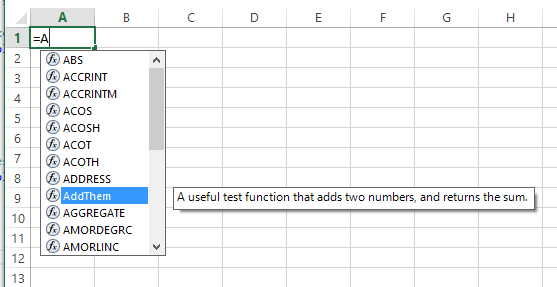
we get both the function description
我们得到了函数描述
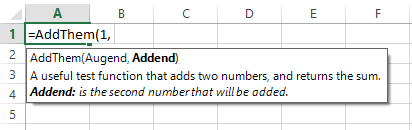
and when selecting the function, we get argument help
当选择函数时,我们得到参数帮助。
User-defined functions written in VBA (either in an add-in or regular Workbook) can also provide IntelliSense descriptions, either by embedding descriptions in the Workbook, or in an external file.
用户定义的VBA编写函数(无论是新增的或定期的工作簿)也可以提供IntelliSense描述,无论是在工作簿中嵌入的描述,或在一个外部文件。
The first configuration being tested now, is where the IntelliSense display server is loaded as a separate add-in.
现在测试第一个形态,就是IntelliSense显示服务器是作为一个单独的补充装。
Getting Started 入门
---------------
For existing Excel-DNA add-ins (v0.32 or later):
* Download and load the latest ExcelDna.IntelliSense.xll or ExcelDna.IntelliSense64.xll from the [Releases](https://github.com/Excel-DNA/IntelliSense/releases) page.
* IntelliSense should work automatically for functions that have descriptions in [ExcelFunction] and [ExcelArgument] attributes.
对于现有的Excel插件(DNA v0.32或以后):
*从[释放](https://github.com/excel-dna/intellisense/releases)下载并获得最新的exceldna.intellisense.xll或exceldna.intellisense64.xll。
*智能感知应自动工作,在 [ExcelFunction]和 [ExcelArgument] 属性中配置。
For VBA workbooks or add-ins:
* Download and load the latest ExcelDna.IntelliSense.xll or ExcelDna.IntelliSense64.xll from the [Releases](https://github.com/Excel-DNA/IntelliSense/releases) page.
* Either add a sheet with the IntelliSense function descriptions, or a separate xml file.
在Excel工作簿或插件:
*从[释放](https://github.com/excel-dna/intellisense/releases)下载并获得最新的exceldna.intellisense.xll或exceldna.intellisense64.xll。
**添加一个IntelliSense功能描述的Sheet(工作表),或一个单独的XML文件。
See the [Getting Started](https://github.com/Excel-DNA/IntelliSense/wiki/Getting-Started) page for more detail.
[开始](https://github.com/excel-dna/intellisense/wiki/getting-started)的更多详细内容。
Future direction 未来的方向
----------------
Once a basic implementation is working, there is scope for quite a lot of enhancement. For example, we could add support for:
* enum lists and other parameter selection and validation
* links to forms or hyperlinks to help
* enhanced argument selection controls, like a date selector
Support and participation 支持和参与
-------------------------
"We accept pull requests" ;-)
Any help or feedback is greatly appreciated.
Please log bugs and feature suggestions on the GitHub 'Issues' page.
For general comments or discussion, use the Excel-DNA forum at https://groups.google.com/forum/#!forum/exceldna .
License 许可证
-------
This project is published under the standard MIT license.
这个项目是根据麻省理工学院的标准许可证出版的。
Govert van Drimmelen
govert@icon.co.za
18 June 2016