# MonkeyOCR
**Repository Path**: avantis-cow/MonkeyOCR
## Basic Information
- **Project Name**: MonkeyOCR
- **Description**: MonkeyOCR 是基于轻量级文档解析模型,仅 3B 参数,性能超越 Gemini 2.5 Pro 等闭源模型,不仅能精确识别文字、公式和表格,还能保持原有的文档结构和布局关系
- **Primary Language**: Python
- **License**: Apache-2.0
- **Default Branch**: main
- **Homepage**: https://www.oschina.net/p/monkeyocr
- **GVP Project**: No
## Statistics
- **Stars**: 0
- **Forks**: 4
- **Created**: 2025-07-01
- **Last Updated**: 2025-07-01
## Categories & Tags
**Categories**: Uncategorized
**Tags**: None
## README
MonkeyOCR: Document Parsing with a Structure-Recognition-Relation Triplet Paradigm
[](https://arxiv.org/abs/2506.05218)
[](https://huggingface.co/echo840/MonkeyOCR)
[](https://github.com/Yuliang-Liu/MonkeyOCR/issues?q=is%3Aopen+is%3Aissue)
[](https://github.com/Yuliang-Liu/MonkeyOCR/issues?q=is%3Aissue+is%3Aclosed)
[](https://github.com/Yuliang-Liu/MonkeyOCR/blob/main/LICENSE.txt)
[](https://github.com/Yuliang-Liu/MonkeyOCR)
> **MonkeyOCR: Document Parsing with a Structure-Recognition-Relation Triplet Paradigm**
> Zhang Li, Yuliang Liu, Qiang Liu, Zhiyin Ma, Ziyang Zhang, Shuo Zhang, Zidun Guo, Jiarui Zhang, Xinyu Wang, Xiang Bai
[](https://arxiv.org/abs/2506.05218)
[](README.md)
[](https://huggingface.co/echo840/MonkeyOCR)
[](https://modelscope.cn/models/l1731396519/MonkeyOCR)
[](https://openbayes.com/console/public/tutorials/91ESrGvEvBq)
[](http://vlrlabmonkey.xyz:7685/)
## Introduction
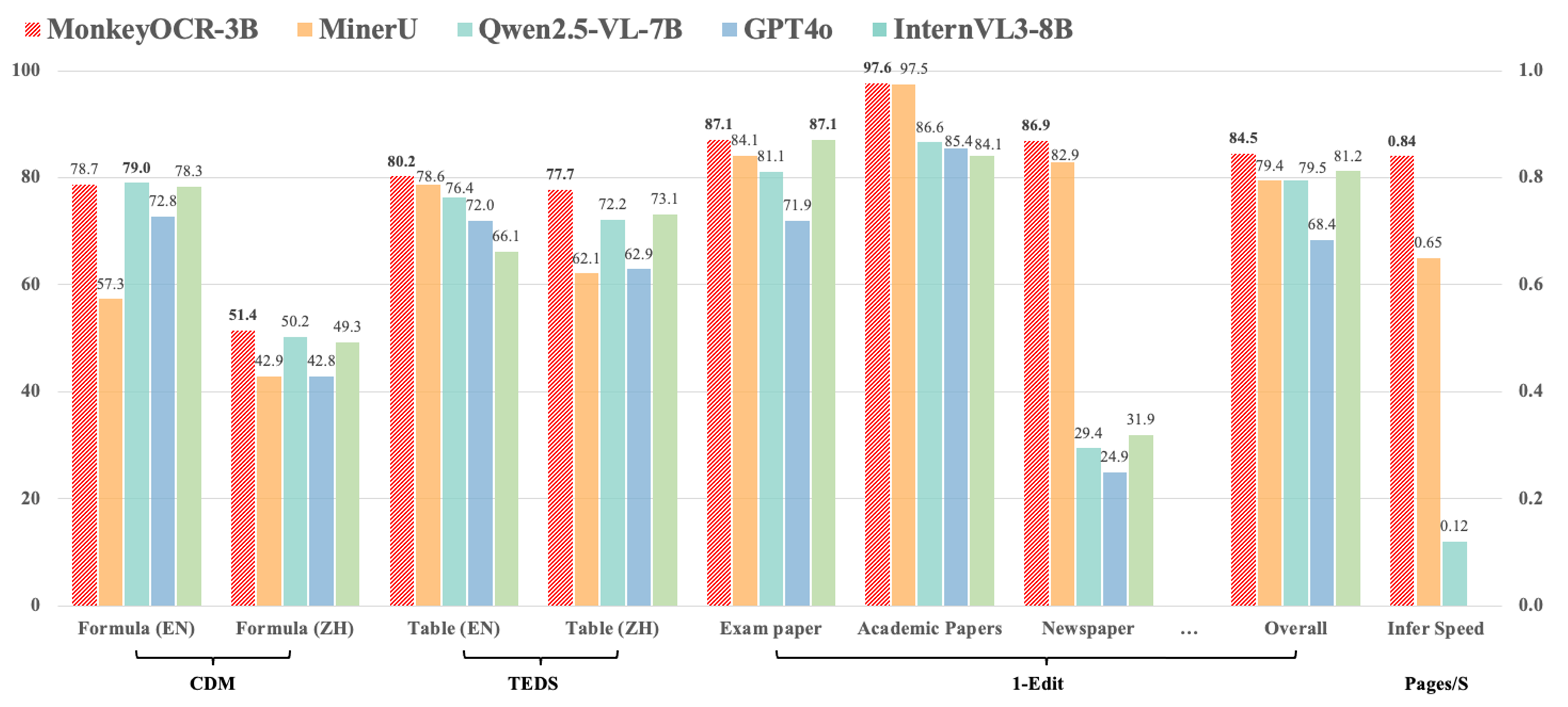
MonkeyOCR adopts a Structure-Recognition-Relation (SRR) triplet paradigm, which simplifies the multi-tool pipeline of modular approaches while avoiding the inefficiency of using large multimodal models for full-page document processing.
1. Compared with the pipeline-based method MinerU, our approach achieves an average improvement of 5.1% across nine types of Chinese and English documents, including a 15.0% gain on formulas and an 8.6% gain on tables.
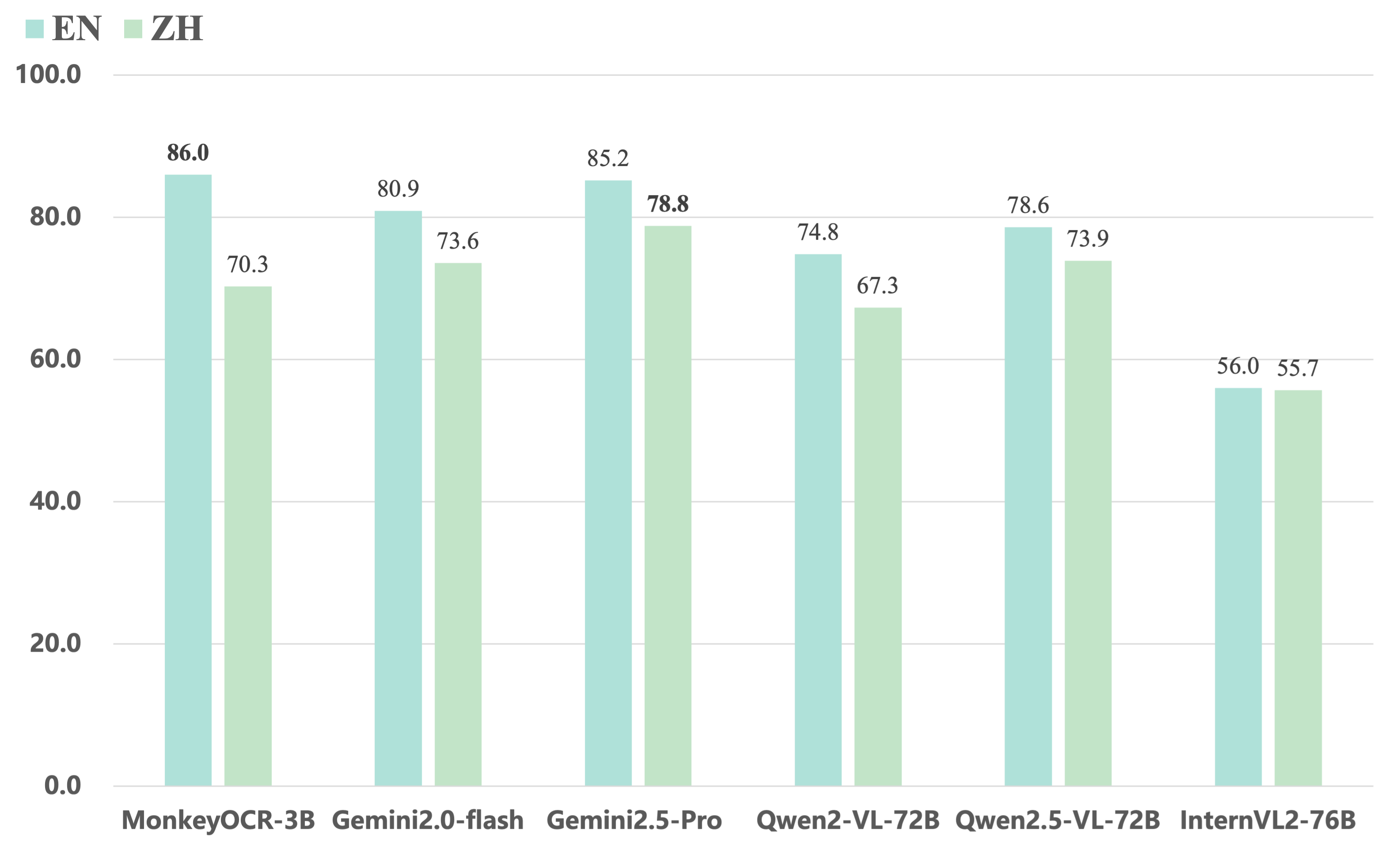
2. Compared to end-to-end models, our 3B-parameter model achieves the best average performance on English documents, outperforming models such as Gemini 2.5 Pro and Qwen2.5 VL-72B.
3. For multi-page document parsing, our method reaches a processing speed of 0.84 pages per second, surpassing MinerU (0.65) and Qwen2.5 VL-7B (0.12).
 MonkeyOCR currently does not support photographed documents, but we will continue to improve it in future updates. Stay tuned!
Currently, our model is deployed on a single GPU, so if too many users upload files at the same time, issues like “This application is currently busy” may occur. We're actively working on supporting Ollama and other deployment solutions to ensure a smoother experience for more users. Additionally, please note that the processing time shown on the demo page does not reflect computation time alone—it also includes result uploading and other overhead. During periods of high traffic, this time may be longer. The inference speeds of MonkeyOCR, MinerU, and Qwen2.5 VL-7B were measured on an H800 GPU.
## News
* ```2025.06.12 ``` 🚀 The model’s trending on [Hugging Face](https://huggingface.co/models?sort=trending). Thanks for the love!
* ```2025.06.05 ``` 🚀 We release MonkeyOCR, an English and Chinese documents parsing model.
# Quick Start
## Locally Install
### 1. Install MonkeyOCR
See the [installation guide](https://github.com/Yuliang-Liu/MonkeyOCR/blob/main/docs/install_cuda.md#install-with-cuda-support) to set up your environment.
### 2. Download Model Weights
Download our model from Huggingface.
```python
pip install huggingface_hub
python tools/download_model.py
```
You can also download our model from ModelScope.
```python
pip install modelscope
python tools/download_model.py -t modelscope
```
### 3. Inference
You can parse a file or a directory containing PDFs or images using the following commands:
```bash
# Make sure you are in the MonkeyOCR directory
# Replace input_path with the path to a PDF or image or directory
# End-to-end parsing
python parse.py input_path
# Single-task recognition (outputs markdown only)
python parse.py input_path -t text/formula/table
# Specify output directory and model config file
python parse.py input_path -o ./output -c config.yaml
```
> [!TIP]
>
> For Chinese scenarios, or cases where text, tables, etc. are mistakenly recognized as images, you can try using the following structure detection model: [layout\_zh.pt](https://huggingface.co/echo840/MonkeyOCR/blob/main/Structure/layout_zh.pt).
> (If the model is not found in `model_weight/Structure/`, you can download it manually.)
>
> To use this model, update the configuration file [`model_configs.yaml`](https://github.com/Yuliang-Liu/MonkeyOCR/blob/main/model_configs.yaml#L3) as follows:
>
> ```yaml
> doclayout_yolo: Structure/layout_zh.pt
> ```
#### Output Results
MonkeyOCR generates three types of output files:
1. **Processed Markdown File** (`your.md`): The final parsed document content in markdown format, containing text, formulas, tables, and other structured elements.
2. **Layout Results** (`your_layout.pdf`): The layout results drawed on origin PDF.
2. **Intermediate Block Results** (`your_middle.json`): A JSON file containing detailed information about all detected blocks, including:
- Block coordinates and positions
- Block content and type information
- Relationship information between blocks
These files provide both the final formatted output and detailed intermediate results for further analysis or processing.
### 4. Gradio Demo
```bash
# Start demo
python demo/demo_gradio.py
```
### 5. Fast API
You can start the MonkeyOCR FastAPI service with the following command:
```bash
uvicorn api.main:app --port 8000
```
Once the API service is running, you can access the API documentation at http://localhost:8000/docs to explore available endpoints.
## Docker Deployment
1. Navigate to the `docker` directory:
```bash
cd docker
```
2. **Prerequisite:** Ensure NVIDIA GPU support is available in Docker (via `nvidia-docker2`).
If GPU support is not enabled, run the following to set up the environment:
```bash
bash env.sh
```
3. Build the Docker image:
```bash
docker compose build monkeyocr
```
> [!IMPORTANT]
>
> If your GPU is from the 30/40-series, V100, or similar, please build the patched Docker image for LMDeploy compatibility:
>
> ```bash
> docker compose build monkeyocr-fix
> ```
>
> Otherwise, you may encounter the following error: `triton.runtime.errors.OutOfResources: out of resource: shared memory`
4. Run the container with the Gradio demo (accessible on port 7860):
```bash
docker compose up monkeyocr-demo
```
Alternatively, start an interactive development environment:
```bash
docker compose run --rm monkeyocr-dev
```
5. Run the FastAPI service (accessible on port 7861):
```bash
docker compose up monkeyocr-api
```
## Windows Support
For deployment on Windows, please use WSL and Docker Desktop. See the [Windows Support](docs/windows_support.md) Guide for details.
## Quantization
This model can be quantized using AWQ. Follow the instructions in the [Quantization guide](docs/Quantization.md).
## Benchmark Results
Here are the evaluation results of our model on OmniDocBench. MonkeyOCR-3B uses DocLayoutYOLO as the structure detection model, while MonkeyOCR-3B* uses our trained structure detection model with improved Chinese performance.
### 1. The end-to-end evaluation results of different tasks.
MonkeyOCR currently does not support photographed documents, but we will continue to improve it in future updates. Stay tuned!
Currently, our model is deployed on a single GPU, so if too many users upload files at the same time, issues like “This application is currently busy” may occur. We're actively working on supporting Ollama and other deployment solutions to ensure a smoother experience for more users. Additionally, please note that the processing time shown on the demo page does not reflect computation time alone—it also includes result uploading and other overhead. During periods of high traffic, this time may be longer. The inference speeds of MonkeyOCR, MinerU, and Qwen2.5 VL-7B were measured on an H800 GPU.
## News
* ```2025.06.12 ``` 🚀 The model’s trending on [Hugging Face](https://huggingface.co/models?sort=trending). Thanks for the love!
* ```2025.06.05 ``` 🚀 We release MonkeyOCR, an English and Chinese documents parsing model.
# Quick Start
## Locally Install
### 1. Install MonkeyOCR
See the [installation guide](https://github.com/Yuliang-Liu/MonkeyOCR/blob/main/docs/install_cuda.md#install-with-cuda-support) to set up your environment.
### 2. Download Model Weights
Download our model from Huggingface.
```python
pip install huggingface_hub
python tools/download_model.py
```
You can also download our model from ModelScope.
```python
pip install modelscope
python tools/download_model.py -t modelscope
```
### 3. Inference
You can parse a file or a directory containing PDFs or images using the following commands:
```bash
# Make sure you are in the MonkeyOCR directory
# Replace input_path with the path to a PDF or image or directory
# End-to-end parsing
python parse.py input_path
# Single-task recognition (outputs markdown only)
python parse.py input_path -t text/formula/table
# Specify output directory and model config file
python parse.py input_path -o ./output -c config.yaml
```
> [!TIP]
>
> For Chinese scenarios, or cases where text, tables, etc. are mistakenly recognized as images, you can try using the following structure detection model: [layout\_zh.pt](https://huggingface.co/echo840/MonkeyOCR/blob/main/Structure/layout_zh.pt).
> (If the model is not found in `model_weight/Structure/`, you can download it manually.)
>
> To use this model, update the configuration file [`model_configs.yaml`](https://github.com/Yuliang-Liu/MonkeyOCR/blob/main/model_configs.yaml#L3) as follows:
>
> ```yaml
> doclayout_yolo: Structure/layout_zh.pt
> ```
#### Output Results
MonkeyOCR generates three types of output files:
1. **Processed Markdown File** (`your.md`): The final parsed document content in markdown format, containing text, formulas, tables, and other structured elements.
2. **Layout Results** (`your_layout.pdf`): The layout results drawed on origin PDF.
2. **Intermediate Block Results** (`your_middle.json`): A JSON file containing detailed information about all detected blocks, including:
- Block coordinates and positions
- Block content and type information
- Relationship information between blocks
These files provide both the final formatted output and detailed intermediate results for further analysis or processing.
### 4. Gradio Demo
```bash
# Start demo
python demo/demo_gradio.py
```
### 5. Fast API
You can start the MonkeyOCR FastAPI service with the following command:
```bash
uvicorn api.main:app --port 8000
```
Once the API service is running, you can access the API documentation at http://localhost:8000/docs to explore available endpoints.
## Docker Deployment
1. Navigate to the `docker` directory:
```bash
cd docker
```
2. **Prerequisite:** Ensure NVIDIA GPU support is available in Docker (via `nvidia-docker2`).
If GPU support is not enabled, run the following to set up the environment:
```bash
bash env.sh
```
3. Build the Docker image:
```bash
docker compose build monkeyocr
```
> [!IMPORTANT]
>
> If your GPU is from the 30/40-series, V100, or similar, please build the patched Docker image for LMDeploy compatibility:
>
> ```bash
> docker compose build monkeyocr-fix
> ```
>
> Otherwise, you may encounter the following error: `triton.runtime.errors.OutOfResources: out of resource: shared memory`
4. Run the container with the Gradio demo (accessible on port 7860):
```bash
docker compose up monkeyocr-demo
```
Alternatively, start an interactive development environment:
```bash
docker compose run --rm monkeyocr-dev
```
5. Run the FastAPI service (accessible on port 7861):
```bash
docker compose up monkeyocr-api
```
## Windows Support
For deployment on Windows, please use WSL and Docker Desktop. See the [Windows Support](docs/windows_support.md) Guide for details.
## Quantization
This model can be quantized using AWQ. Follow the instructions in the [Quantization guide](docs/Quantization.md).
## Benchmark Results
Here are the evaluation results of our model on OmniDocBench. MonkeyOCR-3B uses DocLayoutYOLO as the structure detection model, while MonkeyOCR-3B* uses our trained structure detection model with improved Chinese performance.
### 1. The end-to-end evaluation results of different tasks.
| Model Type |
Methods |
Overall Edit↓ |
Text Edit↓ |
Formula Edit↓ |
Formula CDM↑ |
Table TEDS↑ |
Table Edit↓ |
Read Order Edit↓ |
| EN |
ZH |
EN |
ZH |
EN |
ZH |
EN |
ZH |
EN |
ZH |
EN |
ZH |
EN |
ZH |
| Pipeline Tools |
MinerU |
0.150 |
0.357 |
0.061 |
0.215 |
0.278 |
0.577 |
57.3 |
42.9 |
78.6 |
62.1 |
0.180 |
0.344 |
0.079 |
0.292 |
| Marker |
0.336 |
0.556 |
0.080 |
0.315 |
0.530 |
0.883 |
17.6 |
11.7 |
67.6 |
49.2 |
0.619 |
0.685 |
0.114 |
0.340 |
| Mathpix |
0.191 |
0.365 |
0.105 |
0.384 |
0.306 |
0.454 |
62.7 |
62.1 |
77.0 |
67.1 |
0.243 |
0.320 |
0.108 |
0.304 |
| Docling |
0.589 |
0.909 |
0.416 |
0.987 |
0.999 |
1 |
- |
- |
61.3 |
25.0 |
0.627 |
0.810 |
0.313 |
0.837 |
| Pix2Text |
0.320 |
0.528 |
0.138 |
0.356 |
0.276 |
0.611 |
78.4 |
39.6 |
73.6 |
66.2 |
0.584 |
0.645 |
0.281 |
0.499 |
| Unstructured |
0.586 |
0.716 |
0.198 |
0.481 |
0.999 |
1 |
- |
- |
0 |
0.06 |
1 |
0.998 |
0.145 |
0.387 |
| OpenParse |
0.646 |
0.814 |
0.681 |
0.974 |
0.996 |
1 |
0.11 |
0 |
64.8 |
27.5 |
0.284 |
0.639 |
0.595 |
0.641 |
| Expert VLMs |
GOT-OCR |
0.287 |
0.411 |
0.189 |
0.315 |
0.360 |
0.528 |
74.3 |
45.3 |
53.2 |
47.2 |
0.459 |
0.520 |
0.141 |
0.280 |
| Nougat |
0.452 |
0.973 |
0.365 |
0.998 |
0.488 |
0.941 |
15.1 |
16.8 |
39.9 |
0 |
0.572 |
1.000 |
0.382 |
0.954 |
| Mistral OCR |
0.268 |
0.439 |
0.072 |
0.325 |
0.318 |
0.495 |
64.6 |
45.9 |
75.8 |
63.6 |
0.600 |
0.650 |
0.083 |
0.284 |
| OLMOCR-sglang |
0.326 |
0.469 |
0.097 |
0.293 |
0.455 |
0.655 |
74.3 |
43.2 |
68.1 |
61.3 |
0.608 |
0.652 |
0.145 |
0.277 |
| SmolDocling-256M |
0.493 |
0.816 |
0.262 |
0.838 |
0.753 |
0.997 |
32.1 |
0.55 |
44.9 |
16.5 |
0.729 |
0.907 |
0.227 |
0.522 |
| General VLMs |
GPT4o |
0.233 |
0.399 |
0.144 |
0.409 |
0.425 |
0.606 |
72.8 |
42.8 |
72.0 |
62.9 |
0.234 |
0.329 |
0.128 |
0.251 |
| Qwen2.5-VL-7B |
0.312 |
0.406 |
0.157 |
0.228 |
0.351 |
0.574 |
79.0 |
50.2 |
76.4 |
72.2 |
0.588 |
0.619 |
0.149 |
0.203 |
| InternVL3-8B |
0.314 |
0.383 |
0.134 |
0.218 |
0.417 |
0.563 |
78.3 |
49.3 |
66.1 |
73.1 |
0.586 |
0.564 |
0.118 |
0.186 |
| Mix |
MonkeyOCR-3B [Weight] |
0.140 |
0.297 |
0.058 |
0.185 |
0.238 |
0.506 |
78.7 |
51.4 |
80.2 |
77.7 |
0.170 |
0.253 |
0.093 |
0.244 |
| MonkeyOCR-3B* [Weight] |
0.154 |
0.277 |
0.073 |
0.134 |
0.255 |
0.529 |
78.5 |
50.8 |
78.2 |
76.2 |
0.182 |
0.262 |
0.105 |
0.183 |
### 2. The end-to-end text recognition performance across 9 PDF page types.
| Model Type |
Models |
Book |
Slides |
Financial Report |
Textbook |
Exam Paper |
Magazine |
Academic Papers |
Notes |
Newspaper |
Overall |
| Pipeline Tools |
MinerU |
0.055 |
0.124 |
0.033 |
0.102 |
0.159 |
0.072 |
0.025 |
0.984 |
0.171 |
0.206 |
| Marker |
0.074 |
0.340 |
0.089 |
0.319 |
0.452 |
0.153 |
0.059 |
0.651 |
0.192 |
0.274 |
| Mathpix |
0.131 |
0.220 |
0.202 |
0.216 |
0.278 |
0.147 |
0.091 |
0.634 |
0.690 |
0.300 |
| Expert VLMs |
GOT-OCR |
0.111 |
0.222 |
0.067 |
0.132 |
0.204 |
0.198 |
0.179 |
0.388 |
0.771 |
0.267 |
| Nougat |
0.734 |
0.958 |
1.000 |
0.820 |
0.930 |
0.830 |
0.214 |
0.991 |
0.871 |
0.806 |
| General VLMs |
GPT4o |
0.157 |
0.163 |
0.348 |
0.187 |
0.281 |
0.173 |
0.146 |
0.607 |
0.751 |
0.316 |
| Qwen2.5-VL-7B |
0.148 |
0.053 |
0.111 |
0.137 |
0.189 |
0.117 |
0.134 |
0.204 |
0.706 |
0.205 |
| InternVL3-8B |
0.163 |
0.056 |
0.107 |
0.109 |
0.129 |
0.100 |
0.159 |
0.150 |
0.681 |
0.188 |
| Mix |
MonkeyOCR-3B [Weight] |
0.046 |
0.120 |
0.024 |
0.100 |
0.129 |
0.086 |
0.024 |
0.643 |
0.131 |
0.155 |
| MonkeyOCR-3B* [Weight] |
0.054 |
0.203 |
0.038 |
0.112 |
0.138 |
0.111 |
0.032 |
0.194 |
0.136 |
0.120 |
### 3. Comparing MonkeyOCR with closed-source and extra large open-source VLMs.
 ## Visualization Demo
Get a Quick Hands-On Experience with Our Demo: http://vlrlabmonkey.xyz:7685
> Our demo is simple and easy to use:
>
> 1. Upload a PDF or image.
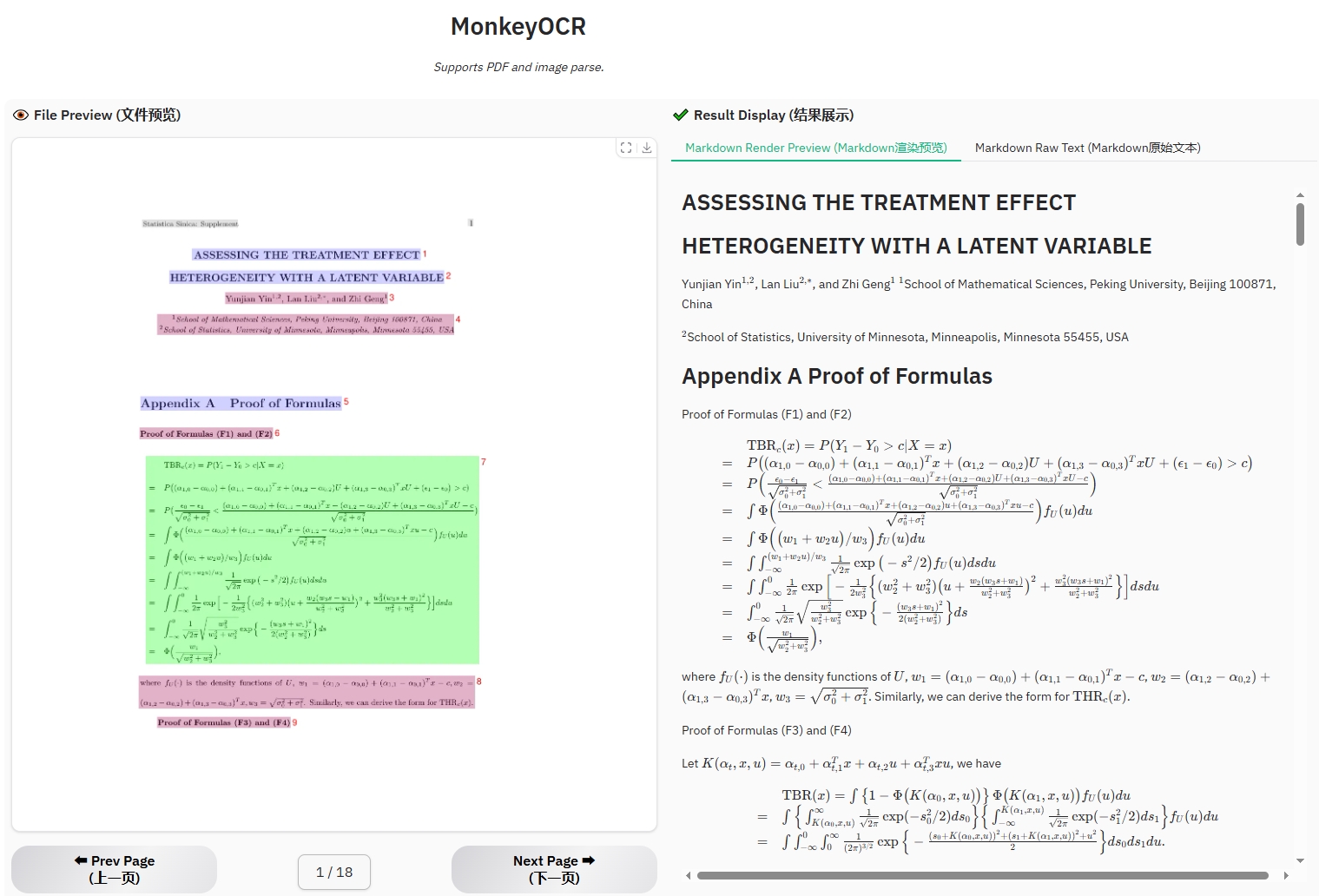
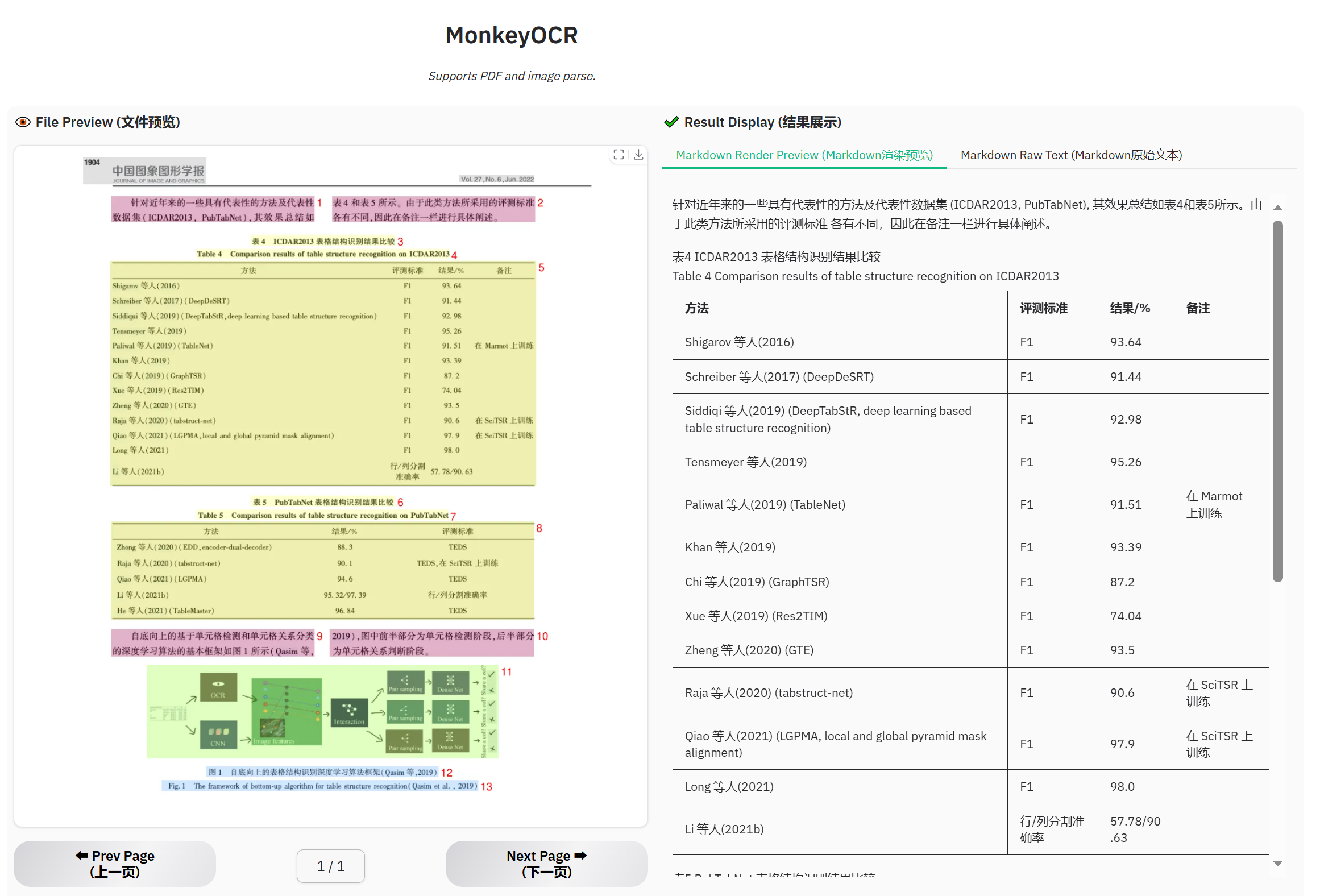
> 2. Click “Parse (解析)” to let the model perform structure detection, content recognition, and relationship prediction on the input document. The final output will be a markdown-formatted version of the document.
> 3. Select a prompt and click “Test by prompt” to let the model perform content recognition on the image based on the selected prompt.
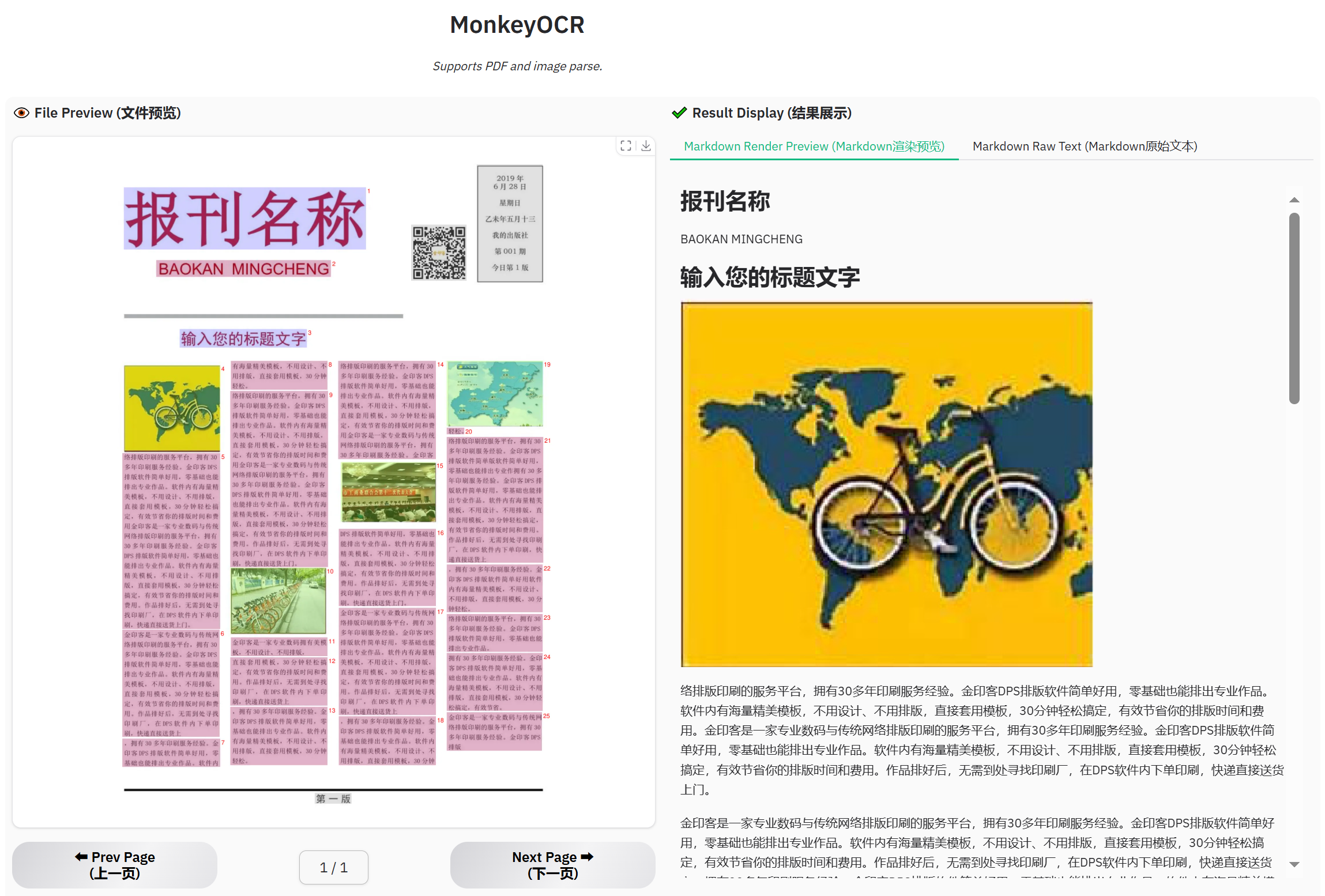
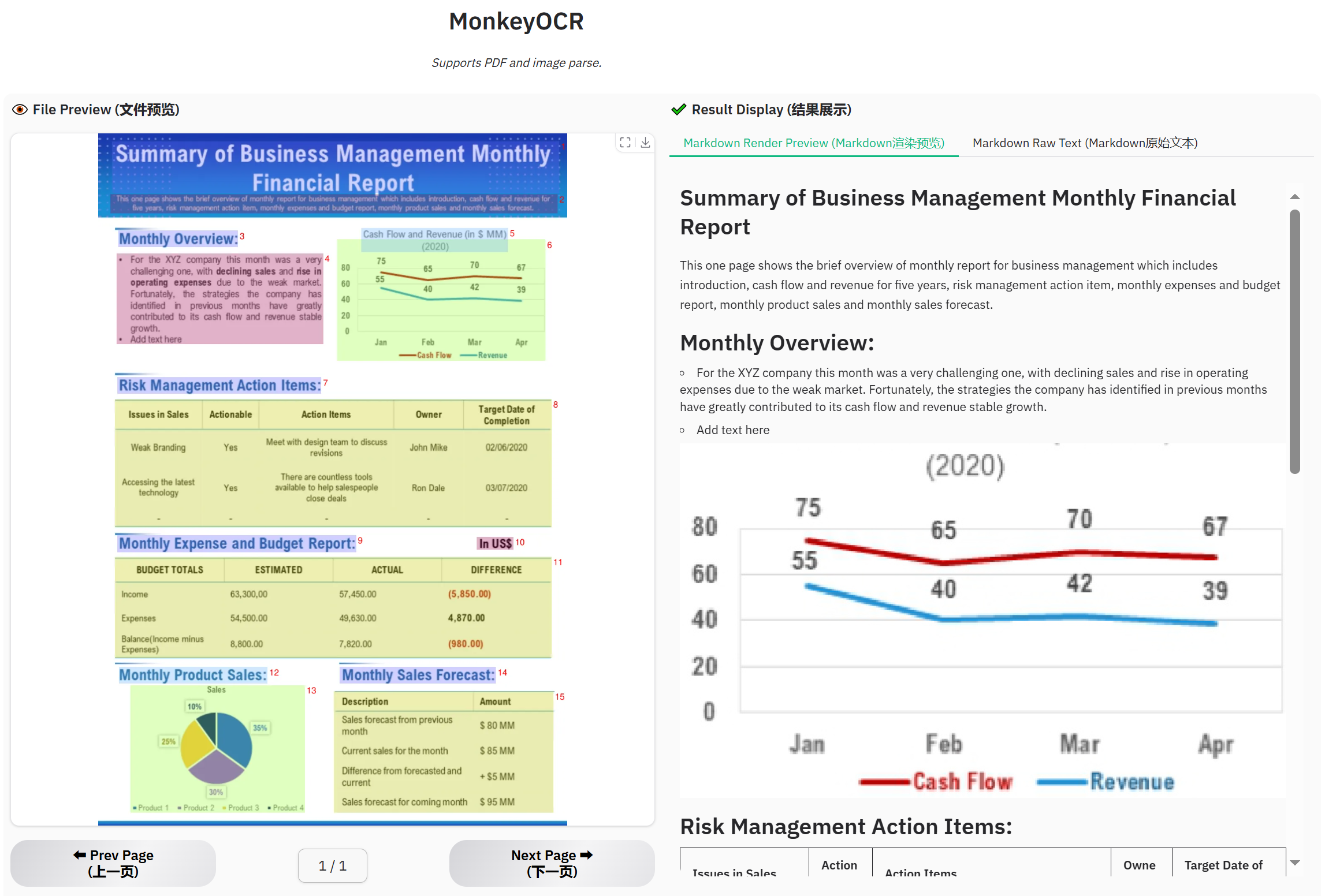
### Support diverse Chinese and English PDF types
## Visualization Demo
Get a Quick Hands-On Experience with Our Demo: http://vlrlabmonkey.xyz:7685
> Our demo is simple and easy to use:
>
> 1. Upload a PDF or image.
> 2. Click “Parse (解析)” to let the model perform structure detection, content recognition, and relationship prediction on the input document. The final output will be a markdown-formatted version of the document.
> 3. Select a prompt and click “Test by prompt” to let the model perform content recognition on the image based on the selected prompt.
### Support diverse Chinese and English PDF types

### Example for formula document
 ### Example for table document
 ### Example for newspaper
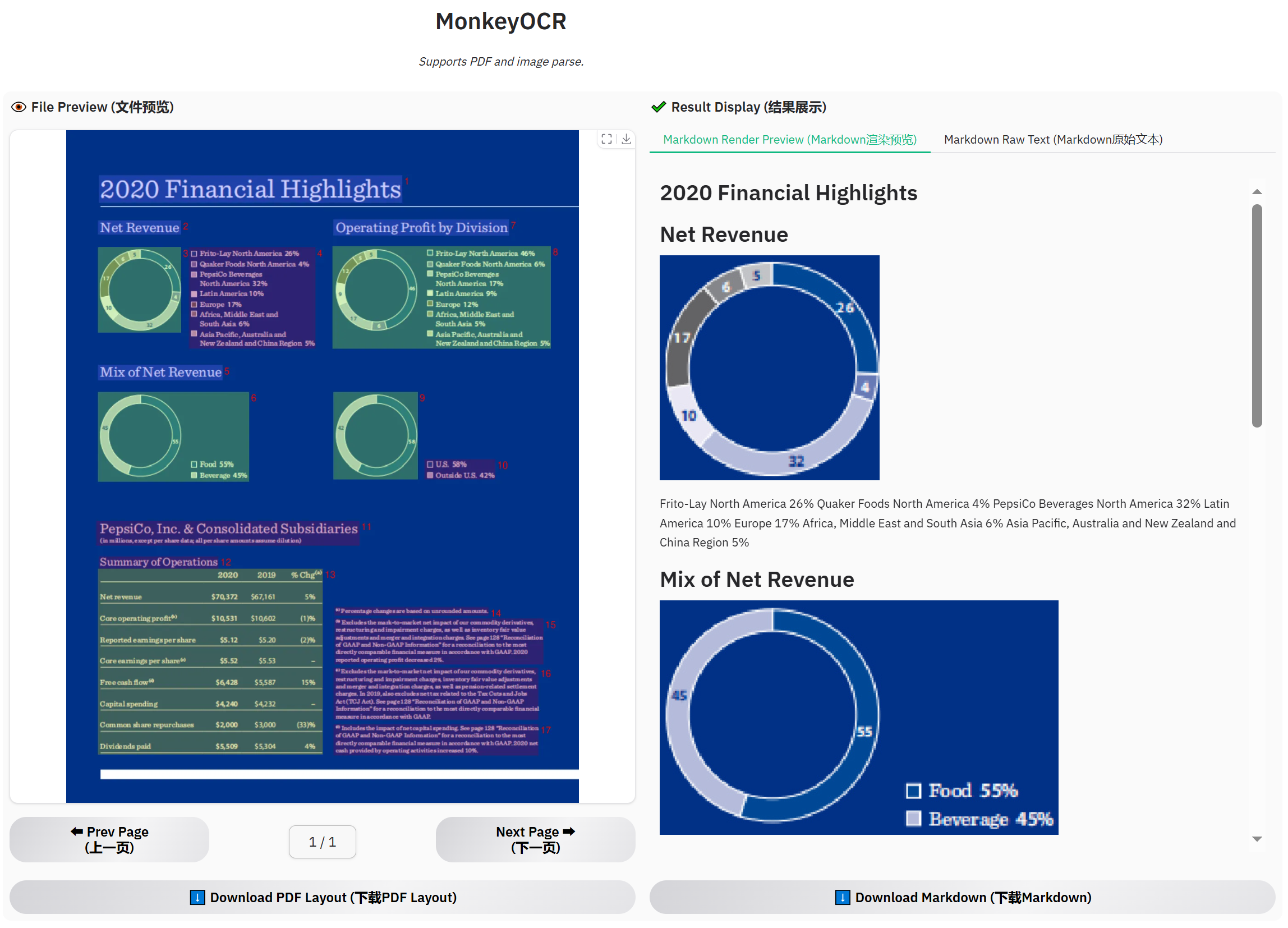
 ### Example for financial report
 ## Citing MonkeyOCR
If you wish to refer to the baseline results published here, please use the following BibTeX entries:
```BibTeX
@misc{li2025monkeyocrdocumentparsingstructurerecognitionrelation,
title={MonkeyOCR: Document Parsing with a Structure-Recognition-Relation Triplet Paradigm},
author={Zhang Li and Yuliang Liu and Qiang Liu and Zhiyin Ma and Ziyang Zhang and Shuo Zhang and Zidun Guo and Jiarui Zhang and Xinyu Wang and Xiang Bai},
year={2025},
eprint={2506.05218},
archivePrefix={arXiv},
primaryClass={cs.CV},
url={https://arxiv.org/abs/2506.05218},
}
```
## Acknowledgments
We would like to thank [MinerU](https://github.com/opendatalab/MinerU), [DocLayout-YOLO](https://github.com/opendatalab/DocLayout-YOLO), [PyMuPDF](https://github.com/pymupdf/PyMuPDF), [layoutreader](https://github.com/ppaanngggg/layoutreader), [Qwen2.5-VL](https://github.com/QwenLM/Qwen2.5-VL), [LMDeploy](https://github.com/InternLM/lmdeploy), and [InternVL3](https://github.com/OpenGVLab/InternVL) for providing base code and models, as well as their contributions to this field. We also thank [M6Doc](https://github.com/HCIILAB/M6Doc), [DocLayNet](https://github.com/DS4SD/DocLayNet), [CDLA](https://github.com/buptlihang/CDLA), [D4LA](https://github.com/AlibabaResearch/AdvancedLiterateMachinery), [DocGenome](https://github.com/Alpha-Innovator/DocGenome), [PubTabNet](https://github.com/ibm-aur-nlp/PubTabNet), and [UniMER-1M](https://github.com/opendatalab/UniMERNet) for providing valuable datasets. We also thank everyone who contributed to this open-source effort.
## Alternative Models to Explore
If you find that our model doesn’t fully meet your needs, feel free to try out the following two recently released awesome models:
[PP-StructureV3](https://github.com/PaddlePaddle/PaddleOCR)
[MinerU 2.0](https://github.com/opendatalab/mineru)
## Copyright
Please don’t hesitate to share your valuable feedback — it’s a key motivation that drives us to continuously improve our framework. The current technical report only presents the results of the 3B model. Our model is intended for non-commercial use. If you are interested in larger one, please contact us at xbai@hust.edu.cn or ylliu@hust.edu.cn.
## Citing MonkeyOCR
If you wish to refer to the baseline results published here, please use the following BibTeX entries:
```BibTeX
@misc{li2025monkeyocrdocumentparsingstructurerecognitionrelation,
title={MonkeyOCR: Document Parsing with a Structure-Recognition-Relation Triplet Paradigm},
author={Zhang Li and Yuliang Liu and Qiang Liu and Zhiyin Ma and Ziyang Zhang and Shuo Zhang and Zidun Guo and Jiarui Zhang and Xinyu Wang and Xiang Bai},
year={2025},
eprint={2506.05218},
archivePrefix={arXiv},
primaryClass={cs.CV},
url={https://arxiv.org/abs/2506.05218},
}
```
## Acknowledgments
We would like to thank [MinerU](https://github.com/opendatalab/MinerU), [DocLayout-YOLO](https://github.com/opendatalab/DocLayout-YOLO), [PyMuPDF](https://github.com/pymupdf/PyMuPDF), [layoutreader](https://github.com/ppaanngggg/layoutreader), [Qwen2.5-VL](https://github.com/QwenLM/Qwen2.5-VL), [LMDeploy](https://github.com/InternLM/lmdeploy), and [InternVL3](https://github.com/OpenGVLab/InternVL) for providing base code and models, as well as their contributions to this field. We also thank [M6Doc](https://github.com/HCIILAB/M6Doc), [DocLayNet](https://github.com/DS4SD/DocLayNet), [CDLA](https://github.com/buptlihang/CDLA), [D4LA](https://github.com/AlibabaResearch/AdvancedLiterateMachinery), [DocGenome](https://github.com/Alpha-Innovator/DocGenome), [PubTabNet](https://github.com/ibm-aur-nlp/PubTabNet), and [UniMER-1M](https://github.com/opendatalab/UniMERNet) for providing valuable datasets. We also thank everyone who contributed to this open-source effort.
## Alternative Models to Explore
If you find that our model doesn’t fully meet your needs, feel free to try out the following two recently released awesome models:
[PP-StructureV3](https://github.com/PaddlePaddle/PaddleOCR)
[MinerU 2.0](https://github.com/opendatalab/mineru)
## Copyright
Please don’t hesitate to share your valuable feedback — it’s a key motivation that drives us to continuously improve our framework. The current technical report only presents the results of the 3B model. Our model is intended for non-commercial use. If you are interested in larger one, please contact us at xbai@hust.edu.cn or ylliu@hust.edu.cn.