# dplyr
**Repository Path**: eleozzr/dplyr
## Basic Information
- **Project Name**: dplyr
- **Description**: No description available
- **Primary Language**: Unknown
- **License**: MIT
- **Default Branch**: main
- **Homepage**: None
- **GVP Project**: No
## Statistics
- **Stars**: 1
- **Forks**: 0
- **Created**: 2024-01-05
- **Last Updated**: 2024-08-01
## Categories & Tags
**Categories**: Uncategorized
**Tags**: None
## README
# dplyr  [](https://cran.r-project.org/package=dplyr)
[](https://github.com/tidyverse/dplyr/actions/workflows/R-CMD-check.yaml)
[](https://app.codecov.io/gh/tidyverse/dplyr?branch=main)
## Overview
dplyr is a grammar of data manipulation, providing a consistent set of
verbs that help you solve the most common data manipulation challenges:
- `mutate()` adds new variables that are functions of existing variables
- `select()` picks variables based on their names.
- `filter()` picks cases based on their values.
- `summarise()` reduces multiple values down to a single summary.
- `arrange()` changes the ordering of the rows.
These all combine naturally with `group_by()` which allows you to
perform any operation “by group”. You can learn more about them in
`vignette("dplyr")`. As well as these single-table verbs, dplyr also
provides a variety of two-table verbs, which you can learn about in
`vignette("two-table")`.
If you are new to dplyr, the best place to start is the [data
transformation chapter](https://r4ds.hadley.nz/data-transform) in R for
Data Science.
## Backends
In addition to data frames/tibbles, dplyr makes working with other
computational backends accessible and efficient. Below is a list of
alternative backends:
- [arrow](https://arrow.apache.org/docs/r/) for larger-than-memory
datasets, including on remote cloud storage like AWS S3, using the
Apache Arrow C++ engine,
[Acero](https://arrow.apache.org/docs/cpp/streaming_execution.html).
- [dtplyr](https://dtplyr.tidyverse.org/) for large, in-memory datasets.
Translates your dplyr code to high performance
[data.table](https://rdatatable.gitlab.io/data.table/) code.
- [dbplyr](https://dbplyr.tidyverse.org/) for data stored in a
relational database. Translates your dplyr code to SQL.
- [duckplyr](https://duckdblabs.github.io/duckplyr/) for using
[duckdb](https://duckdb.org) on large, in-memory datasets with zero
extra copies. Translates your dplyr code to high performance duckdb
queries with an automatic R fallback when translation isn’t possible.
- [duckdb](https://duckdb.org/docs/api/r) for large datasets that are
still small enough to fit on your computer.
- [sparklyr](https://spark.rstudio.com) for very large datasets stored
in [Apache Spark](https://spark.apache.org).
## Installation
``` r
# The easiest way to get dplyr is to install the whole tidyverse:
install.packages("tidyverse")
# Alternatively, install just dplyr:
install.packages("dplyr")
```
### Development version
To get a bug fix or to use a feature from the development version, you
can install the development version of dplyr from GitHub.
``` r
# install.packages("pak")
pak::pak("tidyverse/dplyr")
```
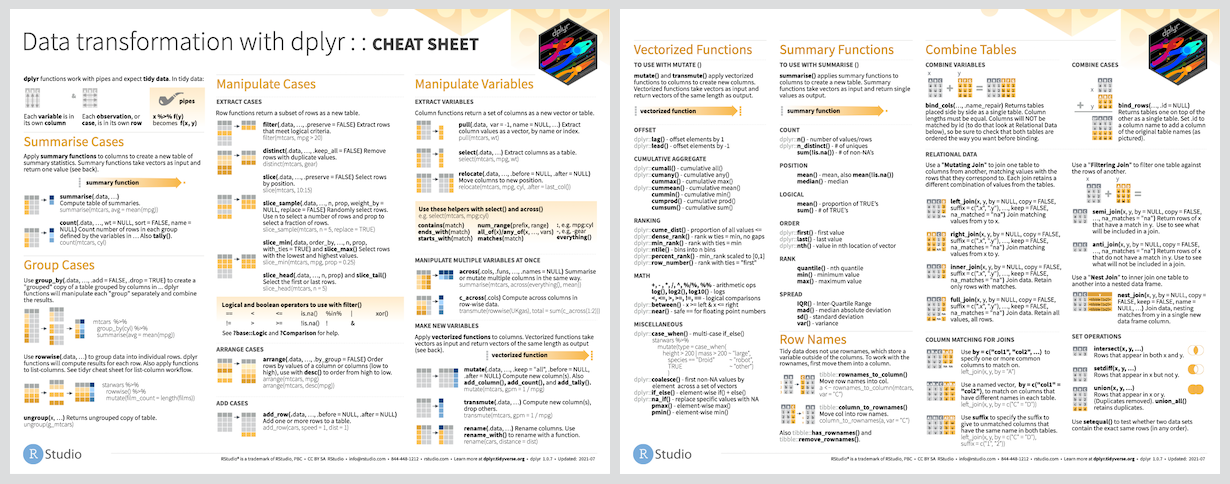
## Cheat Sheet
[](https://cran.r-project.org/package=dplyr)
[](https://github.com/tidyverse/dplyr/actions/workflows/R-CMD-check.yaml)
[](https://app.codecov.io/gh/tidyverse/dplyr?branch=main)
## Overview
dplyr is a grammar of data manipulation, providing a consistent set of
verbs that help you solve the most common data manipulation challenges:
- `mutate()` adds new variables that are functions of existing variables
- `select()` picks variables based on their names.
- `filter()` picks cases based on their values.
- `summarise()` reduces multiple values down to a single summary.
- `arrange()` changes the ordering of the rows.
These all combine naturally with `group_by()` which allows you to
perform any operation “by group”. You can learn more about them in
`vignette("dplyr")`. As well as these single-table verbs, dplyr also
provides a variety of two-table verbs, which you can learn about in
`vignette("two-table")`.
If you are new to dplyr, the best place to start is the [data
transformation chapter](https://r4ds.hadley.nz/data-transform) in R for
Data Science.
## Backends
In addition to data frames/tibbles, dplyr makes working with other
computational backends accessible and efficient. Below is a list of
alternative backends:
- [arrow](https://arrow.apache.org/docs/r/) for larger-than-memory
datasets, including on remote cloud storage like AWS S3, using the
Apache Arrow C++ engine,
[Acero](https://arrow.apache.org/docs/cpp/streaming_execution.html).
- [dtplyr](https://dtplyr.tidyverse.org/) for large, in-memory datasets.
Translates your dplyr code to high performance
[data.table](https://rdatatable.gitlab.io/data.table/) code.
- [dbplyr](https://dbplyr.tidyverse.org/) for data stored in a
relational database. Translates your dplyr code to SQL.
- [duckplyr](https://duckdblabs.github.io/duckplyr/) for using
[duckdb](https://duckdb.org) on large, in-memory datasets with zero
extra copies. Translates your dplyr code to high performance duckdb
queries with an automatic R fallback when translation isn’t possible.
- [duckdb](https://duckdb.org/docs/api/r) for large datasets that are
still small enough to fit on your computer.
- [sparklyr](https://spark.rstudio.com) for very large datasets stored
in [Apache Spark](https://spark.apache.org).
## Installation
``` r
# The easiest way to get dplyr is to install the whole tidyverse:
install.packages("tidyverse")
# Alternatively, install just dplyr:
install.packages("dplyr")
```
### Development version
To get a bug fix or to use a feature from the development version, you
can install the development version of dplyr from GitHub.
``` r
# install.packages("pak")
pak::pak("tidyverse/dplyr")
```
## Cheat Sheet
 ## Usage
``` r
library(dplyr)
starwars %>%
filter(species == "Droid")
#> # A tibble: 6 × 14
#> name height mass hair_color skin_color eye_color birth_year sex gender
#>
#> 1 C-3PO 167 75 gold yellow 112 none masculi…
#> 2 R2-D2 96 32 white, blue red 33 none masculi…
#> 3 R5-D4 97 32 white, red red NA none masculi…
#> 4 IG-88 200 140 none metal red 15 none masculi…
#> 5 R4-P17 96 NA none silver, red red, blue NA none feminine
#> # ℹ 1 more row
#> # ℹ 5 more variables: homeworld , species , films
## Usage
``` r
library(dplyr)
starwars %>%
filter(species == "Droid")
#> # A tibble: 6 × 14
#> name height mass hair_color skin_color eye_color birth_year sex gender
#>
#> 1 C-3PO 167 75 gold yellow 112 none masculi…
#> 2 R2-D2 96 32 white, blue red 33 none masculi…
#> 3 R5-D4 97 32 white, red red NA none masculi…
#> 4 IG-88 200 140 none metal red 15 none masculi…
#> 5 R4-P17 96 NA none silver, red red, blue NA none feminine
#> # ℹ 1 more row
#> # ℹ 5 more variables: homeworld , species , films ,
#> # vehicles , starships
starwars %>%
select(name, ends_with("color"))
#> # A tibble: 87 × 4
#> name hair_color skin_color eye_color
#>
#> 1 Luke Skywalker blond fair blue
#> 2 C-3PO gold yellow
#> 3 R2-D2 white, blue red
#> 4 Darth Vader none white yellow
#> 5 Leia Organa brown light brown
#> # ℹ 82 more rows
starwars %>%
mutate(name, bmi = mass / ((height / 100) ^ 2)) %>%
select(name:mass, bmi)
#> # A tibble: 87 × 4
#> name height mass bmi
#>
#> 1 Luke Skywalker 172 77 26.0
#> 2 C-3PO 167 75 26.9
#> 3 R2-D2 96 32 34.7
#> 4 Darth Vader 202 136 33.3
#> 5 Leia Organa 150 49 21.8
#> # ℹ 82 more rows
starwars %>%
arrange(desc(mass))
#> # A tibble: 87 × 14
#> name height mass hair_color skin_color eye_color birth_year sex gender
#>
#> 1 Jabba De… 175 1358 green-tan… orange 600 herm… mascu…
#> 2 Grievous 216 159 none brown, wh… green, y… NA male mascu…
#> 3 IG-88 200 140 none metal red 15 none mascu…
#> 4 Darth Va… 202 136 none white yellow 41.9 male mascu…
#> 5 Tarfful 234 136 brown brown blue NA male mascu…
#> # ℹ 82 more rows
#> # ℹ 5 more variables: homeworld , species , films ,
#> # vehicles , starships
starwars %>%
group_by(species) %>%
summarise(
n = n(),
mass = mean(mass, na.rm = TRUE)
) %>%
filter(
n > 1,
mass > 50
)
#> # A tibble: 9 × 3
#> species n mass
#>
#> 1 Droid 6 69.8
#> 2 Gungan 3 74
#> 3 Human 35 81.3
#> 4 Kaminoan 2 88
#> 5 Mirialan 2 53.1
#> # ℹ 4 more rows
```
## Getting help
If you encounter a clear bug, please file an issue with a minimal
reproducible example on
[GitHub](https://github.com/tidyverse/dplyr/issues). For questions and
other discussion, please use
[community.rstudio.com](https://community.rstudio.com/) or the
[manipulatr mailing list](https://groups.google.com/d/forum/manipulatr).
------------------------------------------------------------------------
Please note that this project is released with a [Contributor Code of
Conduct](https://dplyr.tidyverse.org/CODE_OF_CONDUCT). By participating
in this project you agree to abide by its terms.