# go_api_tester
**Repository Path**: foxpast/go_api_tester
## Basic Information
- **Project Name**: go_api_tester
- **Description**: 轻量化,简单易用API巡检程序,支持从Excel中读取API列表信息,定期巡检状态并通过钉钉发送告警。
- **Primary Language**: Go
- **License**: Not specified
- **Default Branch**: master
- **Homepage**: None
- **GVP Project**: No
## Statistics
- **Stars**: 4
- **Forks**: 1
- **Created**: 2023-10-27
- **Last Updated**: 2025-01-20
## Categories & Tags
**Categories**: Uncategorized
**Tags**: None
## README
## Go_api_tester 使用文档
文档版本:v3
程序版本:v3
作者:FX
### 1. 监控方案概览
各项目部署运行上线后,为保证运维阶段的可用性,做到故障及时响应处理,需对监控和告警执行以下标准。基础监控和API巡检作为交付标配部署。
| 功能 | 技术选型 | 必选/可选 |
|-------|------------|----|
| 集群监控 | Prometheus | 必选 |
| API巡检 | API巡检工具 | 可选 |
| 链路监控 | Skywalking | 可选 |
| 日志监控 | ELK/Loki | 可选 |
### 2. 软件功能简介
功能介绍:
一款轻量化,面向业务人员的业务API巡检程序,故使用Excel表格读取API列表信息,定期巡检状态并通过钉钉发送告警。
同时可以自行和Devops CICD集成,进行发布后的测试。
支持的Response检查项:
- HTTP状态码检测
- Json对象值检测
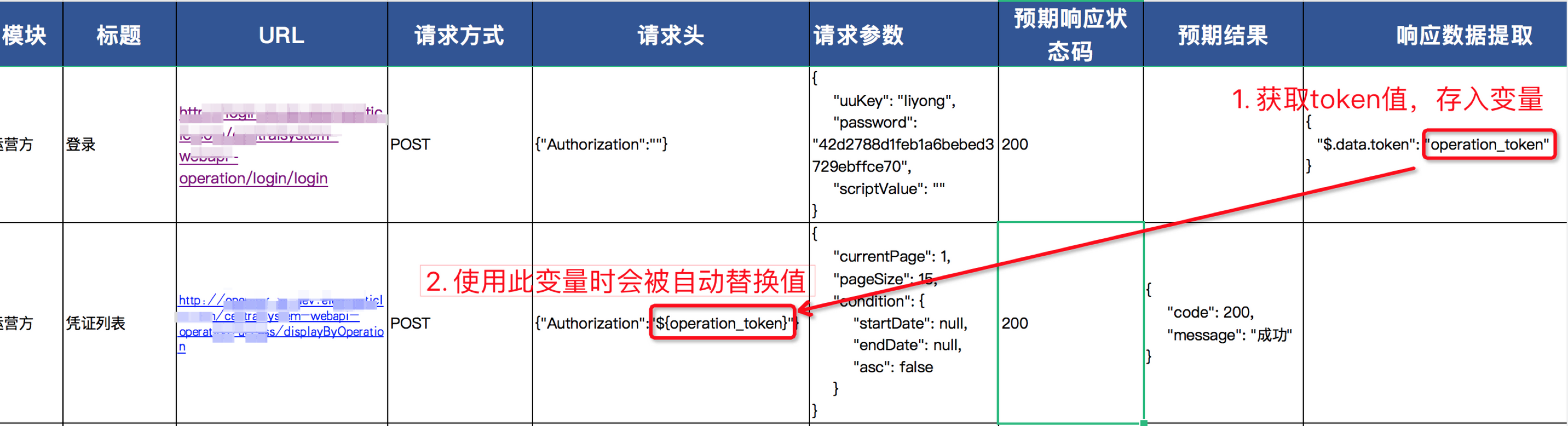
- 需要携带Token的API检测(自动提取返回Json中的token值)
巡检任务包括:
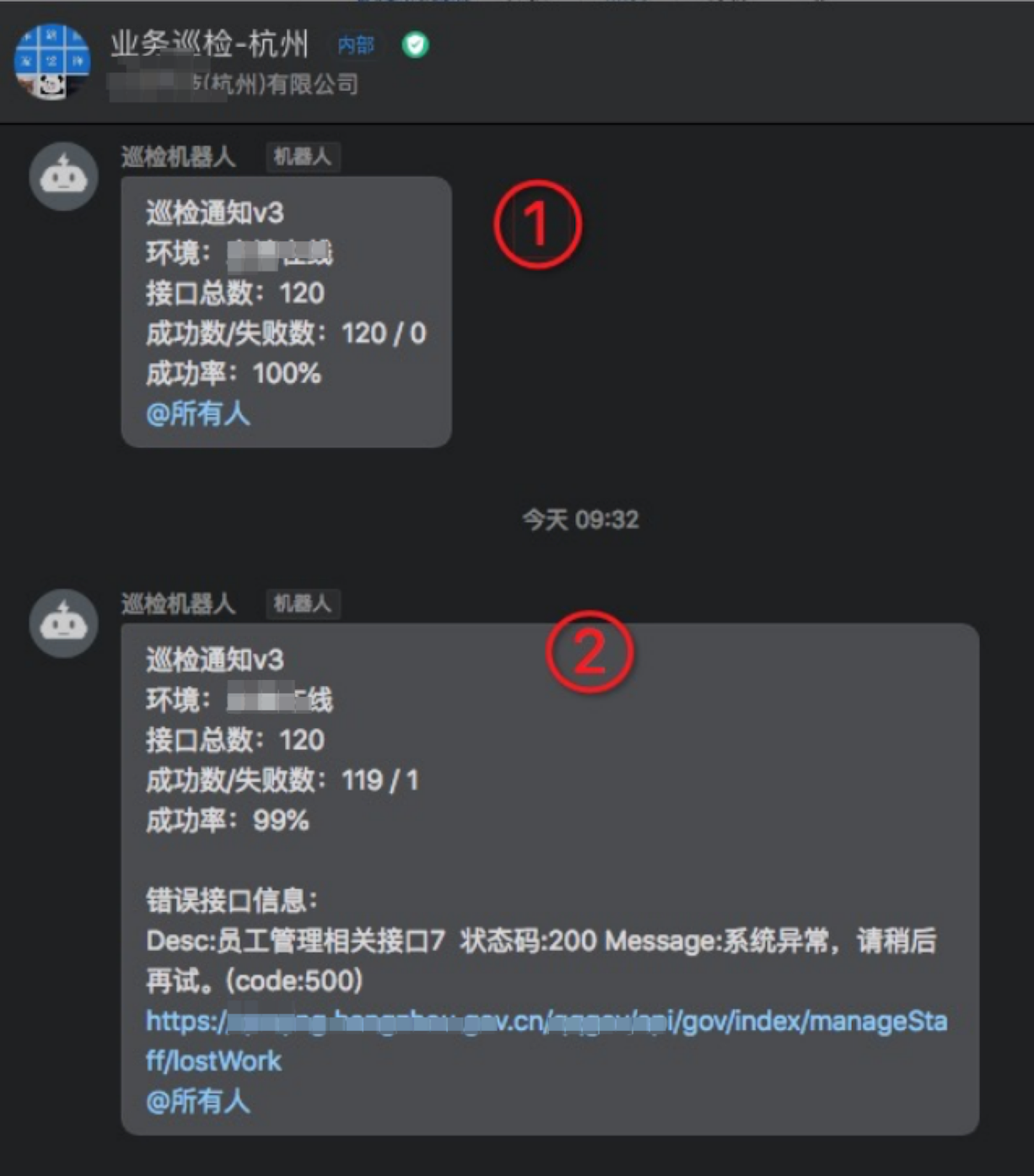
- 日报:例如每天9点定时巡检,将巡检结果发送至钉钉群(如下图①)
- 周期巡检:例如日常每隔5分钟巡检一次,只汇报出错接口的状态(如下图②)
钉钉告警示例:
 ### 3. 下载安装
```shell
$ https://cos-1257855627.cos.ap-shanghai.myqcloud.com/jiankong/xunjian_v3.zip
$ unzip xunjian_v3.zip
$ cd xunjian_v3 && ls
API巡检工具使用说明.md config.yaml start.sh stop.sh xls xunjian_v3
# 启动
$ sh ./start.sh
# 关闭
$ sh ./stop.sh
# 查看日志
$ tailf nohup.out
```
使用Excel保存需要巡检的API列表
1. excel的sheet页根据实际情况决定,支持分页归类处理
2. 如果要先获取token,请参照下图写法。将token存入变量,后续其他接口直接使用此变量
3. 请求参数示例
- Json类型示例:
```json
{
"number": 1,
"string": "some text"
}
```
请求头请添加:
```json
'Content-Type': 'application/json'
```
- x-www-form-urlencoded类型示例:
```json
k1=v1&k2=v2
```
请求头请添加:
```json
'Content-Type': 'application/x-www-form-urlencoded'
```
### 4. 配置文件说明
修改config.yaml,参考以下示例
```yaml
log_mode: info # debug: 可打印出API原始返回等详细信息 info:正常日志输出
mode: test # test:直接扫描一次接口并发送钉钉消息,完成后退出程序 prod:利用cron计划任务定时巡检,长期运行
checkrate: 300 # 检查API的时间间隔,可控制并发速率,单位为ms
retry: 0 # 检测API失败后的重试次数
dingtalk:
send: true # 钉钉发送消息的总开关
title: <你的业务系统名> # 钉钉发送消息的标题
url: https://oapi.dingtalk.com/robot/send # 钉钉机器人webhook接口地址
WebHook: # 钉钉机器人webhook
secret: 巡检 # 钉钉webhook关键字
datasource:
type: excel
file: ./xls/xxx.xlsx # API列表文件路径
excel:
allsheet: true # true:检查所有sheet页, false:只检查sheet字段指定的sheet页
sheet: test
column: # 各字段的在excel文件中的列下标,默认请不要改变
id: 0
module: 1
desc: 2
url: 3
method: 4
headers: 5
body: 6
expectcode: 7
expectdata: 8
extract: 9
domain: # excel中api的URL如果不写domain只写路径,会根据url的值自动补全
url: https://example.cn/
cron_spec:
morning: "0 25 8 * * *" # 每日晨报计划任务
interval: "0 */5 9-20 * * *" # 轮训检测计划任务
```
### 5. 启动和关闭
```shell
# 启动
$ sh ./start.sh
# 关闭
$ sh ./stop.sh
# 查看日志
$ tailf nohup.out
```
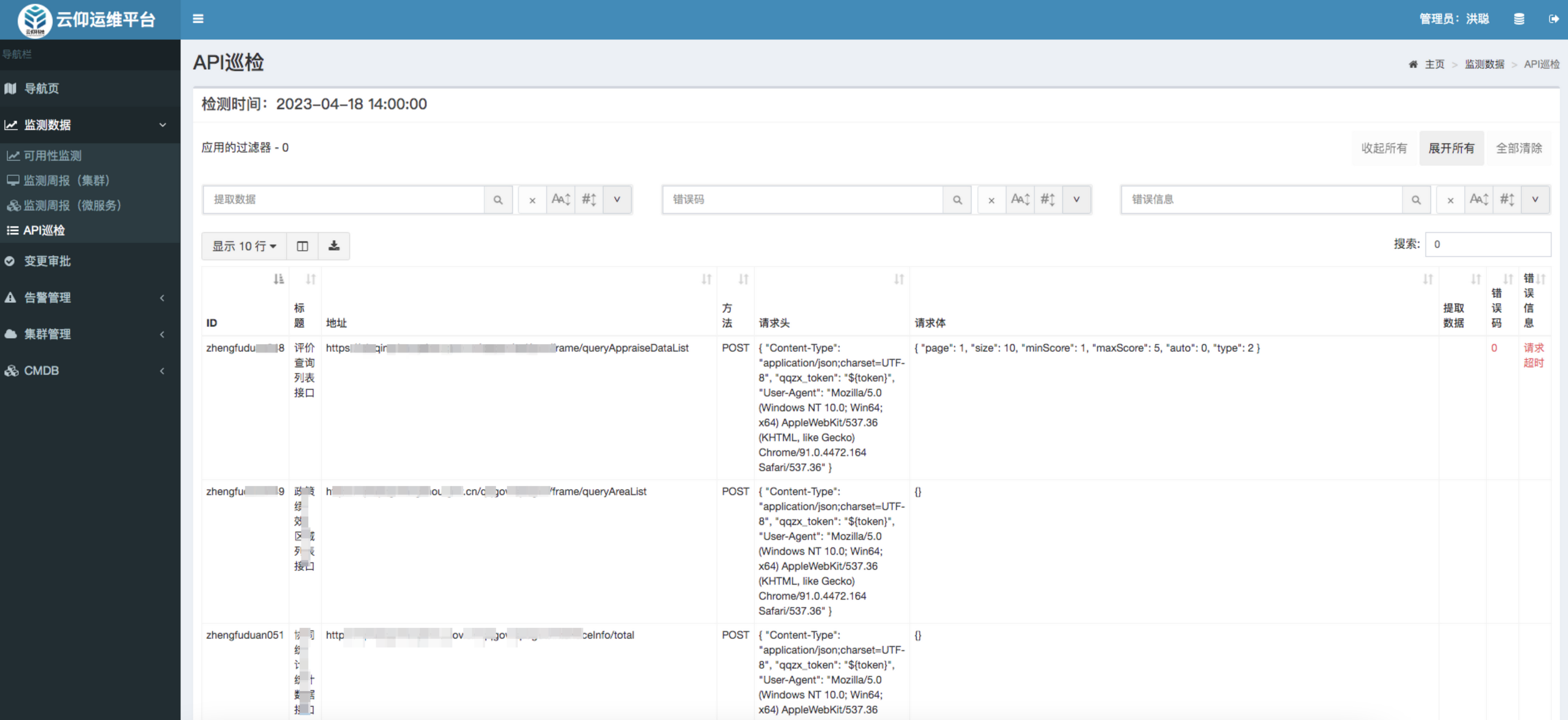
### 6. (可选)配合op-admin运维平台实现可视化
### 3. 下载安装
```shell
$ https://cos-1257855627.cos.ap-shanghai.myqcloud.com/jiankong/xunjian_v3.zip
$ unzip xunjian_v3.zip
$ cd xunjian_v3 && ls
API巡检工具使用说明.md config.yaml start.sh stop.sh xls xunjian_v3
# 启动
$ sh ./start.sh
# 关闭
$ sh ./stop.sh
# 查看日志
$ tailf nohup.out
```
使用Excel保存需要巡检的API列表
1. excel的sheet页根据实际情况决定,支持分页归类处理
2. 如果要先获取token,请参照下图写法。将token存入变量,后续其他接口直接使用此变量

3. 请求参数示例
- Json类型示例:
```json
{
"number": 1,
"string": "some text"
}
```
请求头请添加:
```json
'Content-Type': 'application/json'
```
- x-www-form-urlencoded类型示例:
```json
k1=v1&k2=v2
```
请求头请添加:
```json
'Content-Type': 'application/x-www-form-urlencoded'
```
### 4. 配置文件说明
修改config.yaml,参考以下示例
```yaml
log_mode: info # debug: 可打印出API原始返回等详细信息 info:正常日志输出
mode: test # test:直接扫描一次接口并发送钉钉消息,完成后退出程序 prod:利用cron计划任务定时巡检,长期运行
checkrate: 300 # 检查API的时间间隔,可控制并发速率,单位为ms
retry: 0 # 检测API失败后的重试次数
dingtalk:
send: true # 钉钉发送消息的总开关
title: <你的业务系统名> # 钉钉发送消息的标题
url: https://oapi.dingtalk.com/robot/send # 钉钉机器人webhook接口地址
WebHook: # 钉钉机器人webhook
secret: 巡检 # 钉钉webhook关键字
datasource:
type: excel
file: ./xls/xxx.xlsx # API列表文件路径
excel:
allsheet: true # true:检查所有sheet页, false:只检查sheet字段指定的sheet页
sheet: test
column: # 各字段的在excel文件中的列下标,默认请不要改变
id: 0
module: 1
desc: 2
url: 3
method: 4
headers: 5
body: 6
expectcode: 7
expectdata: 8
extract: 9
domain: # excel中api的URL如果不写domain只写路径,会根据url的值自动补全
url: https://example.cn/
cron_spec:
morning: "0 25 8 * * *" # 每日晨报计划任务
interval: "0 */5 9-20 * * *" # 轮训检测计划任务
```
### 5. 启动和关闭
```shell
# 启动
$ sh ./start.sh
# 关闭
$ sh ./stop.sh
# 查看日志
$ tailf nohup.out
```
### 6. (可选)配合op-admin运维平台实现可视化
