# label-studio
**Repository Path**: hqshen/label-studio
## Basic Information
- **Project Name**: label-studio
- **Description**: No description available
- **Primary Language**: Unknown
- **License**: Apache-2.0
- **Default Branch**: master
- **Homepage**: None
- **GVP Project**: No
## Statistics
- **Stars**: 0
- **Forks**: 0
- **Created**: 2025-03-04
- **Last Updated**: 2025-03-04
## Categories & Tags
**Categories**: Uncategorized
**Tags**: None
## README
# Label Studio ·     ·
[Website](https://labelstud.io/) • [Docs](https://labelstud.io/guide/) • [Twitter](https://twitter.com/heartexlabs) • [Join Slack Community  ](https://join.slack.com/t/label-studio/shared_invite/zt-cr8b7ygm-6L45z7biEBw4HXa5A2b5pw)
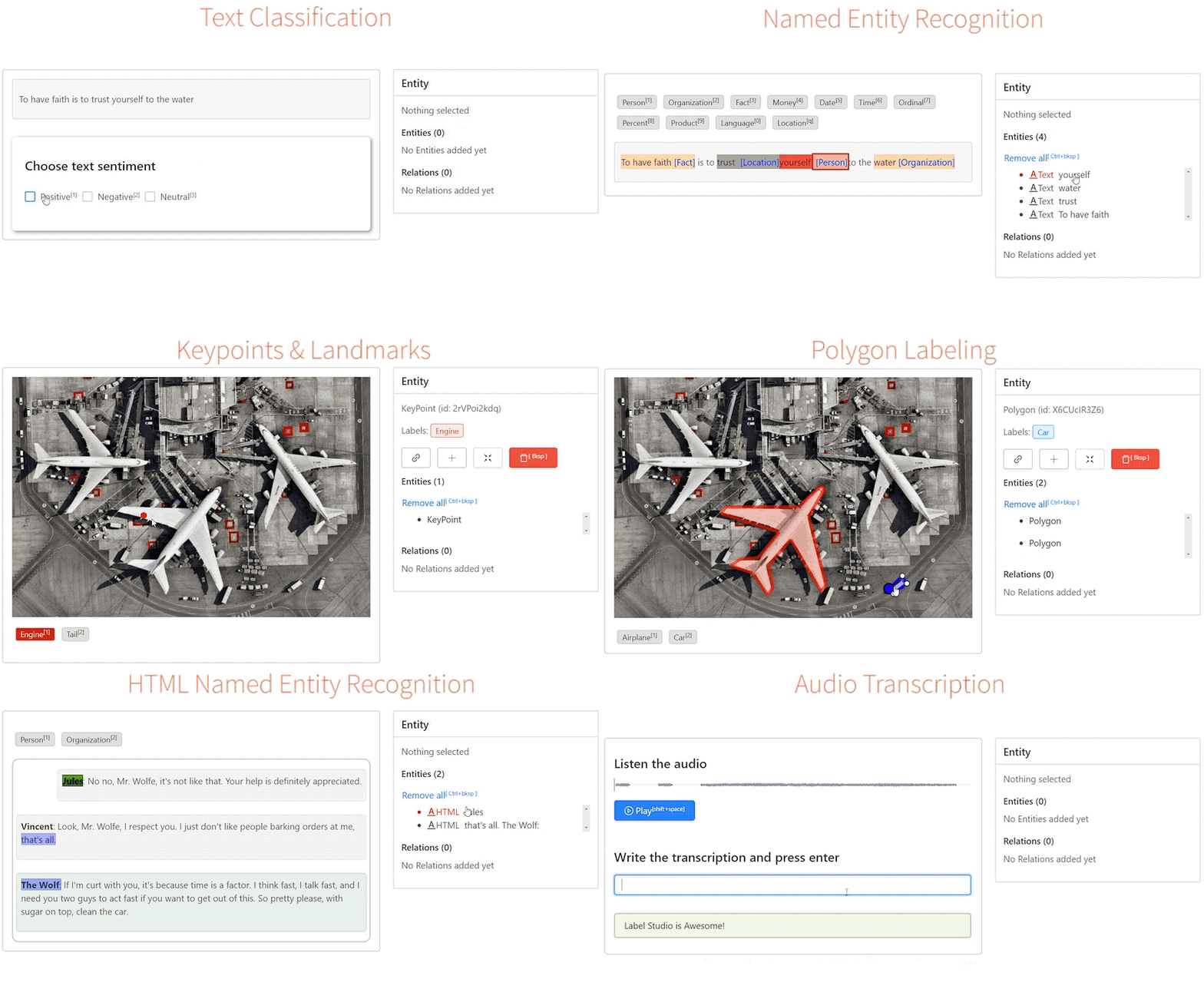
**Label Studio是数据label和标注工具的瑞士军刀 :v:**
在线试用 **[running app](https://app.labelstud.io)** 介绍博客 **[introductory post](https://towardsdatascience.com/introducing-label-studio-a-swiss-army-knife-of-data-labeling-140c1be92881#3907-fd502dc24c8d)**.
其目的是帮助您使用具有标准化输出格式的简单界面来标注不同类型的数据。
您正在处理自定义数据集并考虑创建工具吗?
使用Label Studio,您可以节省时间并在几分钟内创建自定义工具和界面。
## Summary
 - [Quick Start](#quick-start)
- [One Click Deploy](#one-click-deploy)
- [Features :star2:](#features-star2)
- [Use Cases](#use-cases)
- [Machine Learning Integration](#machine-learning-integration)
- [For Teams and Enterprises :office:](#label-studio-for-teams-startups-and-enterprises-office)
- [Ecosystem](#ecosystem)
- [License](#license)
## Quick Start
```bash
# Requires >=Python3.5
pip install label-studio
# 在labeling_project路径中初始化项目
label-studio init labeling_project
# Start 服务器 at http://localhost:8080
label-studio start labeling_project
```
#### Install on Windows
要在Windows上运行,需要从以下位置手动下载以下: [Gohlke builds](https://www.lfd.uci.edu/~gohlke/pythonlibs), by ensuring the right python version:
- [lxml](https://www.lfd.uci.edu/~gohlke/pythonlibs/#lxml)
Install Label Studio:
```bash
# Upgrade pip
pip install -U pip
# Assuming you are running Win64 with Python 3.8, install packages downloaded form Gohlke:
pip install lxml‑4.5.0‑cp38‑cp38‑win_amd64.whl
# Install label studio
pip install label-studio
```
#### Install from Anaconda
```bash
conda create --name label-studio python=3.8
conda activate label-studio
pip install label-studio
```
如果在安装过程中发现任何错误,请尝试重新运行安装
```bash
pip install --ignore-installed label-studio
```
#### 本地部署
可以通过以下方式在本地运行最新版本的Label Studio,而无需从pip安装软件包:
```bash
# Install all package dependencies
pip install -e .
```
```bash
# Start the server at http://localhost:8080
python label_studio/server.py start labeling_project --init
```
## 使用docker部署
试用docker运行 `http://localhost:8080`:
```bash
docker run --rm -p 8080:8080 -v `pwd`/my_project:/label-studio/my_project --name label-studio heartexlabs/label-studio:latest label-studio start my_project --init
```
默认情况下,它在`./my_project` 目录中启动空白项目。
> Note: if `./my_project` folder exists, an exception will be thrown. Please delete this folder or use `--force` option.
您可以通过添加默认值来覆盖默认的启动命令 :
```bash
docker run -p 8080:8080 -v `pwd`/my_project:/label-studio/my_project --name label-studio heartexlabs/label-studio:latest label-studio start my_project --init --force --template text_classification
```
通过Dockerfile build一个本地的镜像:
```bash
docker build -t heartexlabs/label-studio:latest .
```
## Run docker-compose
You can also start serving at `http://localhost:8080` using docker-compose.
**First time to run the app**
```bash
INIT_COMMAND='--init' docker-compose up -d
```
**Run the app with existing project data**
```bash
docker-compose up -d
```
**Run the app reseting project data**
```bash
INIT_COMMAND='--init --force' docker-compose up -d
```
Or you can just use .env file instead of INIT_COMMAND='...' adding this line:
```bash
INIT_COMMAND=--init --force
```
## 云上一键部署
您现在可以一键式部署这些云中的任何一个 :
[
- [Quick Start](#quick-start)
- [One Click Deploy](#one-click-deploy)
- [Features :star2:](#features-star2)
- [Use Cases](#use-cases)
- [Machine Learning Integration](#machine-learning-integration)
- [For Teams and Enterprises :office:](#label-studio-for-teams-startups-and-enterprises-office)
- [Ecosystem](#ecosystem)
- [License](#license)
## Quick Start
```bash
# Requires >=Python3.5
pip install label-studio
# 在labeling_project路径中初始化项目
label-studio init labeling_project
# Start 服务器 at http://localhost:8080
label-studio start labeling_project
```
#### Install on Windows
要在Windows上运行,需要从以下位置手动下载以下: [Gohlke builds](https://www.lfd.uci.edu/~gohlke/pythonlibs), by ensuring the right python version:
- [lxml](https://www.lfd.uci.edu/~gohlke/pythonlibs/#lxml)
Install Label Studio:
```bash
# Upgrade pip
pip install -U pip
# Assuming you are running Win64 with Python 3.8, install packages downloaded form Gohlke:
pip install lxml‑4.5.0‑cp38‑cp38‑win_amd64.whl
# Install label studio
pip install label-studio
```
#### Install from Anaconda
```bash
conda create --name label-studio python=3.8
conda activate label-studio
pip install label-studio
```
如果在安装过程中发现任何错误,请尝试重新运行安装
```bash
pip install --ignore-installed label-studio
```
#### 本地部署
可以通过以下方式在本地运行最新版本的Label Studio,而无需从pip安装软件包:
```bash
# Install all package dependencies
pip install -e .
```
```bash
# Start the server at http://localhost:8080
python label_studio/server.py start labeling_project --init
```
## 使用docker部署
试用docker运行 `http://localhost:8080`:
```bash
docker run --rm -p 8080:8080 -v `pwd`/my_project:/label-studio/my_project --name label-studio heartexlabs/label-studio:latest label-studio start my_project --init
```
默认情况下,它在`./my_project` 目录中启动空白项目。
> Note: if `./my_project` folder exists, an exception will be thrown. Please delete this folder or use `--force` option.
您可以通过添加默认值来覆盖默认的启动命令 :
```bash
docker run -p 8080:8080 -v `pwd`/my_project:/label-studio/my_project --name label-studio heartexlabs/label-studio:latest label-studio start my_project --init --force --template text_classification
```
通过Dockerfile build一个本地的镜像:
```bash
docker build -t heartexlabs/label-studio:latest .
```
## Run docker-compose
You can also start serving at `http://localhost:8080` using docker-compose.
**First time to run the app**
```bash
INIT_COMMAND='--init' docker-compose up -d
```
**Run the app with existing project data**
```bash
docker-compose up -d
```
**Run the app reseting project data**
```bash
INIT_COMMAND='--init --force' docker-compose up -d
```
Or you can just use .env file instead of INIT_COMMAND='...' adding this line:
```bash
INIT_COMMAND=--init --force
```
## 云上一键部署
您现在可以一键式部署这些云中的任何一个 :
[ ](https://heroku.com/deploy)
[
](https://heroku.com/deploy)
[ ](https://portal.azure.com/#create/Microsoft.Template/uri/https%3A%2F%2Fraw.githubusercontent.com%2Fheartexlabs%2Flabel-studio%2Fmaster%2Fazuredeploy.json)
[
](https://portal.azure.com/#create/Microsoft.Template/uri/https%3A%2F%2Fraw.githubusercontent.com%2Fheartexlabs%2Flabel-studio%2Fmaster%2Fazuredeploy.json)
[ ](https://deploy.cloud.run)
## Features :star2:
- **简单**: 用最少的UI设计制作。 简单的设计就是最好的设计 .
- **可配置**: 使用高级jsx tags配置,您可以完全自定义数据的可视界面。 感觉就像为您的特定需求构建了自定义label工具。 而且这是快速的。
- **协作标注**: 由两个或更多人label同一任务,然后比较结果。
- **多种数据类型**: 您定义自己的具有不同的label类型, _Images_, _Audios_, _Texts_, _HTMLs_, _Pairwise_
- **支持导入格式**: JSON, CSV, TSV, RAR and ZIP archives
- **移动设备友好**: 适用于不同尺寸的设备。
- **NPM嵌入**: 前端是NPM包, [NPM package](https://github.com/heartexlabs/label-studio-frontend). 您可以将其包含在您的项目中 .
- **机器学习**: 机器学习的集成支持。 可视化并比较来自不同模型的预测。 使用最好的进行pre-labeling。
- **Stylable**: 配置视觉外观以匹配您的公司品牌,将label任务作为产品的一部分进行分发。
- **Amazon S3 and Google GCS**: [Read more](https://labelstud.io/blog/release-070-cloud-storage-enablement.html) 有关Cloud Storages支持和版本0.7.0的信息。
## Use Cases
数据标注支持的案例列表。 请贡献自己的配置,并随时扩展基本类型以支持更多方案。 请注意,这不是一个详尽的清单,只有主要方案。
| Task | Description |
|-|-|
| **Image** | |
| [Classification](https://labelstud.io/templates/image_classification.html) | 图片分类 |
| 目标检测| 使用边界框或多边形检测图像中的对象 |
| Semantic Segmentation | 语义分隔,为每个像素检测其所属的对象类别 |
| Pose Estimation | 姿势检测,标记人的关节位置 |
| **Text** | |
| [Classification](https://labelstud.io/templates/sentiment_analysis.html) | 文本分类 |
| Summarization | 创建一个代表原始内容中最相关信息的摘要 |
| HTML Tagging | 标注诸如简历,研究,法律文件和转换为HTML的Excel工作表之类的内容 |
| **Audio** | |
| [Classification](https://labelstud.io/templates/audio_classification.html) | 音频分类 |
| Speaker Diarisation | 根据说话人身份将输入音频流划分为同质段 |
| Emotion Recognition | 标记并识别音频中的情感 |
| Transcription | 用文字写下口头交流 |
| **Video** | |
| [Classification](https://labelstud.io/templates/video_classification.html) | 视频分类 |
| **Comparison** | |
| Pairwise | 成对比较实体以判断哪个实体是首选 |
| Ranking | 根据某些属性对列表中的项目进行排序 |
| **Time Series** | |
| Classification | |
| Segmentation | |
## Machine Learning Integration
您可以轻松地将自己喜欢的机器学习框架与Label Studio机器学习SDK连接起来。 只需两个简单的步即可完成:
1. 启动您自己的ML后端服务器 ([了解更多](label_studio/ml/README.md)),
2. 将Label Studio连接到正在运行的ML后端 [/model](http://localhost:8080/model.html) page
您可以使用:
- **Pre-labeling**: 使用模型预测进行pre-labeling(例如,使用实时模型预测创建粗略的图像分割,以进行进一步的手动优化)
- **Autolabeling**: 创建自动标注
- **Online Learning**: 进行标注的同时更新(重新训练)模型
- **Active Learning**: 在主动学习模式下执行label-仅选择最复杂的样本
- **Prediction Service**: 即时创建运行中的production-ready预测服务
## Label Studio Integration to your services
* 你可以使用 [Label Studio Frontend](https://github.com/heartexlabs/label-studio-frontend) 独立的 React library, [read more here](https://labelstud.io/guide/frontend.html).
* Label Studio后端(此仓库)可以通过Flask Blueprints集成到您的应用中 . [See example of integration here](https://github.com/heartexlabs/label-studio/blob/master/blueprint_usage_example.py).
## Label Studio for Teams, Startups, and Enterprises :office:
Label Studio for Teams是我们的企业版(云和本地),其中包括数据管理器,高质量的基线模型,主动学习,协作者支持等。 请访问[website](https://www.heartex.ai/)了解更多信息。
## Ecosystem
| Project | Description |
|-|-|
| label-studio | Server part, distributed as a pip package |
| [label-studio-frontend](https://github.com/heartexlabs/label-studio-frontend) | 用JavaScript和React编写的前端部分可以嵌入到您的应用程序中 |
| [label-studio-converter](https://github.com/heartexlabs/label-studio-converter) | 将label编码为您喜欢的机器学习库的格式 |
| [label-studio-transformers](https://github.com/heartexlabs/label-studio-transformers) | 连接并配置为与Label Studio一起使用的Huggface transformers库 |
## Citation
```tex
@misc{Label Studio,
title={{Label Studio}: Data labeling software},
url={https://github.com/heartexlabs/label-studio},
note={Open source software available from https://github.com/heartexlabs/label-studio},
author={
Maxim Tkachenko and
Mikhail Malyuk and
Nikita Shevchenko and
Andrey Holmanyuk and
Nikolai Liubimov},
year={2020},
}
```
## License
This software is licensed under the [Apache 2.0 LICENSE](/LICENSE) © [Heartex](https://www.heartex.ai/). 2020
](https://deploy.cloud.run)
## Features :star2:
- **简单**: 用最少的UI设计制作。 简单的设计就是最好的设计 .
- **可配置**: 使用高级jsx tags配置,您可以完全自定义数据的可视界面。 感觉就像为您的特定需求构建了自定义label工具。 而且这是快速的。
- **协作标注**: 由两个或更多人label同一任务,然后比较结果。
- **多种数据类型**: 您定义自己的具有不同的label类型, _Images_, _Audios_, _Texts_, _HTMLs_, _Pairwise_
- **支持导入格式**: JSON, CSV, TSV, RAR and ZIP archives
- **移动设备友好**: 适用于不同尺寸的设备。
- **NPM嵌入**: 前端是NPM包, [NPM package](https://github.com/heartexlabs/label-studio-frontend). 您可以将其包含在您的项目中 .
- **机器学习**: 机器学习的集成支持。 可视化并比较来自不同模型的预测。 使用最好的进行pre-labeling。
- **Stylable**: 配置视觉外观以匹配您的公司品牌,将label任务作为产品的一部分进行分发。
- **Amazon S3 and Google GCS**: [Read more](https://labelstud.io/blog/release-070-cloud-storage-enablement.html) 有关Cloud Storages支持和版本0.7.0的信息。
## Use Cases
数据标注支持的案例列表。 请贡献自己的配置,并随时扩展基本类型以支持更多方案。 请注意,这不是一个详尽的清单,只有主要方案。
| Task | Description |
|-|-|
| **Image** | |
| [Classification](https://labelstud.io/templates/image_classification.html) | 图片分类 |
| 目标检测| 使用边界框或多边形检测图像中的对象 |
| Semantic Segmentation | 语义分隔,为每个像素检测其所属的对象类别 |
| Pose Estimation | 姿势检测,标记人的关节位置 |
| **Text** | |
| [Classification](https://labelstud.io/templates/sentiment_analysis.html) | 文本分类 |
| Summarization | 创建一个代表原始内容中最相关信息的摘要 |
| HTML Tagging | 标注诸如简历,研究,法律文件和转换为HTML的Excel工作表之类的内容 |
| **Audio** | |
| [Classification](https://labelstud.io/templates/audio_classification.html) | 音频分类 |
| Speaker Diarisation | 根据说话人身份将输入音频流划分为同质段 |
| Emotion Recognition | 标记并识别音频中的情感 |
| Transcription | 用文字写下口头交流 |
| **Video** | |
| [Classification](https://labelstud.io/templates/video_classification.html) | 视频分类 |
| **Comparison** | |
| Pairwise | 成对比较实体以判断哪个实体是首选 |
| Ranking | 根据某些属性对列表中的项目进行排序 |
| **Time Series** | |
| Classification | |
| Segmentation | |
## Machine Learning Integration
您可以轻松地将自己喜欢的机器学习框架与Label Studio机器学习SDK连接起来。 只需两个简单的步即可完成:
1. 启动您自己的ML后端服务器 ([了解更多](label_studio/ml/README.md)),
2. 将Label Studio连接到正在运行的ML后端 [/model](http://localhost:8080/model.html) page
您可以使用:
- **Pre-labeling**: 使用模型预测进行pre-labeling(例如,使用实时模型预测创建粗略的图像分割,以进行进一步的手动优化)
- **Autolabeling**: 创建自动标注
- **Online Learning**: 进行标注的同时更新(重新训练)模型
- **Active Learning**: 在主动学习模式下执行label-仅选择最复杂的样本
- **Prediction Service**: 即时创建运行中的production-ready预测服务
## Label Studio Integration to your services
* 你可以使用 [Label Studio Frontend](https://github.com/heartexlabs/label-studio-frontend) 独立的 React library, [read more here](https://labelstud.io/guide/frontend.html).
* Label Studio后端(此仓库)可以通过Flask Blueprints集成到您的应用中 . [See example of integration here](https://github.com/heartexlabs/label-studio/blob/master/blueprint_usage_example.py).
## Label Studio for Teams, Startups, and Enterprises :office:
Label Studio for Teams是我们的企业版(云和本地),其中包括数据管理器,高质量的基线模型,主动学习,协作者支持等。 请访问[website](https://www.heartex.ai/)了解更多信息。
## Ecosystem
| Project | Description |
|-|-|
| label-studio | Server part, distributed as a pip package |
| [label-studio-frontend](https://github.com/heartexlabs/label-studio-frontend) | 用JavaScript和React编写的前端部分可以嵌入到您的应用程序中 |
| [label-studio-converter](https://github.com/heartexlabs/label-studio-converter) | 将label编码为您喜欢的机器学习库的格式 |
| [label-studio-transformers](https://github.com/heartexlabs/label-studio-transformers) | 连接并配置为与Label Studio一起使用的Huggface transformers库 |
## Citation
```tex
@misc{Label Studio,
title={{Label Studio}: Data labeling software},
url={https://github.com/heartexlabs/label-studio},
note={Open source software available from https://github.com/heartexlabs/label-studio},
author={
Maxim Tkachenko and
Mikhail Malyuk and
Nikita Shevchenko and
Andrey Holmanyuk and
Nikolai Liubimov},
year={2020},
}
```
## License
This software is licensed under the [Apache 2.0 LICENSE](/LICENSE) © [Heartex](https://www.heartex.ai/). 2020
