# flutter_easyloading
**Repository Path**: indson/flutter_easyloading
## Basic Information
- **Project Name**: flutter_easyloading
- **Description**: Flutter 加载框架
- **Primary Language**: Unknown
- **License**: MIT
- **Default Branch**: develop
- **Homepage**: None
- **GVP Project**: No
## Statistics
- **Stars**: 0
- **Forks**: 0
- **Created**: 2021-09-04
- **Last Updated**: 2022-06-02
## Categories & Tags
**Categories**: Uncategorized
**Tags**: Flutter三方库依赖库
## README
# Flutter EasyLoading
[](https://pub.dev/packages/flutter_easyloading) [](https://pub.dev/packages/flutter_easyloading/score) [](https://pub.dev/packages/flutter_easyloading/score) [](https://pub.dev/packages/flutter_easyloading/score) [](https://github.com/nslog11/flutter_easyloading) [](https://github.com/nslog11/flutter_easyloading)
[English](./README.md) | 简体中文
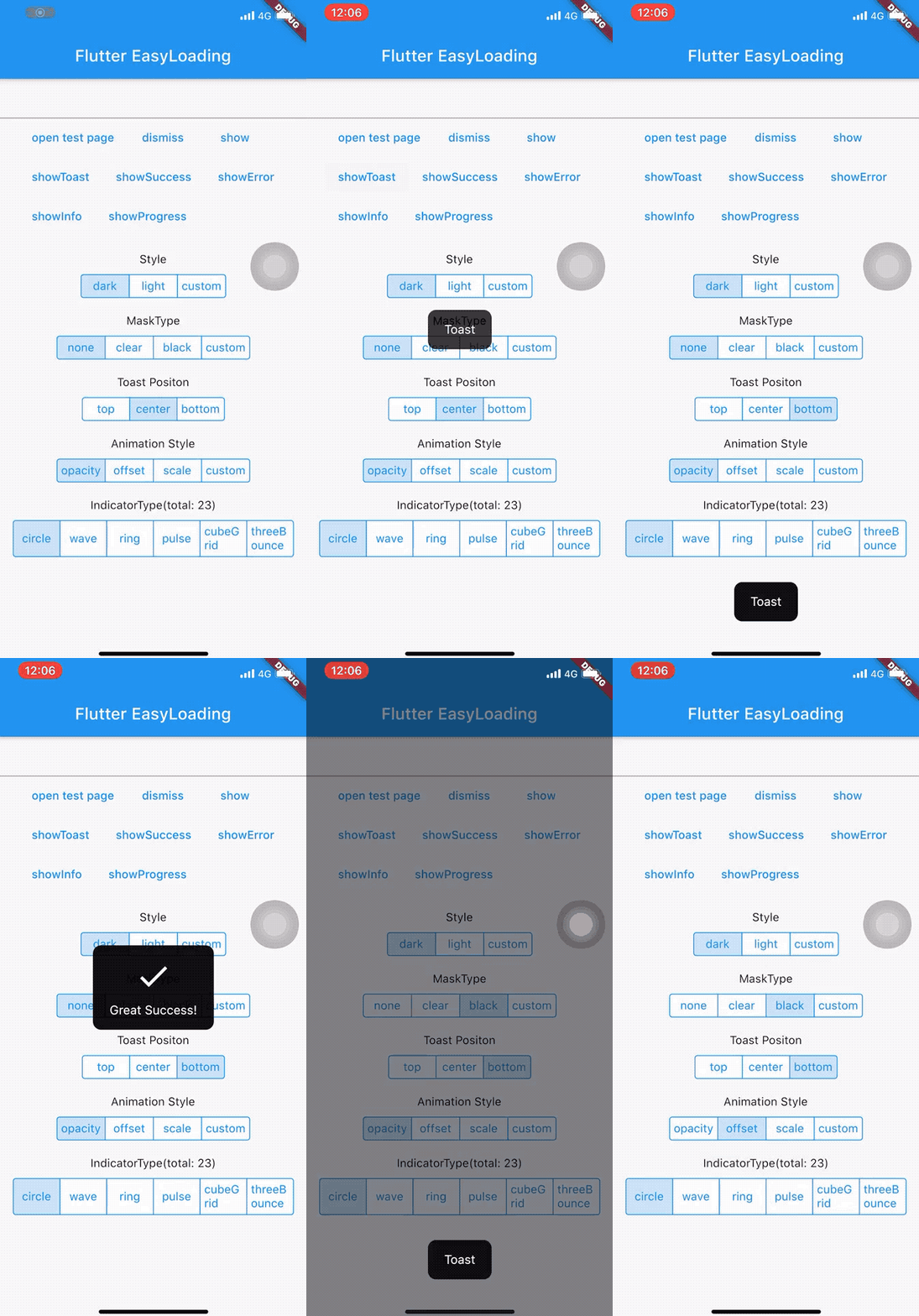
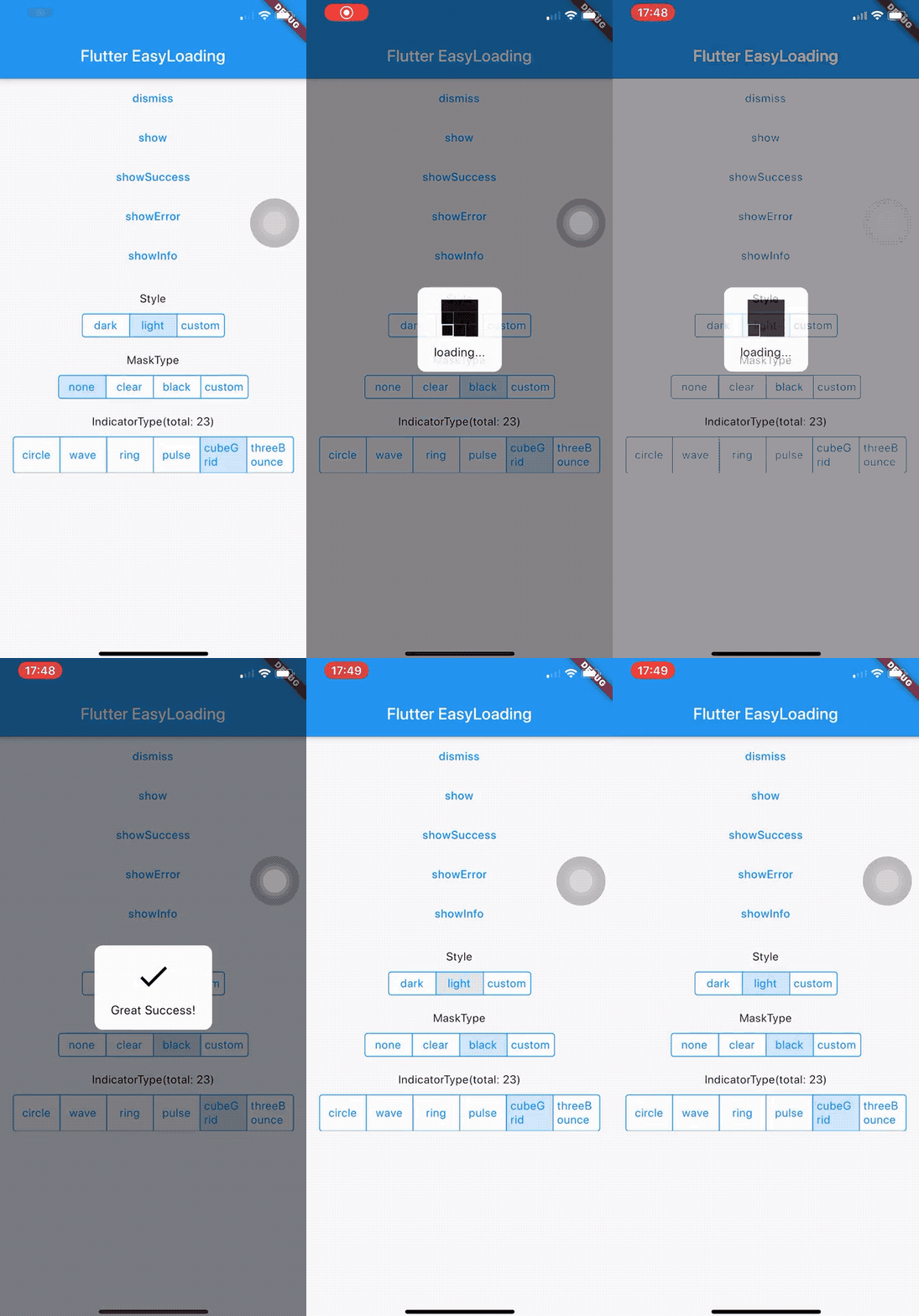
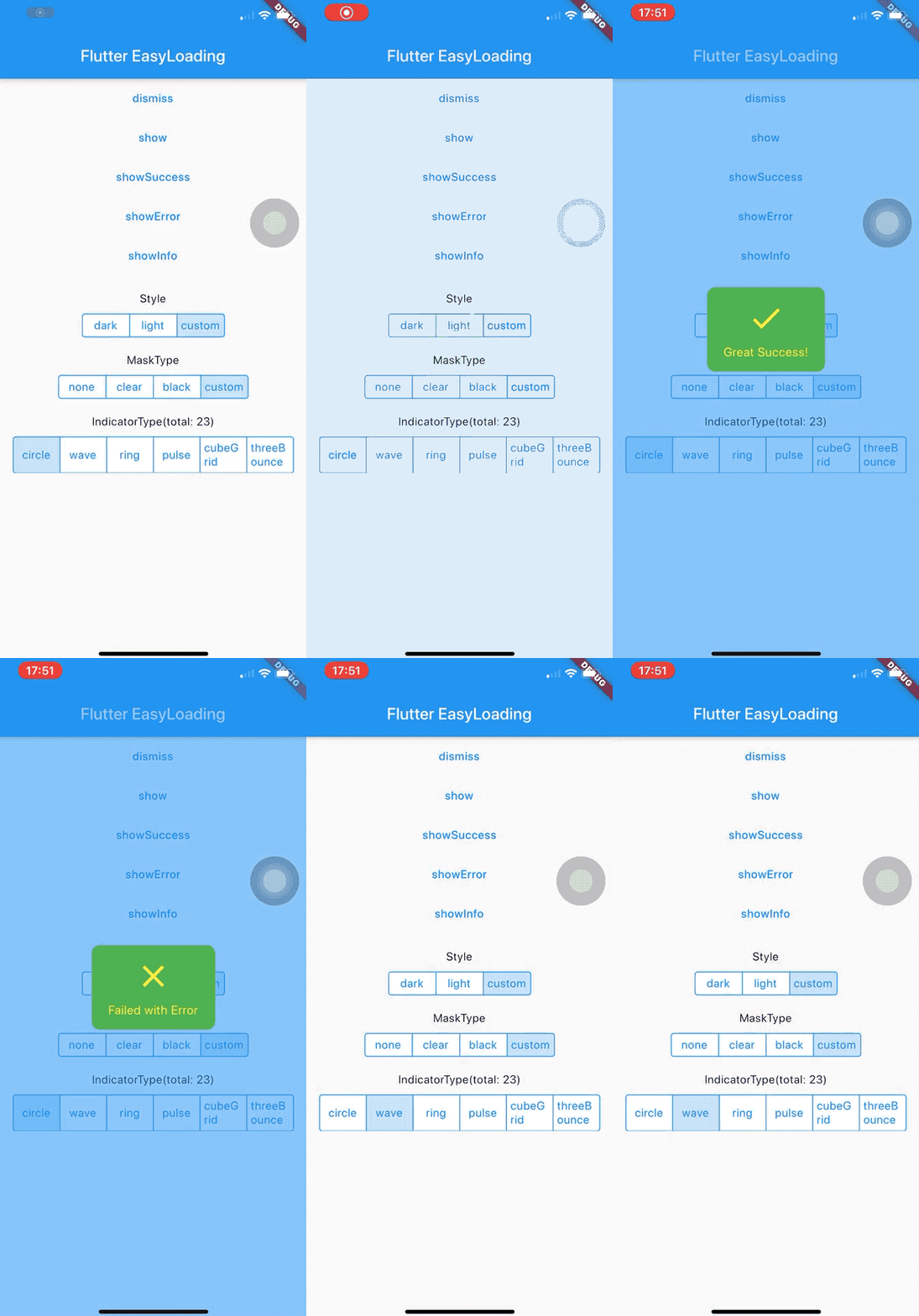
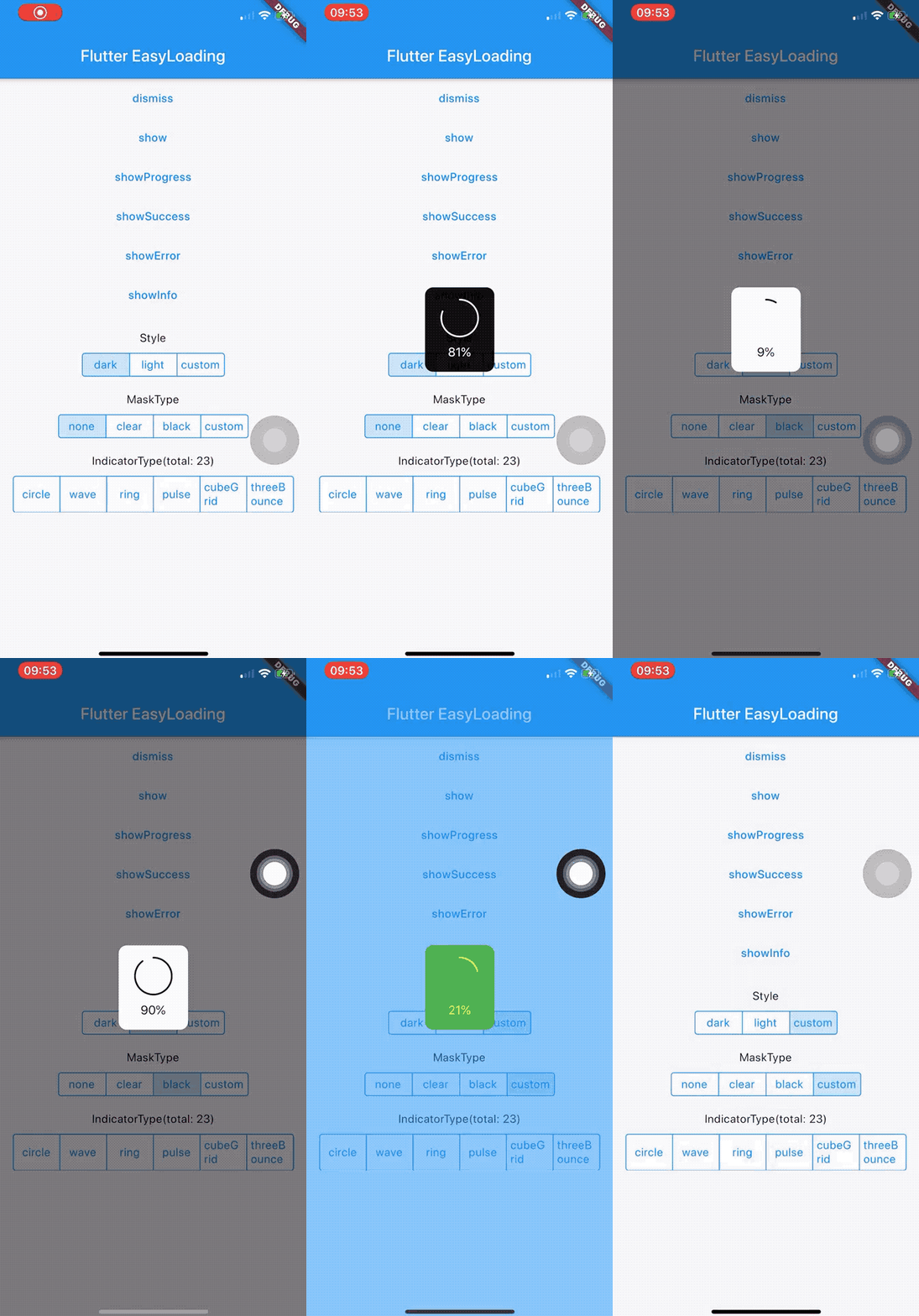 ## 在线预览
👉 [https://nslog11.github.io/flutter_easyloading](https://nslog11.github.io/flutter_easyloading/#/)
## 安装
将以下代码添加到您项目中的 `pubspec.yaml` 文件:
```yaml
dependencies:
flutter_easyloading: ^3.0.3
```
## 导入
```dart
import 'package:flutter_easyloading/flutter_easyloading.dart';
```
## 如何使用
首先, 在`MaterialApp`/`CupertinoApp`中初始化`FlutterEasyLoading`:
```dart
class MyApp extends StatelessWidget {
@override
Widget build(BuildContext context) {
return MaterialApp(
title: 'Flutter EasyLoading',
theme: ThemeData(
primarySwatch: Colors.blue,
),
home: MyHomePage(title: 'Flutter EasyLoading'),
builder: EasyLoading.init(),
);
}
}
```
然后, 请尽情使用吧:
```dart
EasyLoading.show(status: 'loading...');
EasyLoading.showProgress(0.3, status: 'downloading...');
EasyLoading.showSuccess('Great Success!');
EasyLoading.showError('Failed with Error');
EasyLoading.showInfo('Useful Information.');
EasyLoading.showToast('Toast');
EasyLoading.dismiss();
```
添加 Loading 状态回调
```dart
EasyLoading.addStatusCallback((status) {
print('EasyLoading Status $status');
});
```
移除 Loading 状态回调
```dart
EasyLoading.removeCallback(statusCallback);
EasyLoading.removeAllCallbacks();
```
## 自定义
❗️**注意:**
- **`textColor`、`indicatorColor`、`progressColor`、`backgroundColor` 仅对 `EasyLoadingStyle.custom`有效。**
- **`maskColor` 仅对 `EasyLoadingMaskType.custom`有效。**
```dart
/// loading的样式, 默认[EasyLoadingStyle.dark].
EasyLoadingStyle loadingStyle;
/// loading的指示器类型, 默认[EasyLoadingIndicatorType.fadingCircle].
EasyLoadingIndicatorType indicatorType;
/// loading的遮罩类型, 默认[EasyLoadingMaskType.none].
EasyLoadingMaskType maskType;
/// toast的位置, 默认 [EasyLoadingToastPosition.center].
EasyLoadingToastPosition toastPosition;
/// 动画类型, 默认 [EasyLoadingAnimationStyle.opacity].
EasyLoadingAnimationStyle animationStyle;
/// 自定义动画, 默认 null.
EasyLoadingAnimation customAnimation;
/// 文本的对齐方式 , 默认[TextAlign.center].
TextAlign textAlign;
/// 文本的样式 , 默认 null.
TextStyle textStyle;
/// loading内容区域的内边距.
EdgeInsets contentPadding;
/// 文本的内边距.
EdgeInsets textPadding;
/// 指示器的大小, 默认40.0.
double indicatorSize;
/// loading的圆角大小, 默认5.0.
double radius;
/// 文本大小, 默认15.0.
double fontSize;
/// 进度条指示器的宽度, 默认2.0.
double progressWidth;
/// 指示器的宽度, 默认4.0, 仅对[EasyLoadingIndicatorType.ring, EasyLoadingIndicatorType.dualRing]有效.
double lineWidth;
/// [showSuccess] [showError] [showInfo]的展示时间, 默认2000ms.
Duration displayDuration;
/// 动画时间, 默认200ms.
Duration animationDuration;
/// 文本的颜色, 仅对[EasyLoadingStyle.custom]有效.
Color textColor;
/// 指示器的颜色, 仅对[EasyLoadingStyle.custom]有效.
Color indicatorColor;
/// 进度条指示器的颜色, 仅对[EasyLoadingStyle.custom]有效.
Color progressColor;
/// loading的背景色, 仅对[EasyLoadingStyle.custom]有效.
Color backgroundColor;
/// 遮罩的背景色, 仅对[EasyLoadingMaskType.custom]有效.
Color maskColor;
/// 当loading展示的时候,是否允许用户操作.
bool userInteractions;
/// 点击背景是否关闭.
bool dismissOnTap;
/// 指示器自定义组件
Widget indicatorWidget;
/// 展示成功状态的自定义组件
Widget successWidget;
/// 展示失败状态的自定义组件
Widget errorWidget;
/// 展示信息状态的自定义组件
Widget infoWidget;
```
因为 `EasyLoading` 是一个全局单例, 所以你可以在任意一个地方自定义它的样式:
```dart
EasyLoading.instance
..displayDuration = const Duration(milliseconds: 2000)
..indicatorType = EasyLoadingIndicatorType.fadingCircle
..loadingStyle = EasyLoadingStyle.dark
..indicatorSize = 45.0
..radius = 10.0
..progressColor = Colors.yellow
..backgroundColor = Colors.green
..indicatorColor = Colors.yellow
..textColor = Colors.yellow
..maskColor = Colors.blue.withOpacity(0.5)
..userInteractions = true
..dismissOnTap = false
..customAnimation = CustomAnimation();
```
更多的指示器类型可查看 👉 [flutter_spinkit showcase](https://github.com/jogboms/flutter_spinkit#-showcase)
## 自定义动画
例子: 👉 [Custom Animation](https://github.com/nslog11/flutter_easyloading/blob/develop/example/lib/custom_animation.dart)
## 待完成
- [x] 新增进度条指示器
- [x] 新增自定义动画
## 更新日志
[CHANGELOG](./CHANGELOG.md)
## 开源许可协议
[MIT License](./LICENSE)
## ❤️❤️❤️
感谢 [flutter_spinkit](https://github.com/jogboms/flutter_spinkit) ❤️
感谢 [JetBrains Open Source](https://www.jetbrains.com/community/opensource/#support) 提供支持
[
## 在线预览
👉 [https://nslog11.github.io/flutter_easyloading](https://nslog11.github.io/flutter_easyloading/#/)
## 安装
将以下代码添加到您项目中的 `pubspec.yaml` 文件:
```yaml
dependencies:
flutter_easyloading: ^3.0.3
```
## 导入
```dart
import 'package:flutter_easyloading/flutter_easyloading.dart';
```
## 如何使用
首先, 在`MaterialApp`/`CupertinoApp`中初始化`FlutterEasyLoading`:
```dart
class MyApp extends StatelessWidget {
@override
Widget build(BuildContext context) {
return MaterialApp(
title: 'Flutter EasyLoading',
theme: ThemeData(
primarySwatch: Colors.blue,
),
home: MyHomePage(title: 'Flutter EasyLoading'),
builder: EasyLoading.init(),
);
}
}
```
然后, 请尽情使用吧:
```dart
EasyLoading.show(status: 'loading...');
EasyLoading.showProgress(0.3, status: 'downloading...');
EasyLoading.showSuccess('Great Success!');
EasyLoading.showError('Failed with Error');
EasyLoading.showInfo('Useful Information.');
EasyLoading.showToast('Toast');
EasyLoading.dismiss();
```
添加 Loading 状态回调
```dart
EasyLoading.addStatusCallback((status) {
print('EasyLoading Status $status');
});
```
移除 Loading 状态回调
```dart
EasyLoading.removeCallback(statusCallback);
EasyLoading.removeAllCallbacks();
```
## 自定义
❗️**注意:**
- **`textColor`、`indicatorColor`、`progressColor`、`backgroundColor` 仅对 `EasyLoadingStyle.custom`有效。**
- **`maskColor` 仅对 `EasyLoadingMaskType.custom`有效。**
```dart
/// loading的样式, 默认[EasyLoadingStyle.dark].
EasyLoadingStyle loadingStyle;
/// loading的指示器类型, 默认[EasyLoadingIndicatorType.fadingCircle].
EasyLoadingIndicatorType indicatorType;
/// loading的遮罩类型, 默认[EasyLoadingMaskType.none].
EasyLoadingMaskType maskType;
/// toast的位置, 默认 [EasyLoadingToastPosition.center].
EasyLoadingToastPosition toastPosition;
/// 动画类型, 默认 [EasyLoadingAnimationStyle.opacity].
EasyLoadingAnimationStyle animationStyle;
/// 自定义动画, 默认 null.
EasyLoadingAnimation customAnimation;
/// 文本的对齐方式 , 默认[TextAlign.center].
TextAlign textAlign;
/// 文本的样式 , 默认 null.
TextStyle textStyle;
/// loading内容区域的内边距.
EdgeInsets contentPadding;
/// 文本的内边距.
EdgeInsets textPadding;
/// 指示器的大小, 默认40.0.
double indicatorSize;
/// loading的圆角大小, 默认5.0.
double radius;
/// 文本大小, 默认15.0.
double fontSize;
/// 进度条指示器的宽度, 默认2.0.
double progressWidth;
/// 指示器的宽度, 默认4.0, 仅对[EasyLoadingIndicatorType.ring, EasyLoadingIndicatorType.dualRing]有效.
double lineWidth;
/// [showSuccess] [showError] [showInfo]的展示时间, 默认2000ms.
Duration displayDuration;
/// 动画时间, 默认200ms.
Duration animationDuration;
/// 文本的颜色, 仅对[EasyLoadingStyle.custom]有效.
Color textColor;
/// 指示器的颜色, 仅对[EasyLoadingStyle.custom]有效.
Color indicatorColor;
/// 进度条指示器的颜色, 仅对[EasyLoadingStyle.custom]有效.
Color progressColor;
/// loading的背景色, 仅对[EasyLoadingStyle.custom]有效.
Color backgroundColor;
/// 遮罩的背景色, 仅对[EasyLoadingMaskType.custom]有效.
Color maskColor;
/// 当loading展示的时候,是否允许用户操作.
bool userInteractions;
/// 点击背景是否关闭.
bool dismissOnTap;
/// 指示器自定义组件
Widget indicatorWidget;
/// 展示成功状态的自定义组件
Widget successWidget;
/// 展示失败状态的自定义组件
Widget errorWidget;
/// 展示信息状态的自定义组件
Widget infoWidget;
```
因为 `EasyLoading` 是一个全局单例, 所以你可以在任意一个地方自定义它的样式:
```dart
EasyLoading.instance
..displayDuration = const Duration(milliseconds: 2000)
..indicatorType = EasyLoadingIndicatorType.fadingCircle
..loadingStyle = EasyLoadingStyle.dark
..indicatorSize = 45.0
..radius = 10.0
..progressColor = Colors.yellow
..backgroundColor = Colors.green
..indicatorColor = Colors.yellow
..textColor = Colors.yellow
..maskColor = Colors.blue.withOpacity(0.5)
..userInteractions = true
..dismissOnTap = false
..customAnimation = CustomAnimation();
```
更多的指示器类型可查看 👉 [flutter_spinkit showcase](https://github.com/jogboms/flutter_spinkit#-showcase)
## 自定义动画
例子: 👉 [Custom Animation](https://github.com/nslog11/flutter_easyloading/blob/develop/example/lib/custom_animation.dart)
## 待完成
- [x] 新增进度条指示器
- [x] 新增自定义动画
## 更新日志
[CHANGELOG](./CHANGELOG.md)
## 开源许可协议
[MIT License](./LICENSE)
## ❤️❤️❤️
感谢 [flutter_spinkit](https://github.com/jogboms/flutter_spinkit) ❤️
感谢 [JetBrains Open Source](https://www.jetbrains.com/community/opensource/#support) 提供支持
[ ](https://www.jetbrains.com/?from=FlutterEasyLoading)