# LinkedDataHub
**Repository Path**: mirrors/LinkedDataHub
## Basic Information
- **Project Name**: LinkedDataHub
- **Description**: LinkedDataHub (LDH) 是用于在 RDF 知识图谱上管理数据、创建可视化并构建应用的工具
- **Primary Language**: Java
- **License**: Apache-2.0
- **Default Branch**: master
- **Homepage**: https://www.oschina.net/p/LinkedDataHub
- **GVP Project**: No
## Statistics
- **Stars**: 7
- **Forks**: 3
- **Created**: 2022-07-29
- **Last Updated**: 2025-12-13
## Categories & Tags
**Categories**: Uncategorized
**Tags**: None
## README
# The *low-code* Knowledge Graph application platform
**_LinkedDataHub_ (LDH) is open source software you can use to manage data, create visualizations and build apps on RDF Knowledge Graphs.**

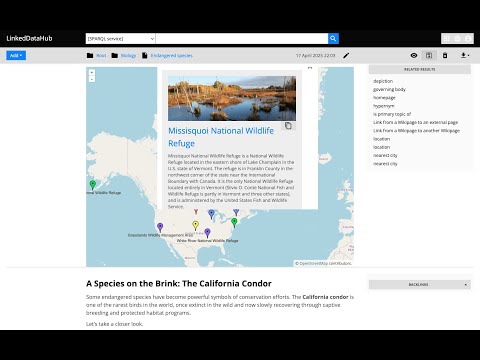
What's new in LinkedDataHub v5? Watch this video for a feature overview:
[](https://www.youtube.com/watch?v=LaOouEYhp_c)
We started the project with the intention to use it for Linked Data publishing, but gradually realized that we've built a multi-purpose data-driven platform.
We are building LinkedDataHub primarily for:
* researchers who need an RDF-native FAIR data environment that can consume and collect Linked Data and SPARQL documents and follows the [FAIR principles](https://www.go-fair.org/fair-principles/)
* developers who are looking for a declarative full stack framework for Knowledge Graph application development, with out-of-the-box UI and API
What makes LinkedDataHub unique is its completely _data-driven architecture_: applications and documents are defined as data, managed using a single generic HTTP API and presented using declarative technologies. The default application structure and user interface are provided, but they can be completely overridden and customized. Unless a custom server-side processing is required, no imperative code such as Java or JavaScript needs to be involved at all.
**Follow the [Get started](https://atomgraph.github.io/LinkedDataHub/linkeddatahub/docs/get-started/) guide to LinkedDataHub.** The setup and basic configuration sections are provided below and should get you running.
**LinkedDataHub is also available as a free AWS Marketplace product!**  It takes a few clicks and filling out a form to install the product into your own AWS account. No manual setup or configuration necessary!
## Setup
It takes a few clicks and filling out a form to install the product into your own AWS account. No manual setup or configuration necessary!
## Setup
Click to expand
### Prerequisites
* `bash` shell 4.x. It should be included by default on Linux. On Windows you can install the [Windows Subsystem for Linux](https://docs.microsoft.com/en-us/windows/wsl/install-win10).
* [Docker](https://docs.docker.com/install/) installed. At least 8GB of memory dedicated to Docker is recommended.
* [Docker Compose](https://docs.docker.com/compose/install/) installed
#### CLI scripts
The following tools are required for CLI scripts in the `bin/` directory:
* [`curl`](https://curl.se/)
* [`openssl`](https://www.openssl.org/)
* `python` 3.x
### Steps
1. [Fork](https://guides.github.com/activities/forking/) this repository and clone the fork into a folder
2. In the folder, create an `.env` file and fill out the missing values (you can use [`.env_sample`](https://github.com/AtomGraph/LinkedDataHub/blob/master/.env_sample) as a template). For example:
```
COMPOSE_CONVERT_WINDOWS_PATHS=1
COMPOSE_PROJECT_NAME=linkeddatahub
PROTOCOL=https
HTTP_PORT=81
HTTPS_PORT=4443
HOST=localhost
ABS_PATH=/
OWNER_MBOX=john@doe.com
OWNER_GIVEN_NAME=John
OWNER_FAMILY_NAME=Doe
OWNER_ORG_UNIT=My unit
OWNER_ORGANIZATION=My org
OWNER_LOCALITY=Copenhagen
OWNER_STATE_OR_PROVINCE=Denmark
OWNER_COUNTRY_NAME=DK
```
3. Setup server's SSL certificates by running this from command line:
```shell
./bin/server-cert-gen.sh .env nginx ssl
```
The script will create an `ssl` sub-folder where the SSL certificates and/or public keys will be placed.
4. Create the following secrets with certificate/truststore passwords:
- `secrets/client_truststore_password.txt`
- `secrets/owner_cert_password.txt`
- `secrets/secretary_cert_password.txt`
The one you will need to remember in order to authenticate with LinkedDataHub using WebID client certificate is `owner_cert_password`.
5. Launch the application services by running this from command line:
```shell
docker-compose up --build
```
It will build LinkedDataHub's Docker image, start its container and mount the following sub-folders:
- `ssl`
* `owner` stores root owner's WebID certificate, keystore, and public key
* `secretary` stores root application's WebID certificate, keystore, and public key
* `server` stores the server's certificate (also used by nginx)
- `data` where the triplestore(s) will persist RDF data
- `datasets` where LDH persists agent metadata files
- `uploads` where LDH stores content-hashed file uploads
It should take up to half a minute as datasets are being loaded into triplestores. After a successful startup you should see periodic healtcheck requests being made to the https://localhost:4443/ns URL.
6. Install `ssl/owner/keystore.p12` into a web browser of your choice (password is the `owner_cert_password` secret value)
- Google Chrome: `Settings > Advanced > Manage Certificates > Import...`
- Mozilla Firefox: `Options > Privacy > Security > View Certificates... > Import...`
- Apple Safari: The file is installed directly into the operating system. Open the file and import it using the [Keychain Access](https://support.apple.com/guide/keychain-access/what-is-keychain-access-kyca1083/mac) tool (drag it to the `local` section).
- Microsoft Edge: Does not support certificate management, you need to install the file into Windows. [Read more here](https://social.technet.microsoft.com/Forums/en-US/18301fff-0467-4e41-8dee-4e44823ed5bf/microsoft-edge-browser-and-ssl-certificates?forum=win10itprogeneral).
7. For authenticated API access use the `ssl/owner/cert.pem` HTTPS client certificate.
If you are running Linux with user other than `root`, you might need to fix the certificate permissions because Docker bind mounts are owned by `root` by default. For example:
```shell
sudo setfacl -m u:$(whoami):r ./ssl/owner/*
```
8. Open **https://localhost:4443/** in the web browser or use `curl` for API access, for example:
```shell
curl -k -E ./ssl/owner/cert.pem: -H "Accept: text/turtle" 'https://localhost:4443/'
```
### Notes
* There might go up to a minute before the web server is available because the nginx server depends on healthy LinkedDataHub and the healthcheck is done every 20s
* You will likely get a browser warning such as `Your connection is not private` in Chrome or `Warning: Potential Security Risk Ahead` in Firefox due to the self-signed server certificate. Ignore it: click `Advanced` and `Proceed` or `Accept the risk` to proceed.
* If this option does not appear in Chrome (as observed on some MacOS), you can open `chrome://flags/#allow-insecure-localhost`, switch `Allow invalid certificates for resources loaded from localhost` to `Enabled` and restart Chrome
* `.env_sample` and `.env` files might be invisible in MacOS Finder which hides filenames starting with a dot. You should be able to [create it using Terminal](https://stackoverflow.com/questions/5891365/mac-os-x-doesnt-allow-to-name-files-starting-with-a-dot-how-do-i-name-the-hta) however.
* On Linux your user may need to be a member of the `docker` group. Add it using
```shell
sudo usermod -aG docker ${USER}
```
and re-login with your user. An alternative, but not recommended, is to run
```shell
sudo docker-compose up
```
## Configuration
Click to expand
### Base URI
A common case is changing the base URI from the default `https://localhost:4443/` to your own.
Lets use `https://ec2-54-235-229-141.compute-1.amazonaws.com/linkeddatahub/` as an example. We need to split the URI into components and set them in the `.env` file using the following parameters:
```
PROTOCOL=https
HTTP_PORT=80
HTTPS_PORT=443
HOST=ec2-54-235-229-141.compute-1.amazonaws.com
ABS_PATH=/linkeddatahub/
```
`ABS_PATH` is required, even if it's just `/`.
### Dataspaces
Dataspaces are configured in [`config/system.trig`](https://github.com/AtomGraph/LinkedDataHub/blob/master/config/system.trig). Relative URIs will be resolved against the base URI configured in the `.env` file.
_:warning: Do not use blank nodes to identify applications or services. We recommend using the `urn:` URI scheme, since LinkedDataHub application resources are not accessible under their own dataspace._
### Secrets
Secrets used in `docker-compose.yml`:
owner_cert_password- Password of the owner's WebID certificate
secretary_cert_password- Password of the secretary's WebID certificate
client_truststore_password- Password of the client truststore
google_client_id- Google's OAuth client ID
- Login with Google authentication is enabled when this value is provided
google_client_secret- Google's OAuth client secret
### Environment
LinkedDataHub supports a range of configuration options that can be passed as environment parameters in `docker-compose.yml`. The most common ones are:
CATALINA_OPTS- Tomcat's command line options
SELF_SIGNED_CERTtrue if the server certificate is self-signedSIGN_UP_CERT_VALIDITY- Validity of the WebID certificates of signed up users (not the owner's)
IMPORT_KEEPALIVE- The period for which the data import can keep an open HTTP connection before it times out, in ms. The larger files are being imported, the longer it has to be in order for the import to complete.
MAX_CONTENT_LENGTH- Maximum allowed size of the request body, in bytes
MAIL_SMTP_HOST- Hostname of the mail server
MAIL_SMTP_PORT- Port number of the mail server
The options are described in more detail in the [configuration documentation](https://atomgraph.github.io/LinkedDataHub/linkeddatahub/docs/reference/configuration/).
## Reset
If you need to start fresh and wipe the existing setup (e.g. after configuring a new base URI), you can do that using
```shell
sudo rm -rf data uploads && docker-compose down -v
```
_:warning: This will **remove the persisted data and files** as well as Docker volumes._
## [Documentation](https://atomgraph.github.io/LinkedDataHub/linkeddatahub/docs/)
* [Get started](https://atomgraph.github.io/LinkedDataHub/linkeddatahub/docs/get-started/)
* [Reference](https://atomgraph.github.io/LinkedDataHub/linkeddatahub/docs/reference/)
* [User guide](https://atomgraph.github.io/LinkedDataHub/linkeddatahub/docs/user-guide/)
## [Command line interface](https://atomgraph.github.io/LinkedDataHub/linkeddatahub/docs/reference/command-line-interface/)
LinkedDataHub CLI wraps the HTTP API into a set of shell scripts with convenient parameters. The scripts can be used for testing, automation, scheduled execution and such. It is usually much quicker to perform actions using CLI rather than the user interface, as well as easier to reproduce.
The scripts can be found in the [`bin`](https://github.com/AtomGraph/LinkedDataHub/tree/master/bin) subfolder. In order to use them, add the `bin` folder and its subfolders to the `$PATH`. For example:
```shell
export PATH="$(find bin -type d -exec realpath {} \; | tr '\n' ':')$PATH"
```
If you will be using LinkedDataHub's CLI regurarly, add the above command to your shell profile.
_:warning: The CLI scripts internally use [Jena's CLI commands](https://jena.apache.org/documentation/tools/). Set up the Jena environment before running the scripts._
The environment variable `JENA_HOME` is used by all the command line tools to configure the class path automatically for you. You can set this up as follows:
**On Linux / Mac**
export JENA_HOME=the directory you downloaded Jena to
export PATH="$PATH:$JENA_HOME/bin"
## Sample applications
### [Demo apps](https://github.com/AtomGraph/LinkedDataHub-Apps)
These demo applications can be installed into a LinkedDataHub instance using `make install`. You will need to provide the path to your WebID certificate as well as its password.
## AI-Powered Automation
### [Web-Algebra](https://github.com/AtomGraph/Web-Algebra)
Web-Algebra enables AI agents to consume Linked Data and SPARQL as well as control and automate LinkedDataHub operations through natural language instructions.
This innovative system translates human language into JSON-formatted RDF operations that can be executed against your LinkedDataHub instance.
**Key capabilities:**
* **Natural Language to RDF Operations**: Translate complex instructions into executable semantic workflows
* **LLM Agent Integration**: AI agents can compose and execute complex multi-step operations automatically
* **Atomic Execution**: Complex workflows are compiled into optimized JSON "bytecode" that executes as a single unit
* **Model Context Protocol (MCP)**: Interactive tools for AI assistants to manage LinkedDataHub content
**Example use cases:**
*Business Analytics:*
> Analyze quarterly sales performance from our Northwind dataset, identify the top 5 customers by revenue, and create an interactive dashboard showing regional sales trends with automated alerts for territories underperforming by more than 15%
*FAIR Life Sciences Integration:*
> Query federated endpoints for protein interaction data from UniProt, gene expression profiles from EBI, and clinical trial outcomes from ClinicalTrials.gov, then integrate these datasets through SPARQL CONSTRUCT queries, create cross-references using shared identifiers, and embed the unified knowledge graph into an interactive research article with live data visualizations
**Perfect for:**
* Business intelligence automation and reporting
* Federated biomedical data integration and analysis
* AI-assisted research data discovery and linking
* Natural language interfaces to knowledge graphs
* Intelligent data processing and monitoring pipelines
See the [Web-Algebra repository](https://github.com/AtomGraph/Web-Algebra) for setup instructions and examples of AI agents managing LinkedDataHub instances.
## How to get involved
* contribute a new LDH application or modify [one of ours](https://github.com/AtomGraph/LinkedDataHub-Apps)
* work on [good first issues](../../contribute)
* work on the features in our [Roadmap](../../wiki/Roadmap)
* join our [community](#community)
## Test suite
LinkedDataHub includes an HTTP [test suite](https://github.com/AtomGraph/LinkedDataHub/tree/master/http-tests). The server implementation is also covered by the [Processor test suite](https://github.com/AtomGraph/Processor/tree/master/http-tests).


## Dependencies
### Browser
* [Saxon-JS](https://www.saxonica.com/saxon-js/)
* [SPARQLBuilder](https://github.com/AtomGraph/sparql-builder)
* [OpenLayers](https://openlayers.org)
* [Google Charts](https://developers.google.com/chart)
* [xml-c14n-sync](https://github.com/AtomGraph/xml-c14n-sync)
### Java
* [Jersey](https://eclipse-ee4j.github.io/jersey/)
* [JavaMail](https://javaee.github.io/javamail/)
* [Guava](https://github.com/google/guava)
* [java-jwt](https://github.com/auth0/java-jwt)
* [ExpiringMap](https://github.com/jhalterman/expiringmap)
* [CSV2RDF](https://github.com/AtomGraph/CSV2RDF)
* [Processor](https://github.com/AtomGraph/Processor)
* [Web-Client](https://github.com/AtomGraph/Web-Client)
### Docker
* [nginx](https://hub.docker.com/_/nginx)
* [varnish](https://hub.docker.com/_/varnish)
* [atomgraph/fuseki](https://hub.docker.com/r/atomgraph/fuseki)
* [namshi/smtp](https://hub.docker.com/r/namshi/smtp)
## Support
Please [report issues](https://github.com/AtomGraph/LinkedDataHub/issues) if you've encountered a bug or have a feature request.
Commercial consulting, development, and support are available from [AtomGraph](https://atomgraph.com).
## Community
* [linkeddatahub@groups.io](https://groups.io/g/linkeddatahub) (mailing list)
* [linkeddatahub/Lobby](https://gitter.im/linkeddatahub/Lobby) on gitter
* [@atomgraphhq](https://twitter.com/atomgraphhq) on Twitter
* [AtomGraph](https://www.linkedin.com/company/atomgraph/) on LinkedIn
* [@atomgraph](https://www.youtube.com/@atomgraph) on YouTube