# vue-boilerplate-template
**Repository Path**: mirrors_nicejade/vue-boilerplate-template
## Basic Information
- **Project Name**: vue-boilerplate-template
- **Description**: 🍎 Efficient development of web SPA using Vue.js(2.*) + Webpack + Element-ui + Pwa + Vuex + Vuex-router + Vue-i18n + Dayjs + Lodash.
- **Primary Language**: Unknown
- **License**: MIT
- **Default Branch**: master
- **Homepage**: None
- **GVP Project**: No
## Statistics
- **Stars**: 0
- **Forks**: 0
- **Created**: 2022-01-07
- **Last Updated**: 2025-12-07
## Categories & Tags
**Categories**: Uncategorized
**Tags**: None
## README

Vue Boilerplate Template
🍒(vue webpack vuex vue-router vue-i18n element-ui) out of the box
🍎 Nice Boilerplate Template for creating medium plus Vue.js(2.*) project
## Goal and Philosophy
For how to build medium-sized (+) **VUE** projects, provide some reference based on past experience. **The latest Vue Boilerplate based on `vue-cli3` has been open source: [awesome-vue-cli3-example](https://github.com/nicejade/awesome-vue-cli3-example), If you pay attention to it, I believe it is very worthwhile** 🎉.
## Prerequisites
[Node.js](https://nodejs.org/en/) (>=4.x, 8.x preferred), Npm version 4+(Yarn preferred), and [Git](https://git-scm.com/).
## Demo
[Online Demo Page](https://blog.lovejade.cn/vue-boilerplate-template/)
## Advantage
- Based on `vue-cli` build, Make more optimization for how to to facilitate the use of vue .
- Has already included a lot of commonly used libraries, such as `vue-i18n`, `axios`, `lodash` ...
- With some experience articles about `Vue`, Such as: [如何写一手漂亮的 Vue](https://jeffjade.com/2017/03/11/120-how-to-write-vue-better/). And is still updated.
- Make more optimization about how to build the application using `WebPack` .
- [Webpack 打包优化之体积篇](http://jeffjade.com/2017/08/06/124-webpack-packge-optimization-for-volume/)
- [Webpack 打包优化之速度篇](http://jeffjade.com/2017/08/12/125-webpack-package-optimization-for-speed/)
- [Optimize your libraries with webpack](https://github.com/GoogleChromeLabs/webpack-libs-optimizations)
- [Webpack Nice Tutorial](https://github.com/nicejade/nice-front-end-tutorial/blob/master/tutorial/webpack-tutorial.md)
## Usage
```
git clone https://github.com/nicejade/vue-boilerplate-template (your-project-name)
cd your-project-name
npm install (npm i / yarn)
npm start / npm run dev / yarn run dev
```
Go to http://localhost:8080/. If port 8080 is already in use on your machine, **the program will specify the available port (incremental) for you, for example, `8081` / `8082` ...**. Of course, you can temporarily replace the port using the following command:
```
PORT=8888 npm run dev
```
>**Additional supplement**: You need to make sure that PORT is a command that can be executed on your machine .
More Command
```
npm run build
```
Equivalent execution `node build.js`, initiate a build project .
```
npm run build:dll
```
Equivalent execution `webpack --config build/webpack.dll.conf.js`, For more information see [webpack.DllPlugin](https://webpack.js.org/plugins/dll-plugin/).
```
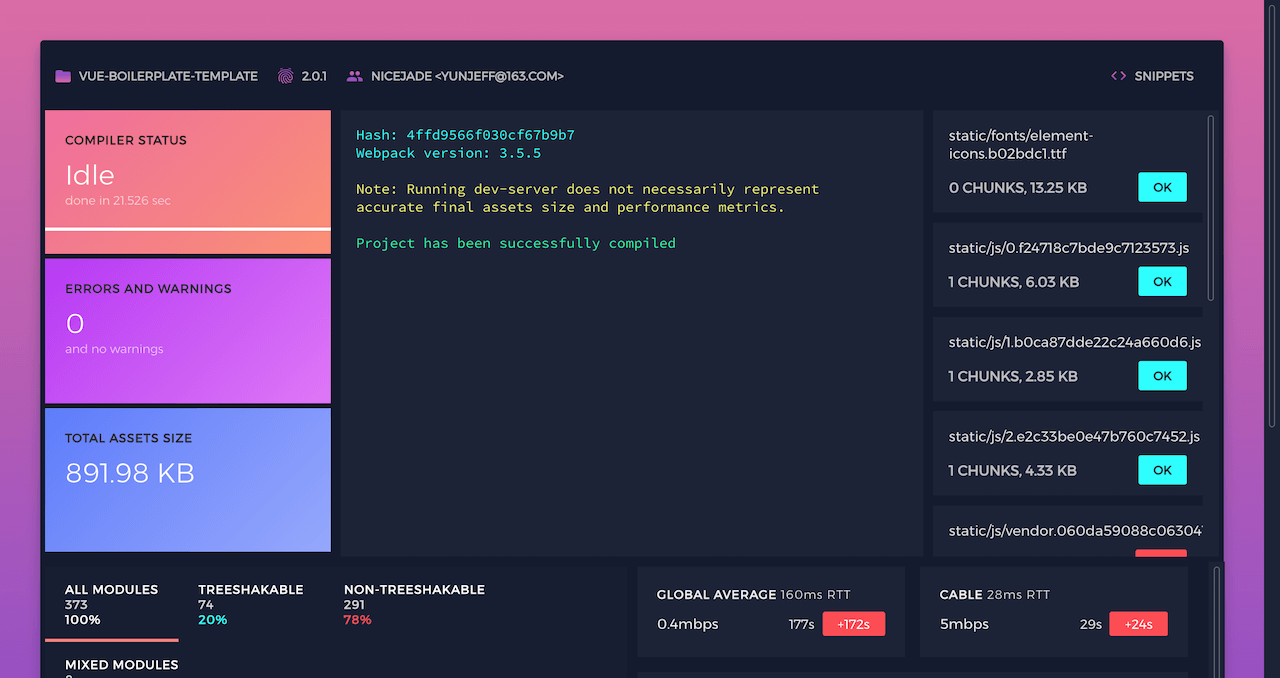
npm run jarvis / yarn run jarvis
```
run [webpack-jarvis](https://github.com/zouhir/jarvis)(A very intelligent browser based Webpack dashboard),In your browser open: localhost:1337 , you have it.
```bash
npm run pretest
```
Using nodejs to build the local server: http://localhost:3000/ , do a simple pre test for the code after the package.
```
npm run analyz
```
Webpack plugin and CLI utility that represents bundle content as convenient interactive zoomable treemap. It will automatically open this address:http://localhost:8888/ .

## Dependent plugin list
- vue2
- vue-router
- vuex
- vue-i18n
- axios
- bootstrap
- element-ui
- lodash
- ~~moment~~ dayjs
- js-cookie
- ... ...
## Operation request
Your backend can return the following format data, it's better .
```
{
success: true,
message: 'err message content',
value: [
// Useful data
]
}
```
At the front end, you can handle the request like this:
```
let params = {
// Interface required parameters
}
this.isLoading = true
this.$apis.moduleName.getProfile(params).then(result => {
// Handle the correct data you received
}).catch(error => {
this.$message.error(`Error: ${error}`)
}).fin(() => {
this.isLoading = false
})
```
So considerate, Template has been helped to handle the request uniformly, so you can be so easy to use, of course, you can change your own as needed in the `helper/ajax.js` file .
## Links
- [Example](https://github.com/nicejade/nicelinks-vue-client)
- [**NICE LINKS**](https://nicelinks.site?from=github)
- [About Me](https://about.me/nicejade/)
- [First Blog](https://jeffjade.com)
- [Second Blog](https://blog.lovejade.cn/)
- [Weibo](http://weibo.com/jeffjade)
- [ZhiHu](https://www.zhihu.com/people/yang-qiong-pu/)
- [SegmentFault](https://segmentfault.com/u/jeffjade)
- [JianShu](http://www.jianshu.com/u/9aae3d8f4c3d)
- [Twitter](https://twitter.com/jeffjade2)
- [Facebook](https://www.facebook.com/yang.gang.jade)
## Writing
See the example in the boilerplate template. Or An [example](https://github.com/nicejade/nicelinks-vue-client) that has been applied, Online address: https://nicelinks.site.
## License
[MIT](http://opensource.org/licenses/MIT)
Copyright (c) 2017-present, [nicejade](https://about.me/nicejade/). 



