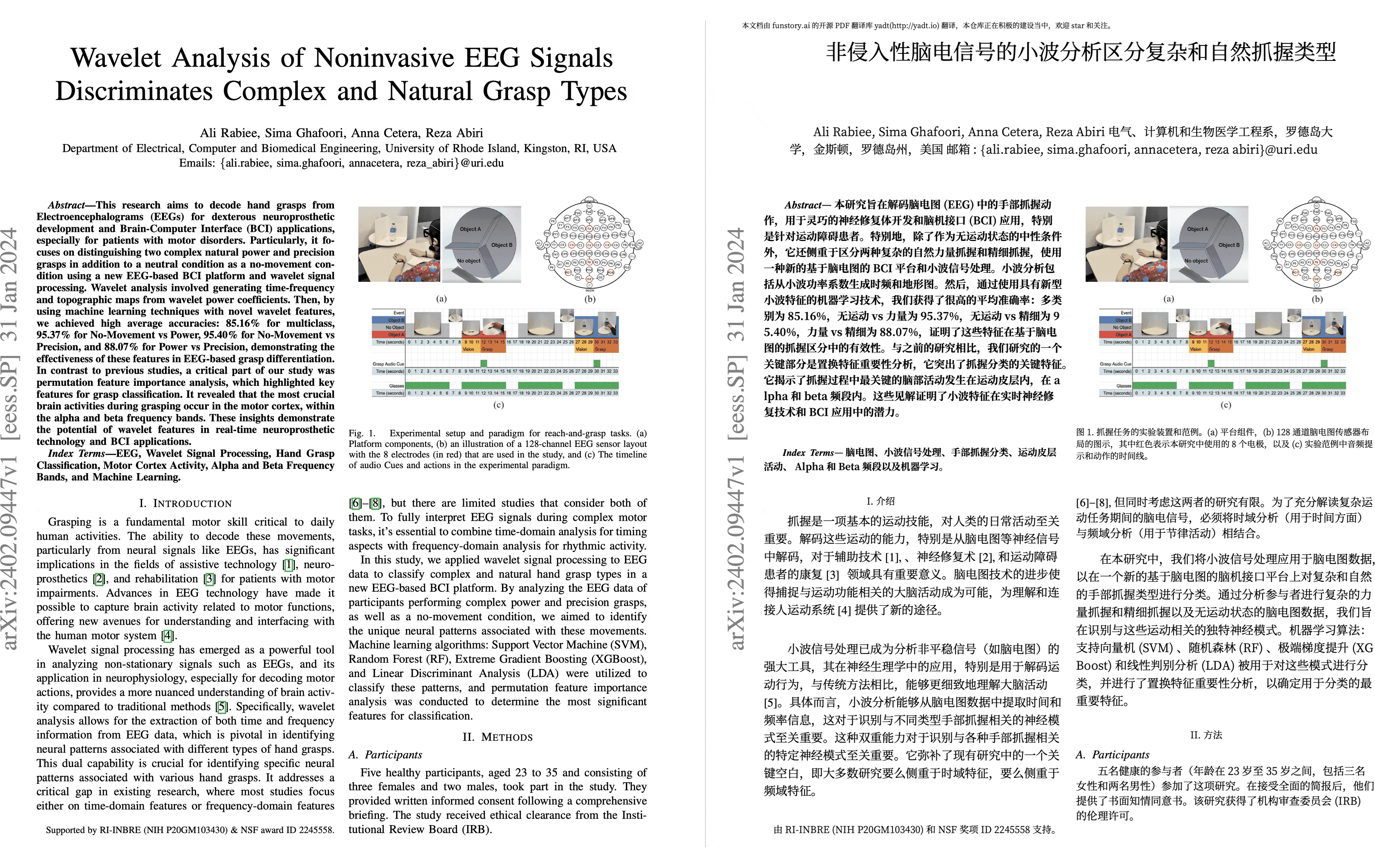
PDF scientific paper translation and bilingual comparison.
- 📊 Preserve formulas, charts, table of contents, and annotations _([preview](#preview))_.
- 🌐 Support [multiple languages](https://pdf2zh-next.com/supported_languages.html), and diverse [translation services](https://pdf2zh-next.com/advanced/Documentation-of-Translation-Services.html).
- 🤖 Provides [commandline tool](https://pdf2zh-next.com/getting-started/USAGE_commandline.html), [interactive user interface](https://pdf2zh-next.com/getting-started/USAGE_webui.html), and [Docker](https://pdf2zh-next.com/getting-started/INSTALLATION_docker.html)
> [!WARNING]
>
> This project is provided "as is" under the [AGPL v3](https://github.com/PDFMathTranslate/PDFMathTranslate-next/blob/main/LICENSE) license, and no guarantees are provided for the quality and performance of the program. **The entire risk of the program's quality and performance is borne by you.** If the program is found to be defective, you will be responsible for all necessary service, repair, or correction costs.
>
> Due to the maintainers' limited energy, we do not provide any form of usage assistance or problem-solving. Related issues will be closed directly! (Pull requests to improve project documentation are welcome; bugs or friendly issues that follow the issue template are not affected by this)
For details on how to contribute, please consult the [Contribution Guide](https://pdf2zh-next.com/community/Contribution-Guide.html).
Updates
- [Jun. 4, 2025] The project is renamed and move to [PDFMathTranslate/PDFMathTranslate-next](https://github.com/PDFMathTranslate/PDFMathTranslate-next) (by [@awwaawwa](https://github.com/awwaawwa))
- [Mar. 3, 2025] Experimental support for the new backend [BabelDOC](https://github.com/funstory-ai/BabelDOC) WebUI added as an experimental option (by [@awwaawwa](https://github.com/awwaawwa))
- [Feb. 22 2025] Better release CI and well-packaged windows-amd64 exe (by [@awwaawwa](https://github.com/awwaawwa))
- [Dec. 24 2024] The translator now supports local models on [Xinference](https://github.com/xorbitsai/inference) _(by [@imClumsyPanda](https://github.com/imClumsyPanda))_
- [Dec. 19 2024] Non-PDF/A documents are now supported using `-cp` _(by [@reycn](https://github.com/reycn))_
- [Dec. 13 2024] Additional support for backend by _(by [@YadominJinta](https://github.com/YadominJinta))_
- [Dec. 10 2024] The translator now supports OpenAI models on Azure _(by [@yidasanqian](https://github.com/yidasanqian))_
Preview
Online Service 🌟
> [!NOTE]
>
> pdf2zh 2.0 does not currently provide an online demo
You can try our application out using either of the following demos:
- [v1.x Public free service](https://pdf2zh.com/) online without installation _(recommended)_.
- [Immersive Translate - BabelDOC](https://app.immersivetranslate.com/babel-doc/) 1000 free pages per month. _(recommended)_
Note that the computing resources of the demo are limited, so please avoid abusing them.
Installation and Usage
### Installation
1. [**Windows EXE**](https://pdf2zh-next.com/getting-started/INSTALLATION_winexe.html) Recommand for Windows
2. [**Docker**](https://pdf2zh-next.com/getting-started/INSTALLATION_docker.html) Recommand for Linux
3. [**uv** (a Python package manager)](https://pdf2zh-next.com/getting-started/INSTALLATION_uv.html) Recommand for macOS
---
### Usage
1. [Using **WebUI**](https://pdf2zh-next.com/getting-started/USAGE_webui.html)
2. [Using **Zotero Plugin**](https://github.com/guaguastandup/zotero-pdf2zh) (Third party program)
3. [Using **Commandline**](https://pdf2zh-next.com/getting-started/USAGE_commandline.html)
For different use cases, we provide distinct methods to use our program. Check out [this page](./getting-started/getting-started.md) for more information.
Advanced Options
For detailed explanations, please refer to our document about [Advanced Usage](https://pdf2zh-next.com/advanced/advanced.html) for a full list of each option.
Secondary Development (APIs)
> [!NOTE]
>
> Currently, no relevant documentation is provided. It will be supplemented later. Please wait patiently.
HTTP API (FastAPI) — Quick Start
> [!TIP]
>
> From v2.6.x, a lightweight HTTP API is bundled for server usage. It wraps the same translation pipeline and supports async progress streaming and file download.
1) Build API image (single container)
```bash
docker build -f script/Dockerfile.Api -t pdf2zh-api:latest .
```
2) Run (Windows PowerShell example)
```bash
docker run -d --name pdf2zh-api -p 8000:8000 ^
-e PDF2ZH_SILICONFLOW=true ^
-e PDF2ZH_SILICONFLOW_API_KEY=YOUR_KEY ^
-e PDF2ZH_LANG_IN=en -e PDF2ZH_LANG_OUT=zh -e PDF2ZH_QPS=10 ^
-v "F:\\pdf2zh-data:/data" -v "F:\\pdf2zh-cache:/.cache" pdf2zh-api:latest
```
3) Use API
- Submit task
```bash
curl -X POST http://localhost:8000/v1/translate -F "file=@example.pdf" -F "options={\"pdf\":{\"pages\":\"1-\"}}"
# {"task_id":""}
```
- Watch progress (SSE)
```bash
curl http://localhost:8000/v1/translate//events
```
- Query status
```bash
curl http://localhost:8000/v1/translate//status
```
- Download result
```bash
curl -L http://localhost:8000/v1/translate//result?type=mono --output mono.pdf
curl -L http://localhost:8000/v1/translate//result?type=dual --output dual.pdf
```
- Cancel task
```bash
curl -X DELETE http://localhost:8000/v1/translate/
```
Environment variables (prefix `PDF2ZH_`) map to settings. For example, select engine via `PDF2ZH_SILICONFLOW=true` and `PDF2ZH_SILICONFLOW_API_KEY=...`. Output directory defaults to `/data` and is persisted via volume.
Language Code
If you don't know what code to use to translate to the language you need, check out [this documentation](https://pdf2zh-next.com/advanced/Language-Codes.html)
Acknowledgements
- [Immersive Translation](https://immersivetranslate.com) sponsors monthly Pro membership redemption codes for active contributors to this project, see details at: [CONTRIBUTOR_REWARD.md](https://github.com/funstory-ai/BabelDOC/blob/main/docs/CONTRIBUTOR_REWARD.md)
- [SiliconFlow](https://siliconflow.cn) provides a free translation service for this project, powered by large language models (LLMs).
- 1.x version: [Byaidu/PDFMathTranslate](https://github.com/Byaidu/PDFMathTranslate)
- backend: [BabelDOC](https://github.com/funstory-ai/BabelDOC)
- PDF Library: [PyMuPDF](https://github.com/pymupdf/PyMuPDF)
- PDF Parsing: [Pdfminer.six](https://github.com/pdfminer/pdfminer.six)
- PDF Preview: [Gradio PDF](https://github.com/freddyaboulton/gradio-pdf)
- Layout Parsing: [DocLayout-YOLO](https://github.com/opendatalab/DocLayout-YOLO)
- PDF Standards: [PDF Explained](https://zxyle.github.io/PDF-Explained/), [PDF Cheat Sheets](https://pdfa.org/resource/pdf-cheat-sheets/)
- Multilingual Font: see [BabelDOC-Assets](https://github.com/funstory-ai/BabelDOC-Assets)
- [Asynchronize](https://github.com/multimeric/Asynchronize/tree/master?tab=readme-ov-file)
- [Rich logging with multiprocessing](https://github.com/SebastianGrans/Rich-multiprocess-logging/tree/main)
- Documentation i18n using [Weblate](https://hosted.weblate.org/projects/pdfmathtranslate-next/)
Before submit your code
We welcome the active participation of contributors to make pdf2zh better. Before you are ready to submit your code, please refer to our [Code of Conduct](https://pdf2zh-next.com/community/CODE_OF_CONDUCT.html) and [Contribution Guide](https://pdf2zh-next.com/community/Contribution-Guide.html).