# openai-edge-tts
**Repository Path**: phpjishu/openai-edge-tts
## Basic Information
- **Project Name**: openai-edge-tts
- **Description**: No description available
- **Primary Language**: Unknown
- **License**: GPL-3.0
- **Default Branch**: main
- **Homepage**: None
- **GVP Project**: No
## Statistics
- **Stars**: 0
- **Forks**: 0
- **Created**: 2025-07-22
- **Last Updated**: 2025-07-22
## Categories & Tags
**Categories**: Uncategorized
**Tags**: None
## README
# OpenAI-Compatible Edge-TTS API 🗣️





[](https://discord.gg/GkFbBCBqJ6)
[](https://linkedin.com/in/travisvannimwegen)
This project provides a local, OpenAI-compatible text-to-speech (TTS) API using `edge-tts`. It emulates the OpenAI TTS endpoint (`/v1/audio/speech`), enabling users to generate speech from text with various voice options and playback speeds, just like the OpenAI API.
`edge-tts` uses Microsoft Edge's online text-to-speech service, so it is completely free.
[View this project on Docker Hub](https://hub.docker.com/r/travisvn/openai-edge-tts)
# Please ⭐️ star this repo if you find it helpful
## Features
- **OpenAI-Compatible Endpoint**: `/v1/audio/speech` with similar request structure and behavior.
- **SSE Streaming Support**: Real-time audio streaming via Server-Sent Events when `stream_format: "sse"` is specified.
- **Supported Voices**: Maps OpenAI voices (alloy, echo, fable, onyx, nova, shimmer) to `edge-tts` equivalents.
- **Flexible Formats**: Supports multiple audio formats (mp3, opus, aac, flac, wav, pcm).
- **Adjustable Speed**: Option to modify playback speed (0.25x to 4.0x).
- **Optional Direct Edge-TTS Voice Selection**: Use either OpenAI voice mappings or specify [any edge-tts voice](https://tts.travisvn.com) directly.
## ⚡️ Quick start
The simplest way to get started without having to configure anything is to run the command below
```bash
docker run -d -p 5050:5050 travisvn/openai-edge-tts:latest
```
This will run the service at port 5050 with all the default configs
_(Docker required, obviously)_
## Setup
### Prerequisites
- **Docker** (recommended): Docker and Docker Compose for containerized setup.
- **Python** (optional): For local development, install dependencies in `requirements.txt`.
- **ffmpeg** (optional): Required for audio format conversion. Optional if sticking to mp3.
### Installation
1. **Clone the Repository**:
```bash
git clone https://github.com/travisvn/openai-edge-tts.git
cd openai-edge-tts
```
2. **Environment Variables**: Create a `.env` file in the root directory with the following variables:
```
API_KEY=your_api_key_here
PORT=5050
DEFAULT_VOICE=en-US-AvaNeural
DEFAULT_RESPONSE_FORMAT=mp3
DEFAULT_SPEED=1.0
DEFAULT_LANGUAGE=en-US
REQUIRE_API_KEY=True
REMOVE_FILTER=False
EXPAND_API=True
DETAILED_ERROR_LOGGING=True
```
Or, copy the default `.env.example` with the following:
```bash
cp .env.example .env
```
3. **Run with Docker Compose** (recommended):
```bash
docker compose up --build
```
Run with `-d` to run docker compose in "detached mode", meaning it will run in the background and free up your terminal.
```bash
docker compose up -d
```
#### Building Locally with FFmpeg using Docker Compose
By default, `docker compose up --build` creates a minimal image _without_ `ffmpeg`. If you're building locally (after cloning this repository) and need `ffmpeg` for audio format conversions (beyond MP3), you can include it in the build.
This is controlled by the `INSTALL_FFMPEG_ARG` build argument. Set this environment variable to `true` in one of these ways:
1. **Prefixing the command:**
```bash
INSTALL_FFMPEG_ARG=true docker compose up --build
```
2. **Adding to your `.env` file:**
Add this line to the `.env` file in the project root:
```env
INSTALL_FFMPEG_ARG=true
```
Then, run `docker compose up --build`.
3. **Exporting in your shell environment:**
Add `export INSTALL_FFMPEG_ARG=true` to your shell configuration (e.g., `~/.zshrc`, `~/.bashrc`) and reload your shell. Then `docker compose up --build` will use it.
This is for local builds. For pre-built Docker Hub images, add the `latest-ffmpeg` tag to the version
```bash
docker run -d -p 5050:5050 -e API_KEY=your_api_key_here -e PORT=5050 travisvn/openai-edge-tts:latest-ffmpeg
```
---
Alternatively, **run directly with Docker**:
```bash
docker build -t openai-edge-tts .
docker run -p 5050:5050 --env-file .env openai-edge-tts
```
To run the container in the background, add `-d` after the `docker run` command:
```bash
docker run -d -p 5050:5050 --env-file .env openai-edge-tts
```
4. **Access the API**: Your server will be accessible at `http://localhost:5050`.
## Running with Python
If you prefer to run this project directly with Python, follow these steps to set up a virtual environment, install dependencies, and start the server.
### 1. Clone the Repository
```bash
git clone https://github.com/travisvn/openai-edge-tts.git
cd openai-edge-tts
```
### 2. Set Up a Virtual Environment
Create and activate a virtual environment to isolate dependencies:
```bash
# For macOS/Linux
python3 -m venv venv
source venv/bin/activate
# For Windows
python -m venv venv
venv\Scripts\activate
```
### 3. Install Dependencies
Use `pip` to install the required packages listed in `requirements.txt`:
```bash
pip install -r requirements.txt
```
### 4. Configure Environment Variables
Create a `.env` file in the root directory and set the following variables:
```plaintext
API_KEY=your_api_key_here
PORT=5050
DEFAULT_VOICE=en-US-AvaNeural
DEFAULT_RESPONSE_FORMAT=mp3
DEFAULT_SPEED=1.0
DEFAULT_LANGUAGE=en-US
REQUIRE_API_KEY=True
REMOVE_FILTER=False
EXPAND_API=True
DETAILED_ERROR_LOGGING=True
```
### 5. Run the Server
Once configured, start the server with:
```bash
python app/server.py
```
The server will start running at `http://localhost:5050`.
### 6. Test the API
You can now interact with the API at `http://localhost:5050/v1/audio/speech` and other available endpoints. See the [Usage](#usage) section for request examples.
## Usage
#### Endpoint: `/v1/audio/speech`
Generates audio from the input text. Available parameters:
**Required Parameter:**
- **input** (string): The text to be converted to audio (up to 4096 characters).
**Optional Parameters:**
- **model** (string): Set to "tts-1" or "tts-1-hd" (default: `"tts-1"`).
- **voice** (string): One of the OpenAI-compatible voices (alloy, echo, fable, onyx, nova, shimmer) or any valid `edge-tts` voice (default: `"en-US-AvaNeural"`).
- **response_format** (string): Audio format. Options: `mp3`, `opus`, `aac`, `flac`, `wav`, `pcm` (default: `mp3`).
- **speed** (number): Playback speed (0.25 to 4.0). Default is `1.0`.
- **stream_format** (string): Response format. Options: `"audio"` (raw audio data, default) or `"sse"` (Server-Sent Events streaming with JSON events).
**Note:** The API is fully compatible with OpenAI's TTS API specification. The `instructions` parameter (for fine-tuning voice characteristics) is not currently supported, but all other parameters work identically to OpenAI's implementation.
#### Standard Audio Generation
Example request with `curl` and saving the output to an mp3 file:
```bash
curl -X POST http://localhost:5050/v1/audio/speech \
-H "Content-Type: application/json" \
-H "Authorization: Bearer your_api_key_here" \
-d '{
"input": "Hello, I am your AI assistant! Just let me know how I can help bring your ideas to life.",
"voice": "echo",
"response_format": "mp3",
"speed": 1.1
}' \
--output speech.mp3
```
#### Direct Audio Playback (like OpenAI)
You can pipe the audio directly to `ffplay` for immediate playback, just like OpenAI's API:
```bash
curl -X POST http://localhost:5050/v1/audio/speech \
-H "Authorization: Bearer your_api_key_here" \
-H "Content-Type: application/json" \
-d '{
"model": "tts-1",
"input": "Today is a wonderful day to build something people love!",
"voice": "alloy",
"response_format": "mp3"
}' | ffplay -i -
```
Or for immediate playback without saving to file:
```bash
curl -X POST http://localhost:5050/v1/audio/speech \
-H "Authorization: Bearer your_api_key_here" \
-H "Content-Type: application/json" \
-d '{
"input": "This will play immediately without saving to disk!",
"voice": "shimmer"
}' | ffplay -autoexit -nodisp -i -
```
Or, to be in line with the OpenAI API endpoint parameters:
```bash
curl -X POST http://localhost:5050/v1/audio/speech \
-H "Content-Type: application/json" \
-H "Authorization: Bearer your_api_key_here" \
-d '{
"model": "tts-1",
"input": "Hello, I am your AI assistant! Just let me know how I can help bring your ideas to life.",
"voice": "alloy"
}' \
--output speech.mp3
```
#### Server-Sent Events (SSE) Streaming
For applications that need structured streaming events (like web applications), use SSE format:
```bash
curl -X POST http://localhost:5050/v1/audio/speech \
-H "Content-Type: application/json" \
-H "Authorization: Bearer your_api_key_here" \
-d '{
"model": "tts-1",
"input": "This will stream as Server-Sent Events with JSON data containing base64-encoded audio chunks.",
"voice": "alloy",
"stream_format": "sse"
}'
```
**SSE Response Format:**
```
data: {"type": "speech.audio.delta", "audio": "base64-encoded-audio-chunk"}
data: {"type": "speech.audio.delta", "audio": "base64-encoded-audio-chunk"}
data: {"type": "speech.audio.done", "usage": {"input_tokens": 12, "output_tokens": 0, "total_tokens": 12}}
```
#### JavaScript/Web Usage
Example using fetch API for SSE streaming:
```javascript
async function streamTTSWithSSE(text) {
const response = await fetch('http://localhost:5050/v1/audio/speech', {
method: 'POST',
headers: {
'Content-Type': 'application/json',
Authorization: 'Bearer your_api_key_here',
},
body: JSON.stringify({
input: text,
voice: 'alloy',
stream_format: 'sse',
}),
});
const reader = response.body.getReader();
const decoder = new TextDecoder();
const audioChunks = [];
while (true) {
const { done, value } = await reader.read();
if (done) break;
const chunk = decoder.decode(value);
const lines = chunk.split('\n');
for (const line of lines) {
if (line.startsWith('data: ')) {
const data = JSON.parse(line.slice(6));
if (data.type === 'speech.audio.delta') {
// Decode base64 audio chunk
const audioData = atob(data.audio);
const audioArray = new Uint8Array(audioData.length);
for (let i = 0; i < audioData.length; i++) {
audioArray[i] = audioData.charCodeAt(i);
}
audioChunks.push(audioArray);
} else if (data.type === 'speech.audio.done') {
console.log('Speech synthesis complete:', data.usage);
// Combine all chunks and play
const totalLength = audioChunks.reduce(
(sum, chunk) => sum + chunk.length,
0
);
const combinedArray = new Uint8Array(totalLength);
let offset = 0;
for (const chunk of audioChunks) {
combinedArray.set(chunk, offset);
offset += chunk.length;
}
const audioBlob = new Blob([combinedArray], { type: 'audio/mpeg' });
const audioUrl = URL.createObjectURL(audioBlob);
const audio = new Audio(audioUrl);
audio.play();
return;
}
}
}
}
}
// Usage
streamTTSWithSSE('Hello from SSE streaming!');
```
#### International Language Example
And an example of a language other than English:
```bash
curl -X POST http://localhost:5050/v1/audio/speech \
-H "Content-Type: application/json" \
-H "Authorization: Bearer your_api_key_here" \
-d '{
"model": "tts-1",
"input": "じゃあ、行く。電車の時間、調べておくよ。",
"voice": "ja-JP-KeitaNeural"
}' \
--output speech.mp3
```
#### JavaScript/Web Usage
Example using fetch API for SSE streaming:
```javascript
async function streamTTSWithSSE(text) {
const response = await fetch('http://localhost:5050/v1/audio/speech', {
method: 'POST',
headers: {
'Content-Type': 'application/json',
Authorization: 'Bearer your_api_key_here',
},
body: JSON.stringify({
input: text,
voice: 'alloy',
stream_format: 'sse',
}),
});
const reader = response.body.getReader();
const decoder = new TextDecoder();
const audioChunks = [];
while (true) {
const { done, value } = await reader.read();
if (done) break;
const chunk = decoder.decode(value);
const lines = chunk.split('\n');
for (const line of lines) {
if (line.startsWith('data: ')) {
const data = JSON.parse(line.slice(6));
if (data.type === 'speech.audio.delta') {
// Decode base64 audio chunk
const audioData = atob(data.audio);
const audioArray = new Uint8Array(audioData.length);
for (let i = 0; i < audioData.length; i++) {
audioArray[i] = audioData.charCodeAt(i);
}
audioChunks.push(audioArray);
} else if (data.type === 'speech.audio.done') {
console.log('Speech synthesis complete:', data.usage);
// Combine all chunks and play
const totalLength = audioChunks.reduce(
(sum, chunk) => sum + chunk.length,
0
);
const combinedArray = new Uint8Array(totalLength);
let offset = 0;
for (const chunk of audioChunks) {
combinedArray.set(chunk, offset);
offset += chunk.length;
}
const audioBlob = new Blob([combinedArray], { type: 'audio/mpeg' });
const audioUrl = URL.createObjectURL(audioBlob);
const audio = new Audio(audioUrl);
audio.play();
return;
}
}
}
}
}
// Usage
streamTTSWithSSE('Hello from SSE streaming!');
```
#### Additional Endpoints
- **POST/GET /v1/models**: Lists available TTS models.
- **POST/GET /v1/voices**: Lists `edge-tts` voices for a given language / locale.
- **POST/GET /v1/voices/all**: Lists all `edge-tts` voices, with language support information.
### Contributing
Contributions are welcome! Please fork the repository and create a pull request for any improvements.
### License
This project is licensed under GNU General Public License v3.0 (GPL-3.0), and the acceptable use-case is intended to be personal use. For enterprise or non-personal use of `openai-edge-tts`, contact me at tts@travisvn.com
---
## Example Use Case
> [!TIP]
> Swap `localhost` to your local IP (ex. `192.168.0.1`) if you have issues
>
> _It may be the case that, when accessing this endpoint on a different server / computer or when the call is made from another source (like Open WebUI), you need to change the URL from `localhost` to your local IP (something like `192.168.0.1` or similar)_
# Open WebUI
Open up the Admin Panel and go to Settings -> Audio
Below, you can see a screenshot of the correct configuration for using this project to substitute the OpenAI endpoint
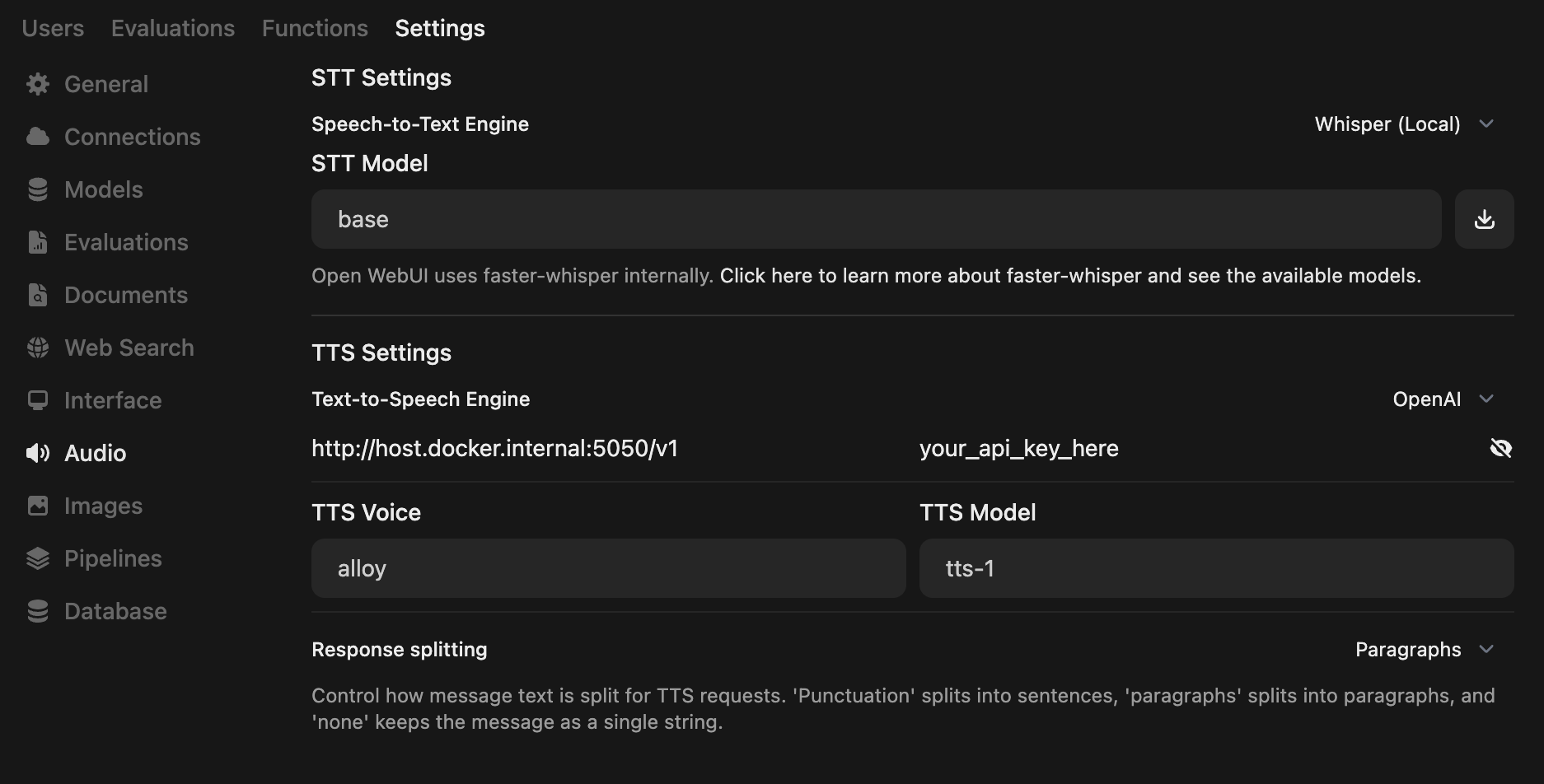
If you're running both Open WebUI and this project in Docker, the API endpoint URL is probably `http://host.docker.internal:5050/v1`
> [!NOTE]
> View the official docs for [Open WebUI integration with OpenAI Edge TTS](https://docs.openwebui.com/tutorials/text-to-speech/openai-edge-tts-integration)
# AnythingLLM
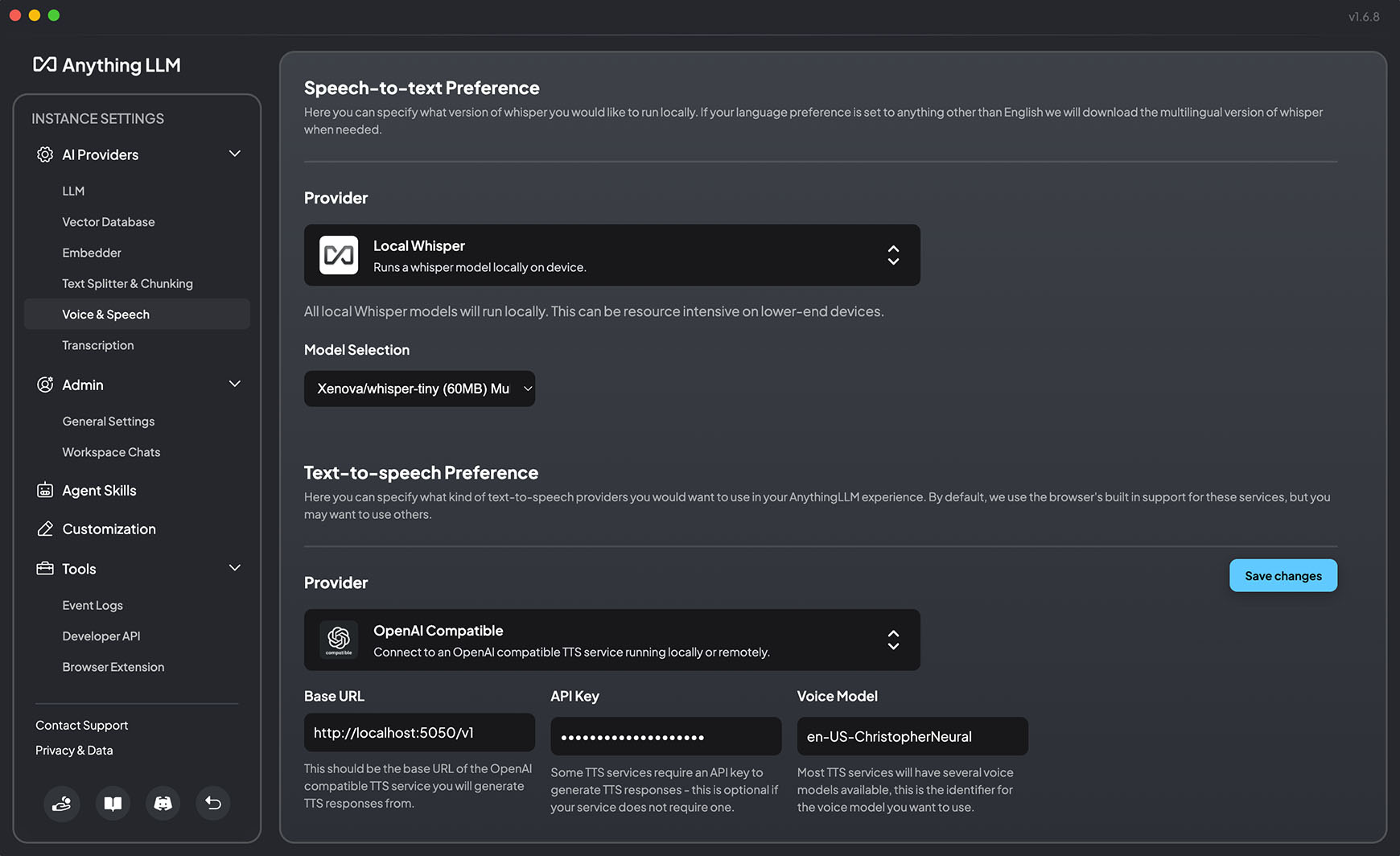
In version 1.6.8, AnythingLLM added support for "generic OpenAI TTS providers" — meaning we can use this project as the TTS provider in AnythingLLM
Open up settings and go to Voice & Speech (Under AI Providers)
Below, you can see a screenshot of the correct configuration for using this project to substitute the OpenAI endpoint
---
## Quick Info
- `your_api_key_here` never needs to be replaced — No "real" API key is required. Use whichever string you'd like.
- The quickest way to get this up and running is to install docker and run the command below:
```bash
docker run -d -p 5050:5050 -e API_KEY=your_api_key_here -e PORT=5050 travisvn/openai-edge-tts:latest
```
---
# Voice Samples 🎙️
[Play voice samples and see all available Edge TTS voices](https://tts.travisvn.com/)