# bdwendwen
**Repository Path**: sparkinfo/bdwendwen
## Basic Information
- **Project Name**: bdwendwen
- **Description**: No description available
- **Primary Language**: JavaScript
- **License**: BSD-2-Clause
- **Default Branch**: main
- **Homepage**: None
- **GVP Project**: No
## Statistics
- **Stars**: 0
- **Forks**: 0
- **Created**: 2022-02-13
- **Last Updated**: 2022-02-13
## Categories & Tags
**Categories**: Uncategorized
**Tags**: None
## README
# 3D版2022北京冬奥冰墩墩
北京冬奥正在火热的进行中,吉祥物冰墩墩成了最大的热门,几乎是“一墩难求”。刚好最近在关注WebGL相关技术,注意到各种版本[_手绘、乐高、开源3D、奖励之星_]冰墩墩也是大受欢迎。于是花了点时间用React-three-fiber相关技术实现了一个非常简单的版本,可以实现免配置一键部署到多种在线云服务商,界面可以在PC和手机端查看。
## 演示效果
_在线演示地址[Live Example]: https://bingdwendwen.vercel.app/_

# 实现说明
WebGL是OpenGL的前端实现,Three.js是WebGL的进一步封装,react-three-fiber是Three.js进一步封装用于react.js前端架构。因为react-three-fiber对threejs做了一些react组件化封装,可以更方便的使用threejs。
为了不重复造轮子,程序采用react-three-fiber/drei的方式实现,直接使用react-three-fiber/drei装好的组件,而不是原生react+threejs的是方式。渲染性能与 threejs 和 GPU 相仿。组件参与 React 之外的 renderloop 时,没有任何额外开销。
当然这种方式也许会有部分无法实现的功能,那就需要另想办法,或者等待react-three-fiber更新。
## License
程序代码采用BSD-2授权。[The code is free under the BSD 2-Clause license.]
## Three.js基本结构
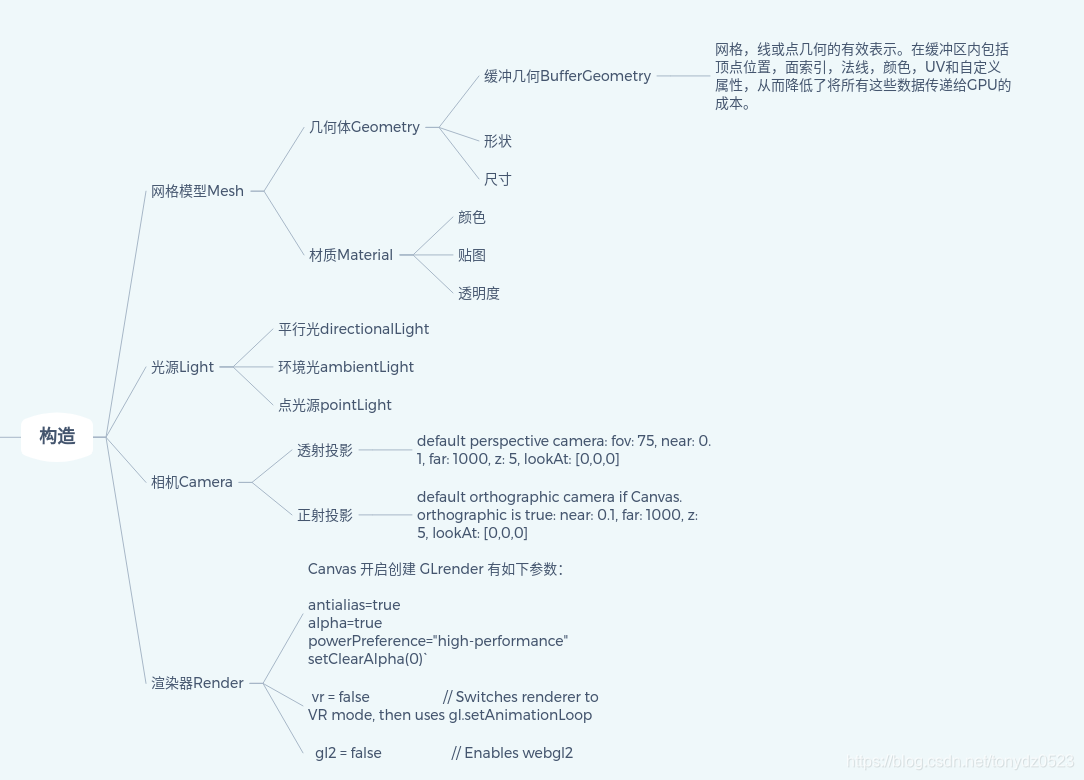
为了简单起见,程序采用 `React-three-filer/drei + Three.js + vercel` 的方式实现,涉及到的Three.js基本构造如下图所示,
## 3D结构模型
可下载冰墩墩的3D模型的网址
https://www.justeasy.cn/3dmodel/OGxVUFg4Zy9UWnJYZkoxQXBwSndJZz09.html
或者可到[sketchfab](https://sketchfab.com)搜索。
> 注意:3D Max模型无法直接在Web处理,需要转化GLTF/GLB/FBX等兼容格式。具体参照react-three-fiber或者three.js网站文档。
## 把模型转换为jsx组件
使用gltfjsx可以自动把模型文件转化成jsx组件,非常方便开发使用。
GitHub地址:https://github.com/pmndrs/gltfjsx
```shell
Usage
$ npx gltfjsx [Model.glb] [options]
Options
--types, -t Add Typescript definitions
--keepnames, -k Keep original names
--keepgroups, -K Keep (empty) groups
--meta, -m Include metadata (as userData)
--shadows, s Let meshes cast and receive shadows
--printwidth, w Prettier printWidth (default: 120)
--precision, -p Number of fractional digits (default: 2)
--draco, -d Draco binary path
--root, -r Sets directory from which .gltf file is served
--instance, -i Instance re-occuring geometry
--instanceall, -I Instance every geometry (for cheaper re-use)
--transform, -T Transform the asset for the web (draco, prune, resize)
--debug, -D Debug output
```
使用例子:
```
npx gltfjsx model.gltf
```
输出结果
```
/*
auto-generated by: https://github.com/pmdrs/gltfjsx
author: abcdef (https://sketchfab.com/abcdef)
license: CC-BY-4.0 (http://creativecommons.org/licenses/by/4.0/)
source: https://sketchfab.com/models/...
title: Model
*/
import { useGLTF, PerspectiveCamera } from '@react-three/drei'
export default function Model(props) {
const { nodes, materials } = useGLTF('/model.gltf')
return (
)
}
useGLTF.preload('/model.gltf')
```
> 说明:
1. 本项目在使用gltfjsx或者useGLTF时,模型文件放在public/models目录下。
2. 模型导入时,一般是黑色的。需要添加灯光,常见的灯光有环境光、平行光、点光源。平行光类似于太阳光,可以投射阴影。
前面生成的jsx组件可以直接放置到页面scene里面去,使用react-three/drei中的Loader组件,加载模型展示。这个过程是异步完成,所以这里采用,可以完整控制加载过程的loading-fallbacks和error handling.
@react-three/drei 网址:
https://github.com/pmndrs/drei
```
import { Canvas } from '@react-three/fiber'
import { Suspense } from 'react'
import Model from './Model'
function App() {
return (