# three-cesium-examples
**Repository Path**: szch/three-cesium-examples
## Basic Information
- **Project Name**: three-cesium-examples
- **Description**: 只做开源 的原生 Three.js Cesium.js 案例
- **Primary Language**: Unknown
- **License**: Apache-2.0
- **Default Branch**: dev
- **Homepage**: None
- **GVP Project**: No
## Statistics
- **Stars**: 0
- **Forks**: 34
- **Created**: 2024-12-12
- **Last Updated**: 2024-12-12
## Categories & Tags
**Categories**: Uncategorized
**Tags**: None
## README
# 💎 原生 Three 和 Cesium 案例 - 为爱发电 - 只做开源 -
## 分享知识 - 👋 - 开源不易 - ⭐ - 点星助力 - ⚡ - 防止断更(日更)
#### 注:方便开发者的案例代码 📘、资源链接保存和共享 👬,方便在日后的开发中便捷高效查阅 📖。
| 加入仓库 🐧QQ | 微信群 | 预览图 | Stars |
| :-----------------------------------------------------------: | :-----------------------------------------------------------------------------------------: | :--------------------------------------------------------------------------------------------------------------------: | :----------------------------------------------------------------------------------------------------------------------------------------------------- |
| 🐧QQ:2586300277
🐧 群:865182188
微信:15230117323 |  |
| 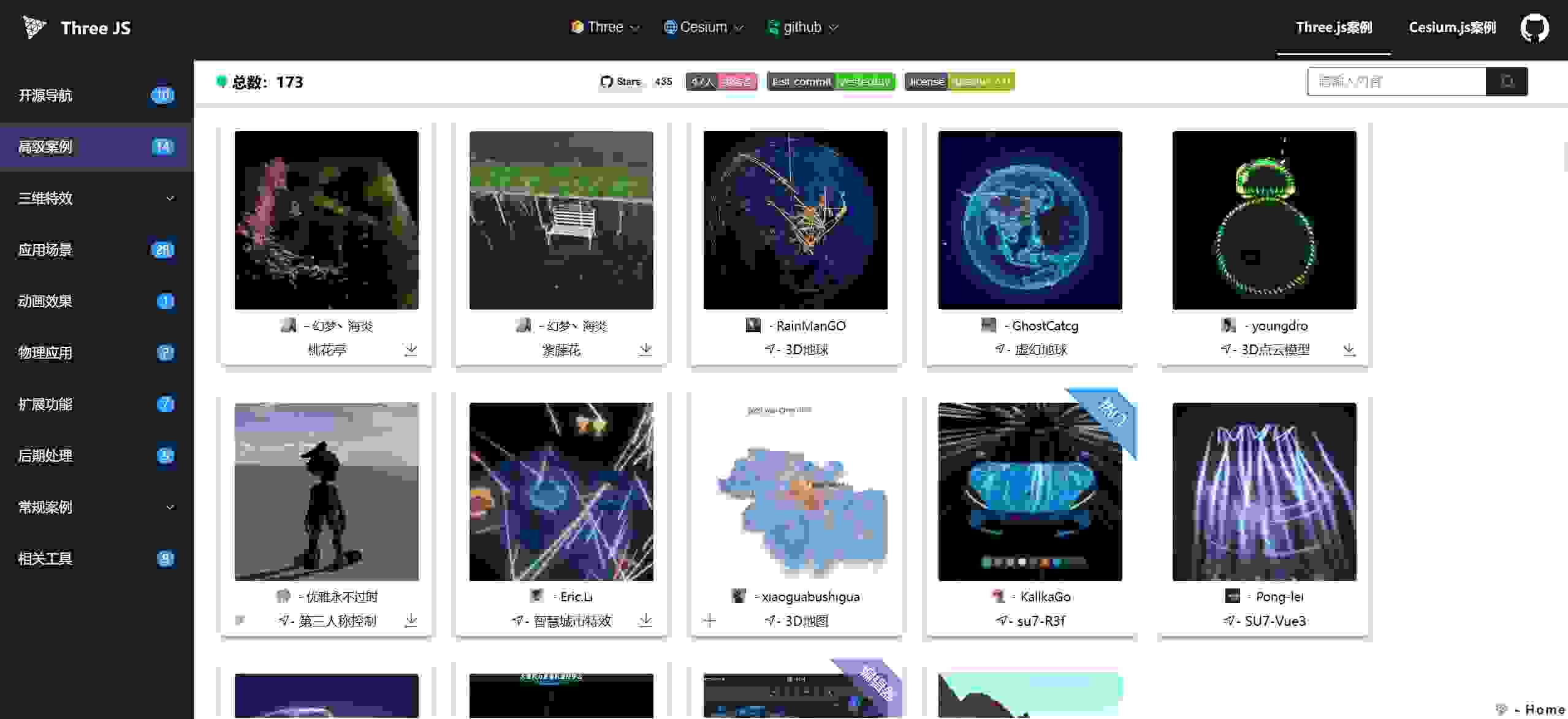 |
| 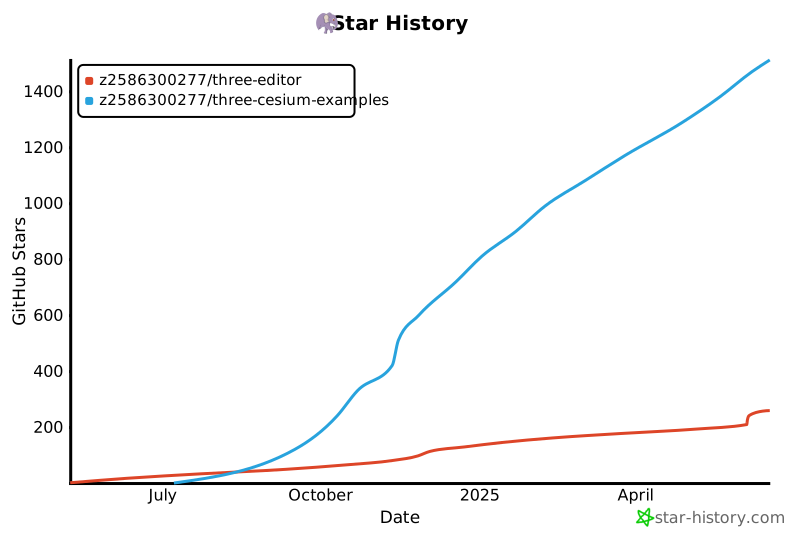 |
- github dev 分支实时预览 http://z2586300277.github.io/three-cesium-examples
- vercel 部署预览 https://three-cesium-examples.vercel.app
- 国内 gitee 仓库 https://gitee.com/zhang-jingguang/three-cesium-examples
- 人生旅程中的 web3d 知识记录, 复习回顾, 高效查阅, 资源共享, 为爱发电。(有好的仓库或作品分享给我哦 🐸)
- 关注 git histroy, 记录我的每一天, 等到 20 年以后, 人生每一天的回忆, 对学习热爱的朋友可 follow me。
- 注: 源码总内存10M内,框架和在线调试源于 作者名下的 three-editor 库
|
- github dev 分支实时预览 http://z2586300277.github.io/three-cesium-examples
- vercel 部署预览 https://three-cesium-examples.vercel.app
- 国内 gitee 仓库 https://gitee.com/zhang-jingguang/three-cesium-examples
- 人生旅程中的 web3d 知识记录, 复习回顾, 高效查阅, 资源共享, 为爱发电。(有好的仓库或作品分享给我哦 🐸)
- 关注 git histroy, 记录我的每一天, 等到 20 年以后, 人生每一天的回忆, 对学习热爱的朋友可 follow me。
- 注: 源码总内存10M内,框架和在线调试源于 作者名下的 three-editor 库
 ### 👋 联系(自行添加)
| 作者 | 联系方式 | 联系方式 | 链接 |
| :----------: | :----------: | :-------------: | :--------------------------: |
| 优雅永不过时 | 🐧2586300277 | 微:z2586300277 |
| nico | 805879871 | 微:15230117323 | http://nicowebgl.cn |
| jiawanlong | 微: trampjwl | 🐧 群 585667336 | https://jiawanlong.github.io |
## 📦 自行部署
1.可通过 config/links 文件修改 所有的链接和 logo, 替换成自己的官网或者链接地址。
2.如在 https://threehub.cn 部署
## 🌳 创作
#### ✋ 如果这些里面有案例帮助了您,有意的话您可以提交您的作品,让爱传递给更多开发者
#### 👏 加入仓库的开发者,可自行创建自己的分支,或者在 dev 分支直接开发
#### 📑 fork 仓库开发 - 增加用户信息 - 提交代码 - 合并到 dev
#### 🌿 分布式仓库开发模式 https://github.com/z2586300277/three-cesium-examples-self
- 运行框架 启动服务端口指向 index.html 即可 如 nginx apache node.js liveServer 等只要可启动服务即可
1. 创作者可以在 config/author.js 录入你的开发者信息,然后你提交的案例关联上 id 就会展示作者信息。
2. 将案例 js 放入目录 cesiumExamples/threeExamples 中的文件夹中 如 threeExamples/basic 中放入 test.js, test.jpg, 或者目录 test[test.js, test.jpg]
3. 在 config 目录下 找到 threeExamples 录入案例信息, 内部的资源指向与你的 js 和 image 资源路径对应
4. 注: 为保证轻量化 案例展示图片资源使用 - https://yasuo.xunjiepdf.com/img/ _(自定义压缩至 4k 以内)_
5. 涉及其他依赖 js,可将 module.js 放到 js 目录 如 dat.gui,gasp ,注入方式 config/config.js 可见
6. 音视频模型存储等一些可以公用的资源 files 文件夹下,涉及文件资源尽量引用外部 url,保证仓库轻量化
- config => js 注入和配置案例 等所有案例配置目录
- files 音视频模型存储等一些可以公用的资源, 尽量不要上传文件资源, 使用 外部 url 地址访问
- js => dat.gui gsap 等等一些依赖存放处,尽量可使用 如 cdn 线上 js 引入
- threeExamples three.js 案例代码目录
- cesiumExamples cesium 案例代码目录
```js
// HOST 自动获取 当前域名/ip 防止部署环境不同 资源引用失效
{
id: '父级对应列表唯一id',
name: '名称',
tag: '标签名字-背景颜色-字体大小',
tip: '提示信息',
author: '作者id',
referUrl: '案例参考来源地址', // 如 没有可不配置
links: [{ url: '连接', name: '名称' }] //配置link referUrl 将不显示
image: HOST + 'threeExamples/basic/test.jpg', // 对应窗口图
codeUrl: HOST + 'threeExamples/basic/test.js', // js module格式 大多数案例形式
htmlUrl: HOST + 'threeExamples/test/test.html' // html 在线格式 如 three案例 => 粒子 => 随机粒子 粒子行星
openUrl: '预览外联地址url', // openurl 和 codeurl 为二选一形式 如 可见桃花亭 su7 案例
downloadUrl: '附带下载的url', // 如three.js => 高级案例 => 桃花亭
githubUrl: '附带github 仓库的url', // 如 three.js => 开源作品 => su7
meta: {
title: '此案例网站标题',
keywords: '搜索引擎关键字',
description: '此案例页面描述'
}
}
```
## 🏠 搭建自己的分布式存储仓库
- 架构设计是以请求资源形式访问代码,所以如 codeUrl image, 等资源信息不局限于存储在 本仓库中,例如存储在你自己的服务器,然后 url 访问到你的资源地址即可。
- 然后在此仓库仅配置 案例信息即可, 可参考 three 案例 => 扩展功能 => 3D 地图 案例的配置
- 注 由于 github 访问限制 http 会被自动禁止, 建议 也搭建自己得 github page ,使用 github 充当自己的资源服务器。
- 如:我的一些分布式资源存储在 https://github.com/z2586300277/3d-file-server 仓库下 —— 访问服务: https://z2586300277.github.io/3d-file-server/
- github page 搭建 => 创建仓库 => 页面流程 => setting => pages => Build and deployment => source (depoly from a branch) => branch 选择对应分支
- 注: github page 搭建完成后 直接访问 如 https://xxxx.github.io/xxxx/ 下的资源文件无法显示是正常现象, 在代码中可正常获取
- 参考访问案例 如 cesium 案例 => 离线地图 => 内网高德
# 💎 Native Three and Cesium Cases - Updated to the death - Only open source-
##Open source is not easy- ⭐ - Dianxing Assistance- ⚡ - Daily updates
| Join the warehouse and manage contacts together 🐧QQ | 🐧 Mutual assistance QQ group |
| :--------------------------------------------------: | :---------------------------: |
| 2586300277 | 865182188 |
- Real time preview of GitHub dev branch http://z2586300277.github.io/three-cesium-examples
- Vercel Deployment Preview https://three-cesium-examples.vercel.app
- Web3D knowledge recording, review, efficient searching, resource sharing in the journey of life, generating electricity for love
- Follow git histroy and record my every day.
- Note: The framework and online debugging of this website are derived from the three editor library.
## 📦 Self deployment
1. All links and logos can be modified through the config/links file and replaced with one's own official website or link address.
2. As in https://threehub.cn Deployment
## 🌳 a literary creation
#### - Developers who join and manage the repository can create their own branches for development
##### If any of these cases have helped you, you can submit your work if you are interested to spread love to more developers
##### - After forking the repository - Add user information - Upload your proudest work - Submit and merge to the main branch - Develop or merge based on dev branch
- Run the framework to start the service port pointing to index.html
1. Creators can enter their developer information in config/author.js, and then the ID associated with the submitted case will display the author information.
2. Place the case js in a folder in the directory cesiumExamples/threeEmples, such as ThreeEmples/basic, and put test.exe, test.jpg, or the directory test [test. js, test. jpg]
3. Find ThreeEmples in the config directory and enter the case information. The internal resources point to the paths corresponding to your JS and image resources
4. Note: To ensure the use of lightweight case display image resources- https://yasuo.xunjiepdf.com/img/ _(Custom compression to within 4k)_
5. If it involves other dependent JS, you can place module.js in the JS directory such as dat.gui, Gasp, and inject it through config/config.js
6. Store audio and video models and other resources that can be shared in the files folder. Whenever possible, reference external URLs for file resources to ensure a lightweight warehouse
- Config=>JS injection and configuration case, all case configuration directories
- Files, audio and video model storage, and other resources that can be shared should be avoided as much as possible, and external URL addresses should be used to access them
- Js=>dat.gui gsap and other dependency repositories, try to use online js such as CDN to introduce them as much as possible
- ThreeEamples Three.js Case Code Catalog
- CesiumExamples cesium case code directory
```js
//HOST automatically retrieves the current domain name/IP to prevent invalid resource references in different deployment environments
{
Id: 'Unique id in the parent corresponding list',
Name: 'Name',
tag: 'tag-color-size',
tip: 'tip',
Author: 'Author ID',
referUrl: 'Case reference source address',//If not available, do not configure it
links: [{ url, name }] // use links referUrl don`t show
Image: HOST+'ThreeEmples/basic/test. jpg',//corresponding window image
CodeURL: HOST+'threExamples/basic/test. js',//js module format Most case forms
HtmlURL: HOST+'threExamples/test/test. html '//HTML online format such as three case=>particle=>random particle particle planet
OpenURL: 'Preview external link URL',//openURL and codeURL are in either form as seen in the Peach Blossom Pavilion Su7 case
DownloadURL: 'URL with attached download',//e.g. Three.js=>Advanced case=>Peach Blossom Pavilion
GithubURL: 'URL with GitHub repository attached',//e.g. Three.js=>Open source works=>su7
meta: {
Title: 'This Case Website Title',
Keywords: 'Search engine keywords',
Description: 'This case page description'
}
}
```
## 🏠 Build your own distributed storage warehouse
- Architecture design is to access code in the form of requesting resources, so resource information such as codeURL image is not limited to being stored in this repository, such as on your own server, and then the URL can be accessed to your resource address.
- Then only the case information can be configured in this warehouse, which can refer to the configuration of three cases=>extended functions=>3D map cases
- Due to access restrictions on GitHub, HTTP will be automatically banned. It is recommended to set up your own GitHub page and use GitHub as your resource server.
- For example, some of my distributed resources are stored in https://github.com/z2586300277/3d-file-server Under the warehouse - Access service: https://z2586300277.github.io/3d-file-server/
- GitHub page setup=>create repository=>page process=>settings=>pages=>build and deployment=>source (depoly from a branch)=>branch Select the corresponding branch
- Note: After the GitHub page is built, you can directly access it as follows: https://xxxx.github.io/xxxx/ It is normal that the resource files under cannot be displayed, but they can be obtained normally in the code
- Reference access cases such as Cesium case=>Offline map=>Intranet Gaode
### 👋 联系(自行添加)
| 作者 | 联系方式 | 联系方式 | 链接 |
| :----------: | :----------: | :-------------: | :--------------------------: |
| 优雅永不过时 | 🐧2586300277 | 微:z2586300277 |
| nico | 805879871 | 微:15230117323 | http://nicowebgl.cn |
| jiawanlong | 微: trampjwl | 🐧 群 585667336 | https://jiawanlong.github.io |
## 📦 自行部署
1.可通过 config/links 文件修改 所有的链接和 logo, 替换成自己的官网或者链接地址。
2.如在 https://threehub.cn 部署
## 🌳 创作
#### ✋ 如果这些里面有案例帮助了您,有意的话您可以提交您的作品,让爱传递给更多开发者
#### 👏 加入仓库的开发者,可自行创建自己的分支,或者在 dev 分支直接开发
#### 📑 fork 仓库开发 - 增加用户信息 - 提交代码 - 合并到 dev
#### 🌿 分布式仓库开发模式 https://github.com/z2586300277/three-cesium-examples-self
- 运行框架 启动服务端口指向 index.html 即可 如 nginx apache node.js liveServer 等只要可启动服务即可
1. 创作者可以在 config/author.js 录入你的开发者信息,然后你提交的案例关联上 id 就会展示作者信息。
2. 将案例 js 放入目录 cesiumExamples/threeExamples 中的文件夹中 如 threeExamples/basic 中放入 test.js, test.jpg, 或者目录 test[test.js, test.jpg]
3. 在 config 目录下 找到 threeExamples 录入案例信息, 内部的资源指向与你的 js 和 image 资源路径对应
4. 注: 为保证轻量化 案例展示图片资源使用 - https://yasuo.xunjiepdf.com/img/ _(自定义压缩至 4k 以内)_
5. 涉及其他依赖 js,可将 module.js 放到 js 目录 如 dat.gui,gasp ,注入方式 config/config.js 可见
6. 音视频模型存储等一些可以公用的资源 files 文件夹下,涉及文件资源尽量引用外部 url,保证仓库轻量化
- config => js 注入和配置案例 等所有案例配置目录
- files 音视频模型存储等一些可以公用的资源, 尽量不要上传文件资源, 使用 外部 url 地址访问
- js => dat.gui gsap 等等一些依赖存放处,尽量可使用 如 cdn 线上 js 引入
- threeExamples three.js 案例代码目录
- cesiumExamples cesium 案例代码目录
```js
// HOST 自动获取 当前域名/ip 防止部署环境不同 资源引用失效
{
id: '父级对应列表唯一id',
name: '名称',
tag: '标签名字-背景颜色-字体大小',
tip: '提示信息',
author: '作者id',
referUrl: '案例参考来源地址', // 如 没有可不配置
links: [{ url: '连接', name: '名称' }] //配置link referUrl 将不显示
image: HOST + 'threeExamples/basic/test.jpg', // 对应窗口图
codeUrl: HOST + 'threeExamples/basic/test.js', // js module格式 大多数案例形式
htmlUrl: HOST + 'threeExamples/test/test.html' // html 在线格式 如 three案例 => 粒子 => 随机粒子 粒子行星
openUrl: '预览外联地址url', // openurl 和 codeurl 为二选一形式 如 可见桃花亭 su7 案例
downloadUrl: '附带下载的url', // 如three.js => 高级案例 => 桃花亭
githubUrl: '附带github 仓库的url', // 如 three.js => 开源作品 => su7
meta: {
title: '此案例网站标题',
keywords: '搜索引擎关键字',
description: '此案例页面描述'
}
}
```
## 🏠 搭建自己的分布式存储仓库
- 架构设计是以请求资源形式访问代码,所以如 codeUrl image, 等资源信息不局限于存储在 本仓库中,例如存储在你自己的服务器,然后 url 访问到你的资源地址即可。
- 然后在此仓库仅配置 案例信息即可, 可参考 three 案例 => 扩展功能 => 3D 地图 案例的配置
- 注 由于 github 访问限制 http 会被自动禁止, 建议 也搭建自己得 github page ,使用 github 充当自己的资源服务器。
- 如:我的一些分布式资源存储在 https://github.com/z2586300277/3d-file-server 仓库下 —— 访问服务: https://z2586300277.github.io/3d-file-server/
- github page 搭建 => 创建仓库 => 页面流程 => setting => pages => Build and deployment => source (depoly from a branch) => branch 选择对应分支
- 注: github page 搭建完成后 直接访问 如 https://xxxx.github.io/xxxx/ 下的资源文件无法显示是正常现象, 在代码中可正常获取
- 参考访问案例 如 cesium 案例 => 离线地图 => 内网高德
# 💎 Native Three and Cesium Cases - Updated to the death - Only open source-
##Open source is not easy- ⭐ - Dianxing Assistance- ⚡ - Daily updates
| Join the warehouse and manage contacts together 🐧QQ | 🐧 Mutual assistance QQ group |
| :--------------------------------------------------: | :---------------------------: |
| 2586300277 | 865182188 |
- Real time preview of GitHub dev branch http://z2586300277.github.io/three-cesium-examples
- Vercel Deployment Preview https://three-cesium-examples.vercel.app
- Web3D knowledge recording, review, efficient searching, resource sharing in the journey of life, generating electricity for love
- Follow git histroy and record my every day.
- Note: The framework and online debugging of this website are derived from the three editor library.
## 📦 Self deployment
1. All links and logos can be modified through the config/links file and replaced with one's own official website or link address.
2. As in https://threehub.cn Deployment
## 🌳 a literary creation
#### - Developers who join and manage the repository can create their own branches for development
##### If any of these cases have helped you, you can submit your work if you are interested to spread love to more developers
##### - After forking the repository - Add user information - Upload your proudest work - Submit and merge to the main branch - Develop or merge based on dev branch
- Run the framework to start the service port pointing to index.html
1. Creators can enter their developer information in config/author.js, and then the ID associated with the submitted case will display the author information.
2. Place the case js in a folder in the directory cesiumExamples/threeEmples, such as ThreeEmples/basic, and put test.exe, test.jpg, or the directory test [test. js, test. jpg]
3. Find ThreeEmples in the config directory and enter the case information. The internal resources point to the paths corresponding to your JS and image resources
4. Note: To ensure the use of lightweight case display image resources- https://yasuo.xunjiepdf.com/img/ _(Custom compression to within 4k)_
5. If it involves other dependent JS, you can place module.js in the JS directory such as dat.gui, Gasp, and inject it through config/config.js
6. Store audio and video models and other resources that can be shared in the files folder. Whenever possible, reference external URLs for file resources to ensure a lightweight warehouse
- Config=>JS injection and configuration case, all case configuration directories
- Files, audio and video model storage, and other resources that can be shared should be avoided as much as possible, and external URL addresses should be used to access them
- Js=>dat.gui gsap and other dependency repositories, try to use online js such as CDN to introduce them as much as possible
- ThreeEamples Three.js Case Code Catalog
- CesiumExamples cesium case code directory
```js
//HOST automatically retrieves the current domain name/IP to prevent invalid resource references in different deployment environments
{
Id: 'Unique id in the parent corresponding list',
Name: 'Name',
tag: 'tag-color-size',
tip: 'tip',
Author: 'Author ID',
referUrl: 'Case reference source address',//If not available, do not configure it
links: [{ url, name }] // use links referUrl don`t show
Image: HOST+'ThreeEmples/basic/test. jpg',//corresponding window image
CodeURL: HOST+'threExamples/basic/test. js',//js module format Most case forms
HtmlURL: HOST+'threExamples/test/test. html '//HTML online format such as three case=>particle=>random particle particle planet
OpenURL: 'Preview external link URL',//openURL and codeURL are in either form as seen in the Peach Blossom Pavilion Su7 case
DownloadURL: 'URL with attached download',//e.g. Three.js=>Advanced case=>Peach Blossom Pavilion
GithubURL: 'URL with GitHub repository attached',//e.g. Three.js=>Open source works=>su7
meta: {
Title: 'This Case Website Title',
Keywords: 'Search engine keywords',
Description: 'This case page description'
}
}
```
## 🏠 Build your own distributed storage warehouse
- Architecture design is to access code in the form of requesting resources, so resource information such as codeURL image is not limited to being stored in this repository, such as on your own server, and then the URL can be accessed to your resource address.
- Then only the case information can be configured in this warehouse, which can refer to the configuration of three cases=>extended functions=>3D map cases
- Due to access restrictions on GitHub, HTTP will be automatically banned. It is recommended to set up your own GitHub page and use GitHub as your resource server.
- For example, some of my distributed resources are stored in https://github.com/z2586300277/3d-file-server Under the warehouse - Access service: https://z2586300277.github.io/3d-file-server/
- GitHub page setup=>create repository=>page process=>settings=>pages=>build and deployment=>source (depoly from a branch)=>branch Select the corresponding branch
- Note: After the GitHub page is built, you can directly access it as follows: https://xxxx.github.io/xxxx/ It is normal that the resource files under cannot be displayed, but they can be obtained normally in the code
- Reference access cases such as Cesium case=>Offline map=>Intranet Gaode