# android-maps-compose
**Repository Path**: wallellen/android-maps-compose
## Basic Information
- **Project Name**: android-maps-compose
- **Description**: 145534546457657865
- **Primary Language**: Unknown
- **License**: Apache-2.0
- **Default Branch**: main
- **Homepage**: None
- **GVP Project**: No
## Statistics
- **Stars**: 0
- **Forks**: 0
- **Created**: 2025-07-22
- **Last Updated**: 2025-08-20
## Categories & Tags
**Categories**: Uncategorized
**Tags**: None
## README
[](https://maven-badges.herokuapp.com/maven-central/com.google.maps.android/maps-compose)


[](https://github.com/googlemaps/android-maps-compose/actions/workflows/test.yml)

[][license]
[](https://stackoverflow.com/questions/tagged/google-maps)
[][Discord server]
# Maps Compose 🗺
## Description
This repository contains [Jetpack Compose][jetpack-compose] components for the [Maps SDK for Android][maps-sdk].
## Requirements
* Android API level 21+
* Kotlin-enabled project
* Jetpack Compose-enabled project (see [releases](https://github.com/googlemaps/android-maps-compose/releases) for the required version of Jetpack Compose)
* [Sign up with Google Maps Platform]
* A Google Maps Platform [project] with the **Maps SDK for Android** enabled
- An [API key] associated with the project above ... follow the [API key instructions] if you're new to the process
## Installation
You no longer need to specify the Maps SDK for Android or its Utility Library as separate dependencies, since `maps-compose` and `maps-compose-utils` pull in the appropriate versions of these respectively.
```groovy
dependencies {
implementation 'com.google.maps.android:maps-compose:6.7.1'
// Optionally, you can include the Compose utils library for Clustering,
// Street View metadata checks, etc.
implementation 'com.google.maps.android:maps-compose-utils:6.7.1'
// Optionally, you can include the widgets library for ScaleBar, etc.
implementation 'com.google.maps.android:maps-compose-widgets:6.7.1'
}
```
## Sample App
This repository includes a [sample app](maps-app).
To run the demo app, ensure you've met the requirements above then:
1. Open the `secrets.properties` file in your top-level directory, and then add the following code. Replace YOUR_API_KEY with your API key. Store your key in this file because secrets.properties is excluded from being checked into a version control system.
If the `secrets.properties` file does not exist, create it in the same folder as the `local.default.properties` file.
```
MAPS_API_KEY=YOUR_API_KEY
```
1. Build and run
## Documentation
See the [documentation] for a full list of classes and their methods.
## Usage
Adding a map to your app looks like the following:
```kotlin
val singapore = LatLng(1.35, 103.87)
val cameraPositionState = rememberCameraPositionState {
position = CameraPosition.fromLatLngZoom(singapore, 10f)
}
GoogleMap(
modifier = Modifier.fillMaxSize(),
cameraPositionState = cameraPositionState
)
```
Creating and configuring a map
## Creating and configuring a map
Configuring the map can be done by passing a `MapProperties` object into the
`GoogleMap` composable, or for UI-related configurations, use `MapUiSettings`.
`MapProperties` and `MapUiSettings` should be your first go-to for configuring
the map. For any other configuration not present in those two classes, use
`googleMapOptionsFactory` to provide a `GoogleMapOptions` instance instead.
Typically, anything that can only be provided once (i.e. when the map is
created)—like map ID—should be provided via `googleMapOptionsFactory`.
```kotlin
// Set properties using MapProperties which you can use to recompose the map
var mapProperties by remember {
mutableStateOf(
MapProperties(maxZoomPreference = 10f, minZoomPreference = 5f)
)
}
var mapUiSettings by remember {
mutableStateOf(
MapUiSettings(mapToolbarEnabled = false)
)
}
Box(Modifier.fillMaxSize()) {
GoogleMap(properties = mapProperties, uiSettings = mapUiSettings)
Column {
Button(onClick = {
mapProperties = mapProperties.copy(
isBuildingEnabled = !mapProperties.isBuildingEnabled
)
}) {
Text(text = "Toggle isBuildingEnabled")
}
Button(onClick = {
mapUiSettings = mapUiSettings.copy(
mapToolbarEnabled = !mapUiSettings.mapToolbarEnabled
)
}) {
Text(text = "Toggle mapToolbarEnabled")
}
}
}
// ...or initialize the map by providing a googleMapOptionsFactory
// This should only be used for values that do not recompose the map such as
// map ID.
GoogleMap(
googleMapOptionsFactory = {
GoogleMapOptions().mapId("MyMapId")
}
)
```
Controlling a map's camera
### Controlling a map's camera
Camera changes and updates can be observed and controlled via `CameraPositionState`.
**Note**: `CameraPositionState` is the source of truth for anything camera
related. So, providing a camera position in `GoogleMapOptions` will be
overridden by `CameraPosition`.
```kotlin
val singapore = LatLng(1.35, 103.87)
val cameraPositionState: CameraPositionState = rememberCameraPositionState {
position = CameraPosition.fromLatLngZoom(singapore, 11f)
}
Box(Modifier.fillMaxSize()) {
GoogleMap(cameraPositionState = cameraPositionState)
Button(onClick = {
// Move the camera to a new zoom level
cameraPositionState.move(CameraUpdateFactory.zoomIn())
}) {
Text(text = "Zoom In")
}
}
```
Drawing on a map
### Drawing on a map
Drawing on the map, such as adding markers, can be accomplished by adding child
composable elements to the content of the `GoogleMap`.
```kotlin
GoogleMap(
googleMapOptionsFactory = {
GoogleMapOptions().mapId("DEMO_MAP_ID")
},
//...
) {
AdvancedMarker(
state = MarkerState(position = LatLng(-34, 151)),
title = "Marker in Sydney"
)
AdvancedMarker(
state = MarkerState(position = LatLng(35.66, 139.6)),
title = "Marker in Tokyo"
)
}
```
You can customize a marker by using `PinConfig` with an `AdvancedMarker`.
```kotlin
val state = MyState()
GoogleMap(
googleMapOptionsFactory = {
GoogleMapOptions().mapId("DEMO_MAP_ID")
},
//...
) {
val pinConfig = PinConfig.builder()
.setBackgroundColor(Color.MAGENTA)
.build()
AdvancedMarker(
state = MarkerState(position = LatLng(-34, 151)),
title = "Magenta marker in Sydney",
pinConfig = pinConfig
)
}
```
Shapes
### Shapes
A shape is an object on the map, tied to a latitude/longitude coordinate. Currently, android-maps-compose offers `Polyline`, `Polygon` and `Circle`. For all shapes, you can customize their appearance by altering a number of properties.
#### Polyline
A `Polyline` is a series of connected line segments that can form any shape you want and can be used to mark paths and routes on the map:
```kotlin
val polylinePoints = remember { listOf(singapore, singapore5) }
// ...
Polyline(
points = polylinePoints
)
```
You can use spans to individually color segments of a polyline, by creating StyleSpan objects:
```kotlin
val styleSpan = StyleSpan(
StrokeStyle.gradientBuilder(
Color.Red.toArgb(),
Color.Green.toArgb(),
).build(),
)
// ...
val polylinePoints = remember { listOf(singapore, singapore5) }
val styleSpanList = remember { listOf(styleSpan) }
// ...
Polyline(
points = polylinePoints,
spans = styleSpanList,
)
```
#### Polygon
A `Polygon` is an enclosed shape that can be used to mark areas on the map:
```kotlin
val polygonPoints = remember { listOf(singapore1, singapore2, singapore3) }
// ...
Polygon(
points = polygonPoints,
fillColor = Color.Black.copy(alpha = 0.5f)
)
```
#### Circle
A Circle is a geographically accurate projection of a circle on the Earth's surface drawn on the map:
```kotlin
var circleCenter by remember { mutableStateOf(singapore) }
// ...
Circle(
center = circleCenter,
fillColor = MaterialTheme.colors.secondary,
strokeColor = MaterialTheme.colors.secondaryVariant,
radius = 1000.0,
)
```
Recomposing elements
### Recomposing elements
Markers and other elements need to be recomposed in the screen. To achieve recomposition, you can set mutable properties of state objects:
```kotlin
val markerState = rememberUpdatedMarkerState(position = singapore)
//...
LaunchedEffect(Unit) {
repeat(10) {
delay(5.seconds)
val old = markerState.position
markerState.position = LatLng(old.latitude + 1.0, old.longitude + 2.0)
}
}
```
In the example above, recomposition occurs as `MarkerState.position` is updated with different values over time, shifting the Marker around the screen.
Customizing a marker's info window
### Customizing a marker's info window
You can customize a marker's info window contents by using the
`MarkerInfoWindowContent` element, or if you want to customize the entire info
window, use the `MarkerInfoWindow` element instead. Both of these elements
accept a `content` parameter to provide your customization in a composable
lambda expression.
```kotlin
MarkerInfoWindowContent(
//...
) { marker ->
Text(marker.title ?: "Default Marker Title", color = Color.Red)
}
MarkerInfoWindow(
//...
) { marker ->
// Implement the custom info window here
Column {
Text(marker.title ?: "Default Marker Title", color = Color.Red)
Text(marker.snippet ?: "Default Marker Snippet", color = Color.Red)
}
}
```
Street View
### Street View
You can add a Street View given a location using the `StreetView` composable.
1. Test whether a Street View location is valid with the the
`fetchStreetViewData` utility from the [`maps-compose-utils` library](#maps-compose-utility-library).
```kotlin
streetViewResult =
fetchStreetViewData(singapore, BuildConfig.MAPS_API_KEY)
```
2. Once the location is confirmed valid, add a Street View composable by providing a `StreetViewPanoramaOptions` object.
```kotlin
val singapore = LatLng(1.3588227, 103.8742114)
StreetView(
streetViewPanoramaOptionsFactory = {
StreetViewPanoramaOptions().position(singapore)
}
)
```
Controlling the map directly (experimental)
## Controlling the map directly (experimental)
Certain use cases may require extending the `GoogleMap` object to decorate / augment
the map. It can be obtained with the `MapEffect` Composable.
Doing so can be dangerous, as the `GoogleMap` object is managed by this library.
```kotlin
GoogleMap(
// ...
) {
MapEffect { map ->
// map is the GoogleMap
}
}
```
## Maps Compose Utility Library
This library provides optional utilities in the `maps-compose-utils` library from the [Maps SDK for Android Utility Library](https://github.com/googlemaps/android-maps-utils).
### Clustering
The marker clustering utility helps you manage multiple markers at different zoom levels.
When a user views the map at a high zoom level, the individual markers show on the map. When the user zooms out, the markers gather together into clusters, to make viewing the map easier.
The [MarkerClusteringActivity](maps-app/src/main/java/com/google/maps/android/compose/markerexamples/MarkerClusteringActivity.kt) demonstrates usage.
```kotlin
Clustering(
items = items,
// Optional: Handle clicks on clusters, cluster items, and cluster item info windows
onClusterClick = null,
onClusterItemClick = null,
onClusterItemInfoWindowClick = null,
// Optional: Custom rendering for clusters
clusterContent = null,
// Optional: Custom rendering for non-clustered items
clusterItemContent = null,
)
```
### Street View metadata utility
The `fetchStreetViewData` method provides functionality to check whether a location is supported in StreetView. You can avoid errors when adding a Street View panorama to an Android app by calling this metadata utility and only adding a Street View panorama if the response is OK.
> [!IMPORTANT]
> Be sure to [enable Street View Static API](https://goo.gle/enable-sv-static-api) on the project associated with your API key.
You can see example usage
in the [`StreetViewActivity`](https://github.com/googlemaps/android-maps-compose/blob/main/maps-app/src/main/java/com/google/maps/android/compose/StreetViewActivity.kt) of the demo app:
```kotlin
streetViewResult =
fetchStreetViewData(singapore, BuildConfig.MAPS_API_KEY)
```
## Maps Compose Widgets
This library also provides optional composable widgets in the `maps-compose-widgets` library that you can use alongside the `GoogleMap` composable.
### ScaleBar
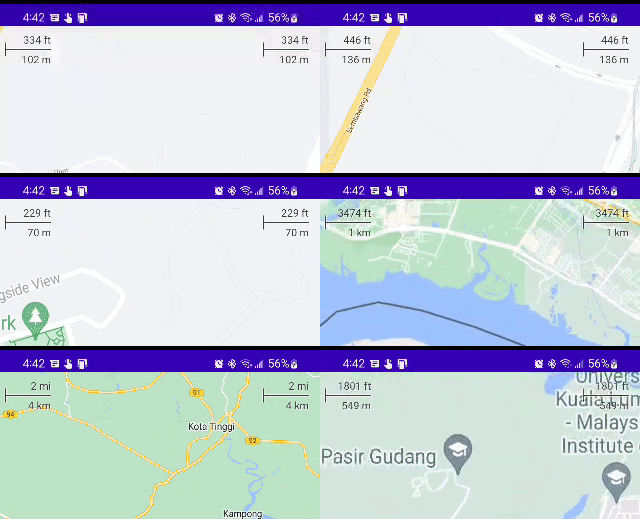
This widget shows the current scale of the map in feet and meters when zoomed into the map, changing to miles and kilometers, respectively, when zooming out. A `DisappearingScaleBar` is also included, which appears when the zoom level of the map changes, and then disappears after a configurable timeout period.
The [ScaleBarActivity](maps-app/src/main/java/com/google/maps/android/compose/ScaleBarActivity.kt) demonstrates both of these, with the `DisappearingScaleBar` in the upper left corner and the normal base `ScaleBar` in the upper right:
Both versions of this widget leverage the `CameraPositionState` in `maps-compose` and therefore are very simple to configure with their defaults:
```kotlin
Box(Modifier.fillMaxSize()) {
GoogleMap(
modifier = Modifier.fillMaxSize(),
cameraPositionState = cameraPositionState
) {
// ... your map composables ...
}
ScaleBar(
modifier = Modifier
.padding(top = 5.dp, end = 15.dp)
.align(Alignment.TopEnd),
cameraPositionState = cameraPositionState
)
// OR
DisappearingScaleBar(
modifier = Modifier
.padding(top = 5.dp, end = 15.dp)
.align(Alignment.TopStart),
cameraPositionState = cameraPositionState
)
}
```
The colors of the text, line, and shadow are also all configurable (e.g., based on `isSystemInDarkTheme()` on a dark map). Similarly, the `DisappearingScaleBar` animations can be configured.
## Contributing
Contributions are welcome and encouraged! If you'd like to contribute, send us a [pull request] and refer to our [code of conduct] and [contributing guide].
## Terms of Service
This library uses Google Maps Platform services. Use of Google Maps Platform services through this library is subject to the Google Maps Platform [Terms of Service].
If your billing address is in the European Economic Area, effective on 8 July 2025, the [Google Maps Platform EEA Terms of Service](https://cloud.google.com/terms/maps-platform/eea) will apply to your use of the Services. Functionality varies by region. [Learn more](https://developers.google.com/maps/comms/eea/faq).
This library is not a Google Maps Platform Core Service. Therefore, the Google Maps Platform Terms of Service (e.g. Technical Support Services, Service Level Agreements, and Deprecation Policy) do not apply to the code in this library.
## Support
This library is offered via an open source [license]. It is not governed by the Google Maps Platform Support [Technical Support Services Guidelines, the SLA, or the [Deprecation Policy]. However, any Google Maps Platform services used by the library remain subject to the Google Maps Platform Terms of Service.
This library adheres to [semantic versioning] to indicate when backwards-incompatible changes are introduced. Accordingly, while the library is in version 0.x, backwards-incompatible changes may be introduced at any time.
If you find a bug, or have a feature request, please [file an issue] on GitHub. If you would like to get answers to technical questions from other Google Maps Platform developers, ask through one of our [developer community channels]. If you'd like to contribute, please check the [contributing guide].
You can also discuss this library on our [Discord server].
[API key]: https://developers.google.com/maps/documentation/android-sdk/get-api-key
[API key instructions]: https://developers.google.com/maps/documentation/android-sdk/config#step_3_add_your_api_key_to_the_project
[maps-sdk]: https://developers.google.com/maps/documentation/android-sdk
[documentation]: https://googlemaps.github.io/android-maps-compose
[jetpack-compose]: https://developer.android.com/jetpack/compose
[code of conduct]: ?tab=coc-ov-file#readme
[contributing guide]: CONTRIBUTING.md
[Deprecation Policy]: https://cloud.google.com/maps-platform/terms
[developer community channels]: https://developers.google.com/maps/developer-community
[Discord server]: https://discord.gg/hYsWbmk
[file an issue]: https://github.com/googlemaps/android-maps-compose/issues/new/choose
[license]: LICENSE
[project]: https://developers.google.com/maps/documentation/android-sdk/cloud-setup
[pull request]: https://github.com/googlemaps/android-maps-compose/compare
[semantic versioning]: https://semver.org
[Sign up with Google Maps Platform]: https://console.cloud.google.com/google/maps-apis/start
[similar inquiry]: https://github.com/googlemaps/android-maps-compose/issues
[SLA]: https://cloud.google.com/maps-platform/terms/sla
[Technical Support Services Guidelines]: https://cloud.google.com/maps-platform/terms/tssg
[Terms of Service]: https://cloud.google.com/maps-platform/terms